 d2d2ce535d
[Error occurred during streaming: 1 validation error for ResponseUsage
input_tokens_details
  Input should be a valid dictionary or instance of InputTokensDetails [type=model_type, input_value=InputTokensDetails(prompt...ens=17, cached_tokens=0), input_type=InputTokensDetails]
    For further information visit https://errors.pydantic.dev/2.10/v/model_type]
Location: Traceback (most recent call last):
  File /Users/alias/Alias/research/openai-agents-python/src/cai/cli.py, line 209, in process_streamed_response
    async for event in result.stream_events():
  File /Users/alias/Alias/research/openai-agents-python/src/cai/sdk/agents/result.py, line 186, in stream_events
    raise self._stored_exception
  File /Users/alias/Alias/research/openai-agents-python/src/cai/sdk/agents/run.py, line 539, in _run_streamed_impl
    turn_result = await cls._run_single_turn_streamed(
                  ^^^^^^^^^^^^^^^^^^^^^^^^^^^^^^^^^^^^
  File /Users/alias/Alias/research/openai-agents-python/src/cai/sdk/agents/run.py, line 641, in _run_single_turn_streamed
    async for event in model.stream_response(
  File /Users/alias/Alias/research/openai-agents-python/src/cai/sdk/agents/models/openai_chatcompletions.py, line 421, in stream_response
    ResponseUsage(
  File /Users/alias/Alias/research/openai-agents-python/env/lib/python3.12/site-packages/pydantic/main.py, line 214, in __init__
    validated_self = self.__pydantic_validator__.validate_python(data, self_instance=self)
                     ^^^^^^^^^^^^^^^^^^^^^^^^^^^^^^^^^^^^^^^^^^^^^^^^^^^^^^^^^^^^^^^^^^^^^
pydantic_core._pydantic_core.ValidationError: 1 validation error for ResponseUsage
input_tokens_details
  Input should be a valid dictionary or instance of InputTokensDetails [type=model_type, input_value=InputTokensDetails(prompt...ens=17, cached_tokens=0), input_type=InputTokensDetails]
    For further information visit https://errors.pydantic.dev/2.10/v/model_type

Signed-off-by: Víctor Mayoral Vilches <v.mayoralv@gmail.com>
|
||
|---|---|---|
| .github | ||
| docs | ||
| examples | ||
| src/cai | ||
| tests | ||
| .gitignore | ||
| .prettierrc | ||
| LICENSE | ||
| LICENSE-MIT | ||
| Makefile | ||
| README.md | ||
| mkdocs.yml | ||
| pyproject.toml | ||
| uv.lock | ||
README.md
OpenAI Agents SDK
The OpenAI Agents SDK is a lightweight yet powerful framework for building multi-agent workflows.
Core concepts:
- Agents: LLMs configured with instructions, tools, guardrails, and handoffs
- Handoffs: A specialized tool call used by the Agents SDK for transferring control between agents
- Guardrails: Configurable safety checks for input and output validation
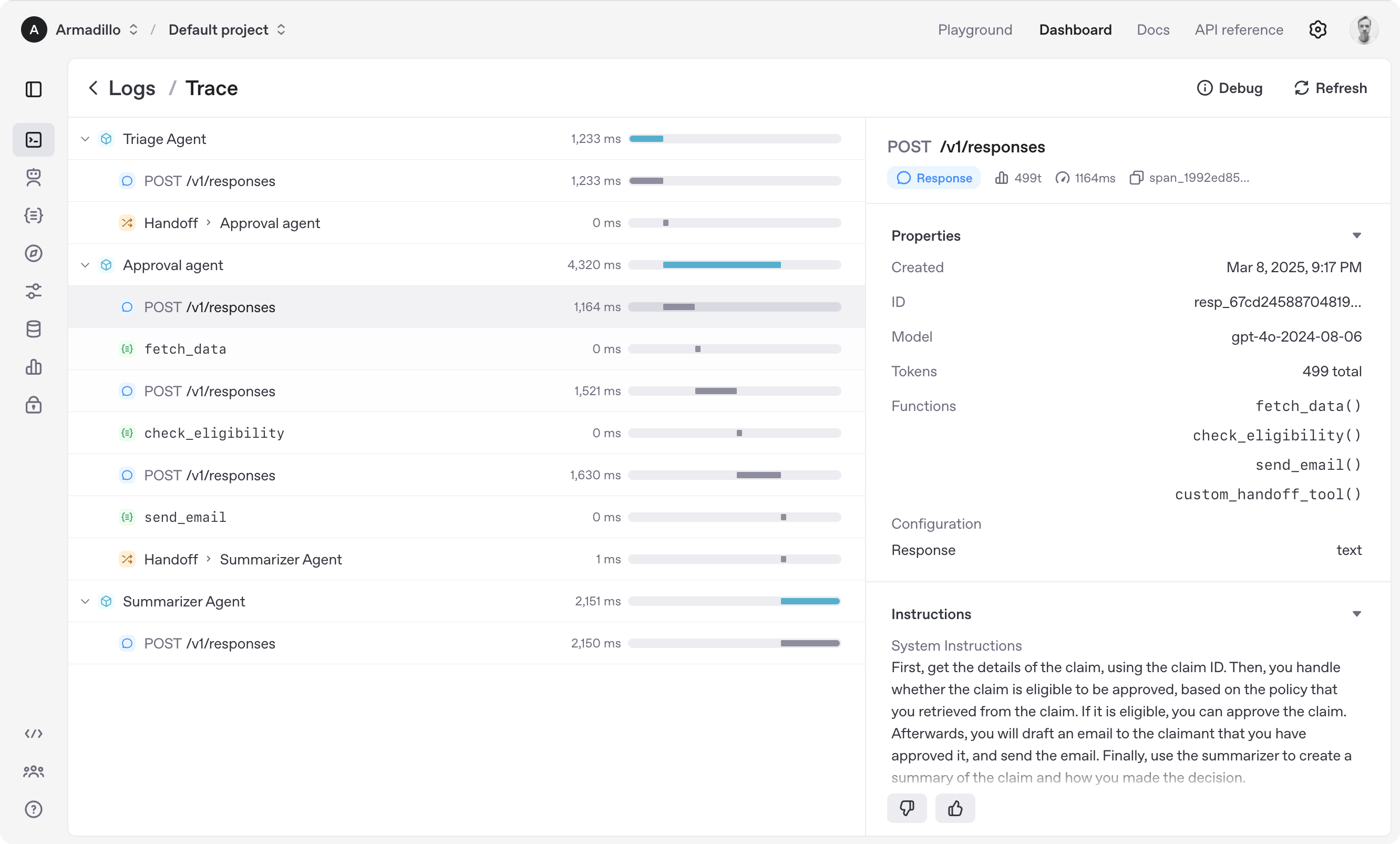
- Tracing: Built-in tracking of agent runs, allowing you to view, debug and optimize your workflows
Explore the examples directory to see the SDK in action, and read our documentation for more details.
Notably, our SDK is compatible with any model providers that support the OpenAI Chat Completions API format.
Get started
- Set up your Python environment (note that within Cursor this is big issue ⚠️, so probably set it up in another folder)
python3 -m venv cai
source cai/bin/activate
- Install Agents SDK
pip install openai-agents
For voice support, install with the optional voice group: pip install 'openai-agents[voice]'.
Hello world example
from agents import Agent, Runner

agent = Agent(name="Assistant", instructions="You are a helpful assistant")

result = Runner.run_sync(agent, "Write a haiku about recursion in programming.")
print(result.final_output)

# Code within the code,
# Functions calling themselves,
# Infinite loop's dance.
(If running this, ensure you set the OPENAI_API_KEY environment variable)
(For Jupyter notebook users, see hello_world_jupyter.py)
Handoffs example
from agents import Agent, Runner
import asyncio

spanish_agent = Agent(
    name="Spanish agent",
    instructions="You only speak Spanish.",
)

english_agent = Agent(
    name="English agent",
    instructions="You only speak English",
)

triage_agent = Agent(
    name="Triage agent",
    instructions="Handoff to the appropriate agent based on the language of the request.",
    handoffs=[spanish_agent, english_agent],
)


async def main():
    result = await Runner.run(triage_agent, input="Hola, ¿cómo estás?")
    print(result.final_output)
    # ¡Hola! Estoy bien, gracias por preguntar. ¿Y tú, cómo estás?


if __name__ == "__main__":
    asyncio.run(main())
Functions example
import asyncio

from agents import Agent, Runner, function_tool


@function_tool
def get_weather(city: str) -> str:
    return f"The weather in {city} is sunny."


agent = Agent(
    name="Hello world",
    instructions="You are a helpful agent.",
    tools=[get_weather],
)


async def main():
    result = await Runner.run(agent, input="What's the weather in Tokyo?")
    print(result.final_output)
    # The weather in Tokyo is sunny.


if __name__ == "__main__":
    asyncio.run(main())
The agent loop
When you call Runner.run(), we run a loop until we get a final output.
- We call the LLM, using the model and settings on the agent, and the message history.
- The LLM returns a response, which may include tool calls.
- If the response has a final output (see below for more on this), we return it and end the loop.
- If the response has a handoff, we set the agent to the new agent and go back to step 1.
- We process the tool calls (if any) and append the tool responses messages. Then we go to step 1.
There is a max_turns parameter that you can use to limit the number of times the loop executes.
Final output
Final output is the last thing the agent produces in the loop.
- If you set an
output_typeon the agent, the final output is when the LLM returns something of that type. We use structured outputs for this. - If there's no
output_type(i.e. plain text responses), then the first LLM response without any tool calls or handoffs is considered as the final output.
As a result, the mental model for the agent loop is:
- If the current agent has an
output_type, the loop runs until the agent produces structured output matching that type. - If the current agent does not have an
output_type, the loop runs until the current agent produces a message without any tool calls/handoffs.
Common agent patterns
The Agents SDK is designed to be highly flexible, allowing you to model a wide range of LLM workflows including deterministic flows, iterative loops, and more. See examples in examples/agent_patterns.
Tracing
The Agents SDK automatically traces your agent runs, making it easy to track and debug the behavior of your agents. Tracing is extensible by design, supporting custom spans and a wide variety of external destinations, including Logfire, AgentOps, Braintrust, Scorecard, and Keywords AI. For more details about how to customize or disable tracing, see Tracing, which also includes a larger list of external tracing processors.
Development (only needed if you need to edit the SDK/examples)
- Ensure you have
uvinstalled.
uv --version
- Install dependencies
make sync
- (After making changes) lint/test
make tests  # run tests
make mypy   # run typechecker
make lint   # run linter
Acknowledgements
We'd like to acknowledge the excellent work of the open-source community, especially:
We're committed to continuing to build the Agents SDK as an open source framework so others in the community can expand on our approach.