 7665adf4fe
* feat: CDP connect — control real Chrome/Comet via Playwright

Add `connectCDP()` to BrowserManager: connects to a running browser via
Chrome DevTools Protocol. All existing browse commands work unchanged
through Playwright's abstraction layer.

- chrome-launcher.ts: browser discovery, CDP probe, auto-relaunch with rollback
- browser-manager.ts: connectCDP(), mode guards (close/closeTab/recreateContext/handoff),
  auto-reconnect on browser restart, getRefMap() for extension API
- server.ts: CDP branch in start(), /health gains mode field, /refs endpoint,
  idle timer only resets on /command (not passive endpoints)

Co-Authored-By: Claude Opus 4.6 (1M context) <noreply@anthropic.com>

* feat: browse connect/disconnect/focus CLI commands

- connect: pre-server command that discovers browser, starts server in CDP mode
- disconnect: drops CDP connection, restarts in headless mode
- focus: brings browser window to foreground via osascript (macOS)
- status: now shows Mode: cdp | launched | headed
- startServer() accepts extra env vars for CDP URL/port passthrough

Co-Authored-By: Claude Opus 4.6 (1M context) <noreply@anthropic.com>

* feat: CDP-aware skill templates — skip cookie import in real browser mode

Skills now check `$B status` for CDP mode and skip:
- /qa: cookie import prompt, user-agent override, headless workarounds
- /design-review: cookie import for authenticated pages
- /setup-browser-cookies: returns "not needed" in CDP mode

Regenerated SKILL.md files from updated templates.

Co-Authored-By: Claude Opus 4.6 (1M context) <noreply@anthropic.com>

* feat: activity streaming — SSE endpoint for Chrome extension Side Panel

Real-time browse command feed via Server-Sent Events:
- activity.ts: ActivityEntry type, CircularBuffer (capacity 1000), privacy
  filtering (redacts passwords, auth tokens, sensitive URL params),
  cursor-based gap detection, async subscriber notification
- server.ts: /activity/stream SSE, /activity/history REST, handleCommand
  instrumented with command_start/command_end events
- 18 unit tests for filterArgs privacy, emitActivity, subscribe lifecycle

Co-Authored-By: Claude Opus 4.6 (1M context) <noreply@anthropic.com>

* feat: Chrome extension Side Panel + Conductor API proposal

Chrome extension (Manifest V3, sideload):
- Side Panel with live activity feed, @ref overlays, dark terminal aesthetic
- Background worker: health polling, SSE relay, ref fetching
- Popup: port config, connection status, side panel launcher
- Content script: floating ref panel with @ref badges

Conductor API proposal (docs/designs/CONDUCTOR_SESSION_API.md):
- SSE endpoint for full Claude Code session mirroring in Side Panel
- Discovery via HTTP endpoint (not filesystem — extensions can't read files)

TODOS.md: add $B watch, multi-agent tabs, cross-platform CDP, Web Store publishing.
Mark CDP mode as shipped.

Co-Authored-By: Claude Opus 4.6 (1M context) <noreply@anthropic.com>

* fix: detect Conductor runtime, skip osascript quit for sandboxed apps

macOS App Management blocks Electron apps (Conductor) from quitting
other apps via osascript. Now detects the runtime environment:
- terminal/claude-code/codex: can manage apps freely
- conductor: prints manual restart instructions + polls for 60s

detectRuntime() checks env vars and parent process. When Chrome needs
restart but we can't quit it, prints step-by-step instructions and
waits for the user to restart Chrome with --remote-debugging-port.

Co-Authored-By: Claude Opus 4.6 (1M context) <noreply@anthropic.com>

* fix: detect Conductor via actual env vars (CONDUCTOR_WORKSPACE_NAME)

Previous detection checked CONDUCTOR_WORKSPACE_ID which doesn't exist.
Conductor sets CONDUCTOR_WORKSPACE_NAME, CONDUCTOR_BIN_DIR, CONDUCTOR_PORT,
and __CFBundleIdentifier=com.conductor.app. Check these FIRST because
Conductor sessions also have ANTHROPIC_API_KEY (which was matching claude-code).

Co-Authored-By: Claude Opus 4.6 (1M context) <noreply@anthropic.com>

* feat: connection status pill — floating indicator when gstack controls Chrome

Small pill in bottom-right corner of every page: "● gstack · 3 refs"
Shows when connected via CDP, fades to 30% opacity after 3s, full on hover.
Disappears entirely when disconnected.

Background worker now notifies content scripts on connect/disconnect state
changes so the pill appears/disappears without polling.

Co-Authored-By: Claude Opus 4.6 (1M context) <noreply@anthropic.com>

* fix: Chrome requires --user-data-dir for remote debugging

Chrome refuses --remote-debugging-port without an explicit --user-data-dir.
Add userDataDir to BrowserBinary registry (macOS Application Support paths)
and pass it in both auto-launch and manual restart instructions.

Fix double-quoting in CLI manual restart instructions.

Co-Authored-By: Claude Opus 4.6 (1M context) <noreply@anthropic.com>

* fix: Chrome must be fully quit before launching with --remote-debugging-port

Chrome refuses to enable CDP on its default profile when another instance
is running (even with explicit --user-data-dir). The only reliable path:
fully quit Chrome first, then relaunch with the flag.

Updated instructions to emphasize this clearly with verification step.

Co-Authored-By: Claude Opus 4.6 (1M context) <noreply@anthropic.com>

* feat: bin/chrome-cdp — quit Chrome and relaunch with CDP in one command

Quits Chrome gracefully, waits for full exit, relaunches with
--remote-debugging-port, polls until CDP is ready. Usage: chrome-cdp [port]

Co-Authored-By: Claude Opus 4.6 (1M context) <noreply@anthropic.com>

* fix: use Playwright channel:chrome instead of broken connectOverCDP

Playwright's connectOverCDP hangs with Chrome 146 due to CDP protocol
version mismatch. Switch to channel:'chrome' which uses Playwright's
native pipe protocol to launch the system Chrome binary directly.

This is simpler and more reliable:
- No CDP port discovery needed
- No --remote-debugging-port or --user-data-dir hassles
- $B connect just works — launches real Chrome headed window
- All Playwright APIs (snapshot, click, fill) work unchanged

bin/chrome-cdp updated with symlinked profile approach (kept for
manual CDP use cases, but $B connect no longer needs it).

Co-Authored-By: Claude Opus 4.6 (1M context) <noreply@anthropic.com>

* feat: green border + gstack label on controlled Chrome window

Injects a 2px green border and small "gstack" label on every page
loaded in the controlled Chrome window via context.addInitScript().
Users can instantly tell which Chrome window Claude controls.

Also fixes close() for channel:chrome mode (uses browser.close()
not browser.disconnect() which doesn't exist).

Co-Authored-By: Claude Opus 4.6 (1M context) <noreply@anthropic.com>

* chore: cleanup chrome-launcher runtime detection, remove puppeteer-core dep

Co-Authored-By: Claude Opus 4.6 (1M context) <noreply@anthropic.com>

* style(design): redesign controlled Chrome indicator

Replace crude green border + label with polished indicator:
- 2px shimmer gradient at top edge (green→cyan→green, 3s loop)
- Floating pill bottom-right with frosted glass bg, fades to 25%
  opacity after 4s so it doesn't compete with page content
- prefers-reduced-motion disables shimmer animation
- Much more subtle — looks like a developer tool, not broken CSS

Co-Authored-By: Claude Opus 4.6 (1M context) <noreply@anthropic.com>

* docs: document real browser mode + Chrome extension in BROWSER.md and README.md

BROWSER.md: new sections for connect/disconnect/focus commands,
Chrome extension Side Panel install, CDP-aware skills, activity streaming.
Updated command reference table, key components, env vars, source map.

README.md: updated /browse description, added "Real browser mode" to
What's New section.

Co-Authored-By: Claude Opus 4.6 (1M context) <noreply@anthropic.com>

* docs: step-by-step Chrome extension install guide in BROWSER.md

Replace terse bullet points with numbered walkthrough covering:
developer mode toggle, load unpacked, macOS file picker tip (Cmd+Shift+G),
pin extension, configure port, open side panel. Added troubleshooting section.

Co-Authored-By: Claude Opus 4.6 (1M context) <noreply@anthropic.com>

* docs: add Cmd+Shift+. tip for hidden folders in macOS file picker

macOS hides folders starting with . by default. Added both shortcuts:
Cmd+Shift+G (paste path directly) and Cmd+Shift+. (show hidden files).

Co-Authored-By: Claude Opus 4.6 (1M context) <noreply@anthropic.com>

* docs: integrate hidden folder tips into the install flow naturally

Move Cmd+Shift+G and Cmd+Shift+. tips inline with the file picker
step instead of as a separate tip block after it.

Co-Authored-By: Claude Opus 4.6 (1M context) <noreply@anthropic.com>

* feat: auto-load Chrome extension when $B connect launches Chrome

Extension auto-loads via --load-extension flag — no manual chrome://extensions
install needed. findExtensionPath() checks repo root, global install, and dev
paths. Also adds bin/gstack-extension helper for manual install in regular
Chrome, and rewrites BROWSER.md install docs with auto-load as primary path.

Co-Authored-By: Claude Opus 4.6 (1M context) <noreply@anthropic.com>

* feat: /connect-chrome skill — one command to launch Chrome with Side Panel

New skill that runs $B connect, verifies the connection, guides the user
to open the Side Panel, and demos the live activity feed. Extension auto-loads
via --load-extension so no manual chrome://extensions install needed.

Co-Authored-By: Claude Opus 4.6 (1M context) <noreply@anthropic.com>

* fix: use launchPersistentContext for Chrome extension loading

Playwright's chromium.launch() silently ignores --load-extension.
Switch to launchPersistentContext with ignoreDefaultArgs to remove
--disable-extensions flag. Use bundled Chromium (real Chrome blocks
unpacked extensions). Fixed port 34567 for CDP mode so the extension
auto-connects.

Co-Authored-By: Claude Opus 4.6 (1M context) <noreply@anthropic.com>

* feat: sync extension to DESIGN.md — amber accent, zinc neutrals, grain texture

Import design system from gstack-website. Update all extension colors:
green (#4ade80) → amber (#F59E0B/#FBBF24), zinc gray neutrals, grain
texture overlay. Regenerate icons as amber "G" monogram on dark background.

Co-Authored-By: Claude Opus 4.6 (1M context) <noreply@anthropic.com>

* feat: sidebar chat with Claude Code — icon opens side panel directly

Replace popup flyout with direct side panel open on icon click. Primary
UI is now a chat interface that sends messages to Claude Code via file
queue. Activity/Refs tabs moved behind a debug toggle in the footer.
Command bar with history, auto-poll for responses, amber design system.

Co-Authored-By: Claude Opus 4.6 (1M context) <noreply@anthropic.com>

* feat: sidebar agent — Claude-powered chat backend via file queue

Add /sidebar-command, /sidebar-response, and /sidebar-chat endpoints
to the browse server. sidebar-agent.ts watches the command queue file,
spawns claude -p with browse context for each message, and streams
responses back to the sidebar chat.

Co-Authored-By: Claude Opus 4.6 (1M context) <noreply@anthropic.com>

* fix: remove duplicate gstack pill overlay, hide crash restore bubble

The addInitScript indicator and the extension's content script were both
injecting bottom-right pills, causing duplicates. Remove the pill from
addInitScript (extension handles it). Replace --restore-last-session with
--hide-crash-restore-bubble to suppress the "Chromium didn't shut down
correctly" dialog.

Co-Authored-By: Claude Opus 4.6 (1M context) <noreply@anthropic.com>

* fix: state file authority — CDP server cannot be silently replaced

Hardens the connect/disconnect lifecycle:
- ensureServer() refuses to auto-start headless when CDP server is alive
- $B connect does full cleanup: SIGTERM → 2s → SIGKILL, profile locks, state
- shutdown() cleans Chromium SingletonLock/Socket/Cookie files
- uncaughtException/unhandledRejection handlers do emergency cleanup

This prevents the bug where a headless server overwrites the CDP server's
state file, causing $B commands to hit the wrong browser.

Co-Authored-By: Claude Opus 4.6 (1M context) <noreply@anthropic.com>

* feat: sidebar agent streaming events + session state management

Enhance sidebar-agent.ts with:
- Live streaming of claude -p events (tool_use, text, result) to sidebar
- Session state file for BROWSE_STATE_FILE propagation to claude subprocess
- Improved logging (stderr, exit codes, event types)
- stdin.end() to prevent claude waiting for input
- summarizeToolInput() with path shortening for compact sidebar display

Co-Authored-By: Claude Opus 4.6 (1M context) <noreply@anthropic.com>

* feat: sidebar chat UI — streaming events, agent status, reconnect retry

Sidebar panel improvements:
- Chat tab renders streaming agent events (tool_use, text, result)
- Thinking dots animation while agent processes
- Agent error display with styled error blocks
- tryConnect() with 2s retry loop for initial connection
- Debug tabs (Activity/Refs) hidden behind gear toggle
- Clear chat button
- Compact tool call display with path shortening

Co-Authored-By: Claude Opus 4.6 (1M context) <noreply@anthropic.com>

* feat: server-integrated sidebar agent with sessions and message queue

Move the sidebar agent from a separate bun process into server.ts:
- Agent spawns claude -p directly when messages arrive via /sidebar-command
- In-memory chat buffer backed by per-session chat.jsonl on disk
- Session manager: create, load, persist, list sessions
- Message queue (cap 5) with agent status tracking (idle/processing/hung)
- Stop/kill endpoints with queue dismiss support
- /health now returns agent status + session info
- All sidebar endpoints require Bearer auth
- Agent killed on server shutdown
- 120s timeout detects hung claude processes

Eliminates: file-queue polling, separate sidebar-agent.ts process,
stale auth tokens, state file conflicts between processes.

Co-Authored-By: Claude Opus 4.6 (1M context) <noreply@anthropic.com>

* feat: extension auth + token flow for server-integrated agent

Update Chrome extension to use Bearer auth on all sidebar endpoints:
- background.js captures auth token from /health, exposes via getToken msg
- background.js sets openPanelOnActionClick for direct side panel access
- sidepanel.js gets token from background, sends in all fetch headers
- Health broadcasts include token so sidebar auto-authenticates
- Removes popup from manifest — icon click opens side panel directly

Co-Authored-By: Claude Opus 4.6 (1M context) <noreply@anthropic.com>

* feat: self-healing sidebar — reconnect banner, state machine, copy button

Sidebar UI now handles disconnection gracefully:
- Connection state machine: connected → reconnecting → dead
- Amber pulsing banner during reconnect (2s retry, 30 attempts)
- Red "Server offline" banner with Reconnect + Copy /connect-chrome buttons
- Green "Reconnected" toast that fades after 3s on successful reconnect
- Copy button lets user paste /connect-chrome into any Claude Code session

Co-Authored-By: Claude Opus 4.6 (1M context) <noreply@anthropic.com>

* fix: crash handling — save session, kill agent, distinct exit codes

Hardened shutdown/crash behavior:
- Browser disconnect exits with code 2 (distinct from crash code 1)
- emergencyCleanup kills agent subprocess and saves session state
- Clean shutdown saves session before exit (chat history persists)
- Clear user message on browser disconnect: "Run $B connect to reconnect"

Co-Authored-By: Claude Opus 4.6 (1M context) <noreply@anthropic.com>

* feat: worktree-per-session isolation for sidebar agent

Each sidebar session gets an isolated git worktree so the agent's file
operations don't conflict with the user's working directory:
- createWorktree() creates detached HEAD worktree in ~/.gstack/worktrees/
- Falls back to main cwd for non-git repos or on creation failure
- Handles collision cleanup from prior crashes
- removeWorktree() cleans up on session switch and shutdown
- worktreePath persisted in session.json

Co-Authored-By: Claude Opus 4.6 (1M context) <noreply@anthropic.com>

* fix(qa): ISSUE-001 — disconnect blocked by CDP guard in ensureServer

$B disconnect was routed through ensureServer() which refused to start a
headless server when a CDP state file existed. Disconnect is now handled
before ensureServer() (like connect), with force-kill + cleanup fallback
when the CDP server is unresponsive.

Co-Authored-By: Claude Opus 4.6 (1M context) <noreply@anthropic.com>

* fix: resolve claude binary path for daemon-spawned agent

The browse server runs as a daemon and may not inherit the user's shell
PATH. Add findClaudeBin() that checks ~/.local/bin/claude (standard
install location), which claude, and common system paths. Shows a clear
error in the sidebar chat if claude CLI is not found.

Co-Authored-By: Claude Opus 4.6 (1M context) <noreply@anthropic.com>

* fix: resolve claude symlinks + check Conductor bundled binary

posix_spawn fails on symlinks in compiled bun binaries. Now:
- Checks Conductor app's bundled binary first (not a symlink)
- Scans ~/.local/share/claude/versions/ for direct versioned binaries
- Uses fs.realpathSync() to resolve symlinks before spawning

Co-Authored-By: Claude Opus 4.6 (1M context) <noreply@anthropic.com>

* fix: compiled bun binary cannot posix_spawn — use external agent process

Compiled bun binaries fail posix_spawn on ALL executables (even /bin/bash).
The server now writes to an agent queue file, and a separate non-compiled
bun process (sidebar-agent.ts) reads the queue, spawns claude, and POSTs
events back via /sidebar-agent/event.

Changes:
- server.ts: spawnClaude writes to queue file instead of spawning directly
- server.ts: new /sidebar-agent/event endpoint for agent → server relay
- server.ts: fix result event field name (event.text vs event.result)
- sidebar-agent.ts: rewritten to poll queue file, relay events via HTTP
- cli.ts: $B connect auto-starts sidebar-agent as non-compiled bun process

Co-Authored-By: Claude Opus 4.6 (1M context) <noreply@anthropic.com>

* feat: loading spinner on sidebar open while connecting to server

Shows an amber spinner with "Connecting..." when the sidebar first opens,
replacing the empty state. After the first successful /sidebar-chat poll:
- If chat history exists: renders it immediately
- If no history: shows the welcome message

Prevents the jarring empty-then-populated flash on sidebar open.

Co-Authored-By: Claude Opus 4.6 (1M context) <noreply@anthropic.com>

* feat: zero-friction side panel — auto-open on install, pill is clickable

Three changes to eliminate manual side panel setup:
- Auto-open side panel on extension install/update (onInstalled listener)
- gstack pill (bottom-right) is now clickable — opens the side panel
- Pill has pointer-events: auto so clicks always register (was: none)

User no longer needs to find the puzzle piece icon, pin the extension,
or know the side panel exists. It opens automatically on first launch
and can be re-opened by clicking the floating gstack pill.

Co-Authored-By: Claude Opus 4.6 (1M context) <noreply@anthropic.com>

* refactor: kill CDP naming, delete chrome-launcher.ts dead code

The connectCDP() method and connectionMode: 'cdp' naming was a legacy
artifact — real Chrome was tried but failed (silently blocks
--load-extension), so the implementation already used Playwright's
bundled Chromium via launchPersistentContext(). The naming was
misleading.

Changes:
- Delete chrome-launcher.ts (361 LOC) — only import was in unreachable
  attemptReconnect() method
- Delete dead attemptReconnect() and reconnecting field
- Delete preExistingTabIds (was for protecting real Chrome tabs we
  never connect to)
- Rename connectCDP() → launchHeaded()
- Rename connectionMode: 'cdp' → 'headed' across all files
- Replace BROWSE_CDP_URL/BROWSE_CDP_PORT env vars with BROWSE_HEADED=1
- Regenerate SKILL.md files for updated command descriptions
- Move BrowserManager unit tests to browser-manager-unit.test.ts

Co-Authored-By: Claude Opus 4.6 (1M context) <noreply@anthropic.com>

* feat: converge handoff into connect — extension loads on handoff

Handoff now uses launchPersistentContext() with extension auto-loading,
same as the connect/launchHeaded() path. This means when the agent
gets stuck (2FA, CAPTCHA) and hands off to the user, the Chrome
extension + side panel are available automatically.

Before: handoff used chromium.launch() + newContext() — no extension
After: handoff uses chromium.launchPersistentContext() — extension loads

Also sets connectionMode to 'headed' and disables dialog auto-accept
on handoff, matching connect behavior.

Co-Authored-By: Claude Opus 4.6 (1M context) <noreply@anthropic.com>

* feat: gate sidebar chat behind --chat flag

$B connect (default): headed Chromium + extension with Activity + Refs
tabs only. No separate agent spawned. Clean, no confusion.

$B connect --chat: same + Chat tab with standalone claude -p agent.
Shows experimental banner: "Standalone mode — this is a separate
agent from your workspace."

Implementation:
- cli.ts: parse --chat, set BROWSE_SIDEBAR_CHAT env, conditionally
  spawn sidebar-agent
- server.ts: gate /sidebar-* routes behind chatEnabled, return 403
  when disabled, include chatEnabled in /health response
- sidepanel.js: applyChatEnabled() hides/shows Chat tab + banner
- background.js: forward chatEnabled from health response
- sidepanel.html/css: experimental banner with amber styling

Co-Authored-By: Claude Opus 4.6 (1M context) <noreply@anthropic.com>

* feat: file drop relay + $B inbox command

Sidebar agent now writes structured messages to .context/sidebar-inbox/
when processing user input. The workspace agent can read these via
$B inbox to see what the user reported from the browser.

File drop format:
  .context/sidebar-inbox/{timestamp}-observation.json
  { type, timestamp, page: {url}, userMessage, sidebarSessionId }

Atomic writes (tmp + rename) prevent partial reads. $B inbox --clear
removes messages after display.

Co-Authored-By: Claude Opus 4.6 (1M context) <noreply@anthropic.com>

* feat: $B watch — passive observation mode

Claude enters read-only mode and captures periodic snapshots (every 5s)
while the user browses. Mutation commands (click, fill, etc.) are
blocked during watch. $B watch stop exits and returns a summary with
the last snapshot.

Requires headed mode ($B connect). This is the inverse of the scout
pattern — the workspace agent watches through the browser instead of
the sidebar relaying to it.

Co-Authored-By: Claude Opus 4.6 (1M context) <noreply@anthropic.com>

* test: add coverage for sidebar-agent, file-drop, and watch mode

33 new tests covering:
- Sidebar agent queue parsing (valid/malformed/empty JSONL)
- writeToInbox file drop (directory creation, atomic writes, JSON format)
- Inbox command (display, sorting, --clear, malformed file handling)
- Watch mode state machine (start/stop cycles, snapshots, duration)

Co-Authored-By: Claude Opus 4.6 (1M context) <noreply@anthropic.com>

* docs: TODOS cleanup + Chrome vs Chromium exploration doc

- Update TODOS.md: mark CDP mode, $B watch, sidebar scout as SHIPPED
- Delete dead "cross-platform CDP browser discovery" TODO
- Rename dependencies from "CDP connect" to "headed mode"
- Add docs/designs/CHROME_VS_CHROMIUM_EXPLORATION.md memorializing
  the architecture exploration and decision to use Playwright Chromium

Co-Authored-By: Claude Opus 4.6 (1M context) <noreply@anthropic.com>

* docs: add Conductor Chrome sidebar integration design doc

Co-Authored-By: Claude Opus 4.6 (1M context) <noreply@anthropic.com>

* fix: sidebar-agent validates cwd before spawning claude

The queue entry may reference a worktree that was cleaned up between
sessions. Now falls back to process.cwd() if the path doesn't exist,
preventing silent spawn failures.

Co-Authored-By: Claude Opus 4.6 (1M context) <noreply@anthropic.com>

* fix: gen-skill-docs resolver merge + preamble tier gate + plan file discovery

The local RESOLVERS record in gen-skill-docs.ts was shadowing the imported
canonical resolvers, causing stale test coverage and preamble generators
to be used instead of the authoritative versions in resolvers/.

Changes:
- Merge imported RESOLVERS with local overrides (spread + override pattern)
- Fix preamble tier gate: tier 1 skills no longer get AskUserQuestion format
- Make plan file discovery host-agnostic (search multiple plan dirs)
- Add missing E2E tier entries for ship/review plan completion tests

Co-Authored-By: Claude Opus 4.6 (1M context) <noreply@anthropic.com>

* feat: ungate sidebar agent + raise timeout to 5 minutes (v0.12.0)

Sidebar chat is now always available in headed mode — no --chat flag needed.
Agent tasks get 5 minutes instead of 2, enabling multi-page workflows like
navigating directories and filling forms across pages.

Changes:
- cli.ts: remove --chat flag, always set BROWSE_SIDEBAR_CHAT=1, always spawn agent
- server.ts: remove chatEnabled gate (403 response), raise AGENT_TIMEOUT_MS to 300s
- sidebar-agent.ts: raise child process timeout from 120s to 300s

Co-Authored-By: Claude Opus 4.6 (1M context) <noreply@anthropic.com>

* docs: headed mode + sidebar agent documentation (v0.12.0)

- README: sidebar agent section, personal automation example (school parent
  portal), two auth paths (manual login + cookie import), DevTools MCP mention
- BROWSER.md: sidebar agent section with usage, timeout, session isolation,
  authentication, and random delay documentation
- connect-chrome template: add sidebar chat onboarding step
- CHANGELOG: v0.12.0 entry covering headed mode, sidebar agent, extension
- VERSION: bump to 0.12.0.0
- TODOS: Chrome DevTools MCP integration as P0

Co-Authored-By: Claude Opus 4.6 (1M context) <noreply@anthropic.com>

* chore: regenerate SKILL.md files

Generated from updated templates + resolver merge. Key changes:
- Tier 1 skills no longer include AskUserQuestion format section
- Ship/review skills now include coverage gate with thresholds
- Connect-chrome skill includes sidebar chat onboarding step
- Plan file discovery uses host-agnostic paths

Co-Authored-By: Claude Opus 4.6 (1M context) <noreply@anthropic.com>

* chore: regenerate Codex connect-chrome skill

Updated preamble with proactive prompt and sidebar chat onboarding step.

Co-Authored-By: Claude Opus 4.6 (1M context) <noreply@anthropic.com>

* feat: network idle, state persistence, iframe support, chain pipe format (v0.12.1.0) (#516)

* feat: network idle detection + chain pipe format

- Upgrade click/fill/select from domcontentloaded to networkidle wait
  (2s timeout, best-effort). Catches XHR/fetch triggered by interactions.
- Add pipe-delimited format to chain as JSON fallback:
  $B chain 'goto url | click @e5 | snapshot -ic'
- Add post-loop networkidle wait in chain when last command was a write.
- Frame-aware: commands use target (getActiveFrameOrPage) for locator ops,
  page-only ops (goto/back/forward/reload) guard against frame context.

Co-Authored-By: Claude Opus 4.6 (1M context) <noreply@anthropic.com>

* feat: $B state save/load + $B frame — new browse commands

- state save/load: persist cookies + URLs to .gstack/browse-states/{name}.json
  File perms 0o600, name sanitized to [a-zA-Z0-9_-]. V1 skips localStorage
  (breaks on load-before-navigate). Load replaces session via closeAllPages().
- frame: switch command context to iframe via CSS selector, @ref, --name, or
  --url. 'frame main' returns to main frame. Execution target abstraction
  (getActiveFrameOrPage) across read-commands, snapshot, and write-commands.
- Frame context cleared on tab switch, navigation, resume, and handoff.
- Snapshot shows [Context: iframe src="..."] header when in frame.

Co-Authored-By: Claude Opus 4.6 (1M context) <noreply@anthropic.com>

* test: add tests for network idle, chain pipe format, state, and frame

- Network idle: click on fetch button waits for XHR, static click is fast
- Chain pipe: pipe-delimited commands, quoted args, JSON still works
- State: save/load round-trip, name sanitization, missing state error
- Frame: switch to iframe + back, snapshot context header, fill in frame,
  goto-in-frame guard, usage error

New fixtures: network-idle.html (fetch + static buttons), iframe.html (srcdoc)

Co-Authored-By: Claude Opus 4.6 (1M context) <noreply@anthropic.com>

* fix: review fixes — iframe ref scoping, detached frame recovery, state validation

- snapshot.ts: ref locators, cursor-interactive scan, and cursor locator
  now use target (frame-aware) instead of page — fixes @ref clicking in iframes
- browser-manager.ts: getActiveFrameOrPage auto-recovers from detached frames
  via isDetached() check
- meta-commands.ts: state load resets activeFrame, elementHandle disposed after
  contentFrame(), state file schema validation (cookies + pages arrays),
  filter empty pipe segments in chain tokenizer
- write-commands.ts: upload command uses target.locator() for frame support

Co-Authored-By: Claude Opus 4.6 (1M context) <noreply@anthropic.com>

* chore: regenerate SKILL.md files + rebuild binary

Co-Authored-By: Claude Opus 4.6 (1M context) <noreply@anthropic.com>

* chore: bump version and changelog (v0.12.1.0)

Co-Authored-By: Claude Opus 4.6 <noreply@anthropic.com>

---------

Co-authored-by: Claude Opus 4.6 (1M context) <noreply@anthropic.com>

---------

Co-authored-by: Claude Opus 4.6 (1M context) <noreply@anthropic.com>
|
||
|---|---|---|
| .agents/skills | ||
| .github | ||
| agents | ||
| autoplan | ||
| benchmark | ||
| bin | ||
| browse | ||
| canary | ||
| careful | ||
| codex | ||
| connect-chrome | ||
| cso | ||
| design-consultation | ||
| design-review | ||
| docs | ||
| document-release | ||
| extension | ||
| freeze | ||
| gstack-upgrade | ||
| guard | ||
| investigate | ||
| land-and-deploy | ||
| lib | ||
| office-hours | ||
| plan-ceo-review | ||
| plan-design-review | ||
| plan-eng-review | ||
| qa | ||
| qa-only | ||
| retro | ||
| review | ||
| scripts | ||
| setup-browser-cookies | ||
| setup-deploy | ||
| ship | ||
| supabase | ||
| test | ||
| unfreeze | ||
| .env.example | ||
| .gitignore | ||
| AGENTS.md | ||
| ARCHITECTURE.md | ||
| BROWSER.md | ||
| CHANGELOG.md | ||
| CLAUDE.md | ||
| CONTRIBUTING.md | ||
| DESIGN.md | ||
| ETHOS.md | ||
| LICENSE | ||
| README.md | ||
| SKILL.md | ||
| SKILL.md.tmpl | ||
| TODOS.md | ||
| VERSION | ||
| actionlint.yaml | ||
| conductor.json | ||
| package.json | ||
| setup | ||
README.md
gstack
"I don't think I've typed like a line of code probably since December, basically, which is an extremely large change." — Andrej Karpathy, No Priors podcast, March 2026
When I heard Karpathy say this, I wanted to find out how. How does one person ship like a team of twenty? Peter Steinberger built OpenClaw — 247K GitHub stars — essentially solo with AI agents. The revolution is here. A single builder with the right tooling can move faster than a traditional team.
I'm Garry Tan, President & CEO of Y Combinator. I've worked with thousands of startups — Coinbase, Instacart, Rippling — when they were one or two people in a garage. Before YC, I was one of the first eng/PM/designers at Palantir, cofounded Posterous (sold to Twitter), and built Bookface, YC's internal social network.
gstack is my answer. I've been building products for twenty years, and right now I'm shipping more code than I ever have. In the last 60 days: 600,000+ lines of production code (35% tests), 10,000-20,000 lines per day, part-time, while running YC full-time. Here's my last /retro across 3 projects: 140,751 lines added, 362 commits, ~115k net LOC in one week.
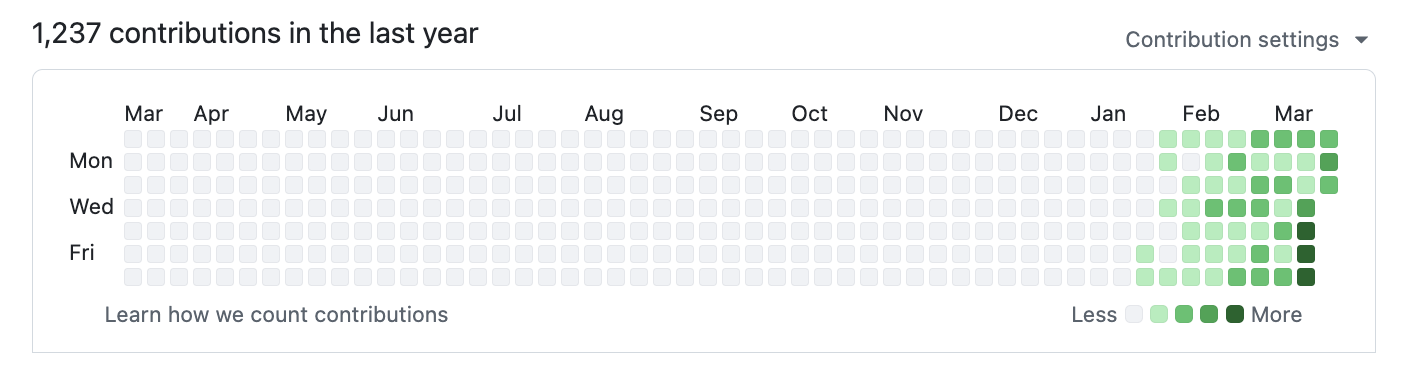
2026 — 1,237 contributions and counting:
2013 — when I built Bookface at YC (772 contributions):
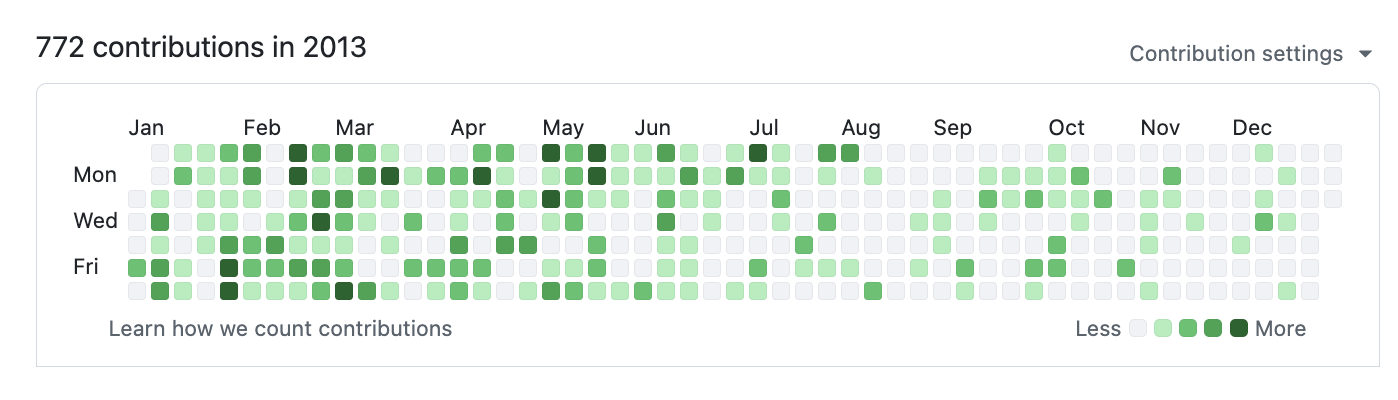
Same person. Different era. The difference is the tooling.
gstack is how I do it. It turns Claude Code into a virtual engineering team — a CEO who rethinks the product, an eng manager who locks architecture, a designer who catches AI slop, a reviewer who finds production bugs, a QA lead who opens a real browser, a security officer who runs OWASP + STRIDE audits, and a release engineer who ships the PR. Twenty specialists and eight power tools, all slash commands, all Markdown, all free, MIT license.
This is my open source software factory. I use it every day. I'm sharing it because these tools should be available to everyone.
Fork it. Improve it. Make it yours. And if you want to hate on free open source software — you're welcome to, but I'd rather you just try it first.
Who this is for:
- Founders and CEOs — especially technical ones who still want to ship
- First-time Claude Code users — structured roles instead of a blank prompt
- Tech leads and staff engineers — rigorous review, QA, and release automation on every PR
Quick start
- Install gstack (30 seconds — see below)
- Run
/office-hours— describe what you're building - Run
/plan-ceo-reviewon any feature idea - Run
/reviewon any branch with changes - Run
/qaon your staging URL - Stop there. You'll know if this is for you.
Install — 30 seconds
Requirements: Claude Code, Git, Bun v1.0+, Node.js (Windows only)
Step 1: Install on your machine
Open Claude Code and paste this. Claude does the rest.
Install gstack: run
git clone https://github.com/garrytan/gstack.git ~/.claude/skills/gstack && cd ~/.claude/skills/gstack && ./setupthen add a "gstack" section to CLAUDE.md that says to use the /browse skill from gstack for all web browsing, never use mcp__claude-in-chrome__* tools, and lists the available skills: /office-hours, /plan-ceo-review, /plan-eng-review, /plan-design-review, /design-consultation, /review, /ship, /land-and-deploy, /canary, /benchmark, /browse, /qa, /qa-only, /design-review, /setup-browser-cookies, /setup-deploy, /retro, /investigate, /document-release, /codex, /cso, /autoplan, /careful, /freeze, /guard, /unfreeze, /gstack-upgrade. Then ask the user if they also want to add gstack to the current project so teammates get it.
Step 2: Add to your repo so teammates get it (optional)
Add gstack to this project: run
cp -Rf ~/.claude/skills/gstack .claude/skills/gstack && rm -rf .claude/skills/gstack/.git && cd .claude/skills/gstack && ./setupthen add a "gstack" section to this project's CLAUDE.md that says to use the /browse skill from gstack for all web browsing, never use mcp__claude-in-chrome__* tools, lists the available skills: /office-hours, /plan-ceo-review, /plan-eng-review, /plan-design-review, /design-consultation, /review, /ship, /land-and-deploy, /canary, /benchmark, /browse, /qa, /qa-only, /design-review, /setup-browser-cookies, /setup-deploy, /retro, /investigate, /document-release, /codex, /cso, /careful, /freeze, /guard, /unfreeze, /gstack-upgrade, and tells Claude that if gstack skills aren't working, runcd .claude/skills/gstack && ./setupto build the binary and register skills.
Real files get committed to your repo (not a submodule), so git clone just works. Everything lives inside .claude/. Nothing touches your PATH or runs in the background.
Codex, Gemini CLI, or Cursor
gstack works on any agent that supports the SKILL.md standard. Skills live in .agents/skills/ and are discovered automatically.
Install to one repo:
git clone https://github.com/garrytan/gstack.git .agents/skills/gstack
cd .agents/skills/gstack && ./setup --host codex
When setup runs from .agents/skills/gstack, it installs the generated Codex skills next to it in the same repo and does not write to ~/.codex/skills.
Install once for your user account:
git clone https://github.com/garrytan/gstack.git ~/gstack
cd ~/gstack && ./setup --host codex
setup --host codex creates the runtime root at ~/.codex/skills/gstack and
links the generated Codex skills at the top level. This avoids duplicate skill
discovery from the source repo checkout.
Or let setup auto-detect which agents you have installed:
git clone https://github.com/garrytan/gstack.git ~/gstack
cd ~/gstack && ./setup --host auto
For Codex-compatible hosts, setup now supports both repo-local installs from .agents/skills/gstack and user-global installs from ~/.codex/skills/gstack. All 28 skills work across all supported agents. Hook-based safety skills (careful, freeze, guard) use inline safety advisory prose on non-Claude hosts.
See it work
You:    I want to build a daily briefing app for my calendar.
You:    /office-hours
Claude: [asks about the pain — specific examples, not hypotheticals]

You:    Multiple Google calendars, events with stale info, wrong locations.
        Prep takes forever and the results aren't good enough...

Claude: I'm going to push back on the framing. You said "daily briefing
        app." But what you actually described is a personal chief of
        staff AI.
        [extracts 5 capabilities you didn't realize you were describing]
        [challenges 4 premises — you agree, disagree, or adjust]
        [generates 3 implementation approaches with effort estimates]
        RECOMMENDATION: Ship the narrowest wedge tomorrow, learn from
        real usage. The full vision is a 3-month project — start with
        the daily briefing that actually works.
        [writes design doc → feeds into downstream skills automatically]

You:    /plan-ceo-review
        [reads the design doc, challenges scope, runs 10-section review]

You:    /plan-eng-review
        [ASCII diagrams for data flow, state machines, error paths]
        [test matrix, failure modes, security concerns]

You:    Approve plan. Exit plan mode.
        [writes 2,400 lines across 11 files. ~8 minutes.]

You:    /review
        [AUTO-FIXED] 2 issues. [ASK] Race condition → you approve fix.

You:    /qa https://staging.myapp.com
        [opens real browser, clicks through flows, finds and fixes a bug]

You:    /ship
        Tests: 42 → 51 (+9 new). PR: github.com/you/app/pull/42
You said "daily briefing app." The agent said "you're building a chief of staff AI" — because it listened to your pain, not your feature request. Eight commands, end to end. That is not a copilot. That is a team.
The sprint
gstack is a process, not a collection of tools. The skills run in the order a sprint runs:
Think → Plan → Build → Review → Test → Ship → Reflect
Each skill feeds into the next. /office-hours writes a design doc that /plan-ceo-review reads. /plan-eng-review writes a test plan that /qa picks up. /review catches bugs that /ship verifies are fixed. Nothing falls through the cracks because every step knows what came before it.
| Skill | Your specialist | What they do |
|---|---|---|
/office-hours |
YC Office Hours | Start here. Six forcing questions that reframe your product before you write code. Pushes back on your framing, challenges premises, generates implementation alternatives. Design doc feeds into every downstream skill. |
/plan-ceo-review |
CEO / Founder | Rethink the problem. Find the 10-star product hiding inside the request. Four modes: Expansion, Selective Expansion, Hold Scope, Reduction. |
/plan-eng-review |
Eng Manager | Lock in architecture, data flow, diagrams, edge cases, and tests. Forces hidden assumptions into the open. |
/plan-design-review |
Senior Designer | Rates each design dimension 0-10, explains what a 10 looks like, then edits the plan to get there. AI Slop detection. Interactive — one AskUserQuestion per design choice. |
/design-consultation |
Design Partner | Build a complete design system from scratch. Researches the landscape, proposes creative risks, generates realistic product mockups. |
/review |
Staff Engineer | Find the bugs that pass CI but blow up in production. Auto-fixes the obvious ones. Flags completeness gaps. |
/investigate |
Debugger | Systematic root-cause debugging. Iron Law: no fixes without investigation. Traces data flow, tests hypotheses, stops after 3 failed fixes. |
/design-review |
Designer Who Codes | Same audit as /plan-design-review, then fixes what it finds. Atomic commits, before/after screenshots. |
/qa |
QA Lead | Test your app, find bugs, fix them with atomic commits, re-verify. Auto-generates regression tests for every fix. |
/qa-only |
QA Reporter | Same methodology as /qa but report only. Pure bug report without code changes. |
/cso |
Chief Security Officer | OWASP Top 10 + STRIDE threat model. Zero-noise: 17 false positive exclusions, 8/10+ confidence gate, independent finding verification. Each finding includes a concrete exploit scenario. |
/ship |
Release Engineer | Sync main, run tests, audit coverage, push, open PR. Bootstraps test frameworks if you don't have one. |
/land-and-deploy |
Release Engineer | Merge the PR, wait for CI and deploy, verify production health. One command from "approved" to "verified in production." |
/canary |
SRE | Post-deploy monitoring loop. Watches for console errors, performance regressions, and page failures. |
/benchmark |
Performance Engineer | Baseline page load times, Core Web Vitals, and resource sizes. Compare before/after on every PR. |
/document-release |
Technical Writer | Update all project docs to match what you just shipped. Catches stale READMEs automatically. |
/retro |
Eng Manager | Team-aware weekly retro. Per-person breakdowns, shipping streaks, test health trends, growth opportunities. /retro global runs across all your projects and AI tools (Claude Code, Codex, Gemini). |
/browse |
QA Engineer | Give the agent eyes. Real Chromium browser, real clicks, real screenshots. ~100ms per command. $B connect launches your real Chrome as a headed window — watch every action live. |
/setup-browser-cookies |
Session Manager | Import cookies from your real browser (Chrome, Arc, Brave, Edge) into the headless session. Test authenticated pages. |
/autoplan |
Review Pipeline | One command, fully reviewed plan. Runs CEO → design → eng review automatically with encoded decision principles. Surfaces only taste decisions for your approval. |
Power tools
| Skill | What it does |
|---|---|
/codex |
Second Opinion — independent code review from OpenAI Codex CLI. Three modes: review (pass/fail gate), adversarial challenge, and open consultation. Cross-model analysis when both /review and /codex have run. |
/careful |
Safety Guardrails — warns before destructive commands (rm -rf, DROP TABLE, force-push). Say "be careful" to activate. Override any warning. |
/freeze |
Edit Lock — restrict file edits to one directory. Prevents accidental changes outside scope while debugging. |
/guard |
Full Safety — /careful + /freeze in one command. Maximum safety for prod work. |
/unfreeze |
Unlock — remove the /freeze boundary. |
/setup-deploy |
Deploy Configurator — one-time setup for /land-and-deploy. Detects your platform, production URL, and deploy commands. |
/gstack-upgrade |
Self-Updater — upgrade gstack to latest. Detects global vs vendored install, syncs both, shows what changed. |
Deep dives with examples and philosophy for every skill →
Parallel sprints
gstack works well with one sprint. It gets interesting with ten running at once.
Design is at the heart. /design-consultation doesn't just pick fonts. It researches what's out there in your space, proposes safe choices AND creative risks, generates realistic mockups of your actual product, and writes DESIGN.md — and then /design-review and /plan-eng-review read what you chose. Design decisions flow through the whole system.
/qa was a massive unlock. It let me go from 6 to 12 parallel workers. Claude Code saying "I SEE THE ISSUE" and then actually fixing it, generating a regression test, and verifying the fix — that changed how I work. The agent has eyes now.
Smart review routing. Just like at a well-run startup: CEO doesn't have to look at infra bug fixes, design review isn't needed for backend changes. gstack tracks what reviews are run, figures out what's appropriate, and just does the smart thing. The Review Readiness Dashboard tells you where you stand before you ship.
Test everything. /ship bootstraps test frameworks from scratch if your project doesn't have one. Every /ship run produces a coverage audit. Every /qa bug fix generates a regression test. 100% test coverage is the goal — tests make vibe coding safe instead of yolo coding.
/document-release is the engineer you never had. It reads every doc file in your project, cross-references the diff, and updates everything that drifted. README, ARCHITECTURE, CONTRIBUTING, CLAUDE.md, TODOS — all kept current automatically. And now /ship auto-invokes it — docs stay current without an extra command.
Real browser mode. $B connect launches your actual Chrome as a headed window controlled by Playwright. You watch Claude click, fill, and navigate in real time — same window, same screen. A subtle green shimmer at the top edge tells you which Chrome window gstack controls. All existing browse commands work unchanged. $B disconnect returns to headless. A Chrome extension Side Panel shows a live activity feed of every command and a chat sidebar where you can direct Claude. This is co-presence — Claude isn't remote-controlling a hidden browser, it's sitting next to you in the same cockpit.
Sidebar agent — your AI browser assistant. Type natural language instructions in the Chrome side panel and a child Claude instance executes them. "Navigate to the settings page and screenshot it." "Fill out this form with test data." "Go through every item in this list and extract the prices." Each task gets up to 5 minutes. The sidebar agent runs in an isolated session, so it won't interfere with your main Claude Code window. It's like having a second pair of hands in the browser.
Personal automation. The sidebar agent isn't just for dev workflows. Example: "Browse my kid's school parent portal and add all the other parents' names, phone numbers, and photos to my Google Contacts." Two ways to get authenticated: (1) log in once in the headed browser — your session persists, or (2) run /setup-browser-cookies to import cookies from your real Chrome. Once authenticated, Claude navigates the directory, extracts the data, and creates the contacts.
Browser handoff when the AI gets stuck. Hit a CAPTCHA, auth wall, or MFA prompt? $B handoff opens a visible Chrome at the exact same page with all your cookies and tabs intact. Solve the problem, tell Claude you're done, $B resume picks up right where it left off. The agent even suggests it automatically after 3 consecutive failures.
Multi-AI second opinion. /codex gets an independent review from OpenAI's Codex CLI — a completely different AI looking at the same diff. Three modes: code review with a pass/fail gate, adversarial challenge that actively tries to break your code, and open consultation with session continuity. When both /review (Claude) and /codex (OpenAI) have reviewed the same branch, you get a cross-model analysis showing which findings overlap and which are unique to each.
Safety guardrails on demand. Say "be careful" and /careful warns before any destructive command — rm -rf, DROP TABLE, force-push, git reset --hard. /freeze locks edits to one directory while debugging so Claude can't accidentally "fix" unrelated code. /guard activates both. /investigate auto-freezes to the module being investigated.
Proactive skill suggestions. gstack notices what stage you're in — brainstorming, reviewing, debugging, testing — and suggests the right skill. Don't like it? Say "stop suggesting" and it remembers across sessions.
10-15 parallel sprints
gstack is powerful with one sprint. It is transformative with ten running at once.
Conductor runs multiple Claude Code sessions in parallel — each in its own isolated workspace. One session running /office-hours on a new idea, another doing /review on a PR, a third implementing a feature, a fourth running /qa on staging, and six more on other branches. All at the same time. I regularly run 10-15 parallel sprints — that's the practical max right now.
The sprint structure is what makes parallelism work. Without a process, ten agents is ten sources of chaos. With a process — think, plan, build, review, test, ship — each agent knows exactly what to do and when to stop. You manage them the way a CEO manages a team: check in on the decisions that matter, let the rest run.
Free, MIT licensed, open source. No premium tier, no waitlist.
I open sourced how I build software. You can fork it and make it your own.
We're hiring. Want to ship 10K+ LOC/day and help harden gstack? Come work at YC — ycombinator.com/software Extremely competitive salary and equity. San Francisco, Dogpatch District.
Docs
| Doc | What it covers |
|---|---|
| Skill Deep Dives | Philosophy, examples, and workflow for every skill (includes Greptile integration) |
| Builder Ethos | Builder philosophy: Boil the Lake, Search Before Building, three layers of knowledge |
| Architecture | Design decisions and system internals |
| Browser Reference | Full command reference for /browse |
| Contributing | Dev setup, testing, contributor mode, and dev mode |
| Changelog | What's new in every version |
Privacy & Telemetry
gstack includes opt-in usage telemetry to help improve the project. Here's exactly what happens:
- Default is off. Nothing is sent anywhere unless you explicitly say yes.
- On first run, gstack asks if you want to share anonymous usage data. You can say no.
- What's sent (if you opt in): skill name, duration, success/fail, gstack version, OS. That's it.
- What's never sent: code, file paths, repo names, branch names, prompts, or any user-generated content.
- Change anytime:
gstack-config set telemetry offdisables everything instantly.
Data is stored in Supabase (open source Firebase alternative). The schema is in supabase/migrations/ — you can verify exactly what's collected. The Supabase publishable key in the repo is a public key (like a Firebase API key) — row-level security policies deny all direct access. Telemetry flows through validated edge functions that enforce schema checks, event type allowlists, and field length limits.
Local analytics are always available. Run gstack-analytics to see your personal usage dashboard from the local JSONL file — no remote data needed.
Troubleshooting
Skill not showing up? cd ~/.claude/skills/gstack && ./setup
/browse fails? cd ~/.claude/skills/gstack && bun install && bun run build
Stale install? Run /gstack-upgrade — or set auto_upgrade: true in ~/.gstack/config.yaml
Codex says "Skipped loading skill(s) due to invalid SKILL.md"? Your Codex skill descriptions are stale. Fix: cd ~/.codex/skills/gstack && git pull && ./setup --host codex — or for repo-local installs: cd "$(readlink -f .agents/skills/gstack)" && git pull && ./setup --host codex
Windows users: gstack works on Windows 11 via Git Bash or WSL. Node.js is required in addition to Bun — Bun has a known bug with Playwright's pipe transport on Windows (bun#4253). The browse server automatically falls back to Node.js. Make sure both bun and node are on your PATH.
Claude says it can't see the skills? Make sure your project's CLAUDE.md has a gstack section. Add this:
## gstack
Use /browse from gstack for all web browsing. Never use mcp__claude-in-chrome__* tools.
Available skills: /office-hours, /plan-ceo-review, /plan-eng-review, /plan-design-review,
/design-consultation, /review, /ship, /land-and-deploy, /canary, /benchmark, /browse,
/qa, /qa-only, /design-review, /setup-browser-cookies, /setup-deploy, /retro,
/investigate, /document-release, /codex, /cso, /autoplan, /careful, /freeze, /guard,
/unfreeze, /gstack-upgrade.
License
MIT. Free forever. Go build something.