 e7df387af0
|
||
|---|---|---|
| .github | ||
| app | ||
| bootstrap | ||
| config | ||
| database | ||
| elastic/migrations | ||
| public | ||
| resources | ||
| routes | ||
| storage | ||
| tests | ||
| .dockerignore | ||
| .editorconfig | ||
| .env.ci | ||
| .env.example | ||
| .gitattributes | ||
| .gitignore | ||
| .phpstorm.meta.php | ||
| .styleci.yml | ||
| ATTRIBUTIONS.md | ||
| Dockerfile | ||
| LICENSE | ||
| Procfile | ||
| README.md | ||
| _ide_helper.php | ||
| app.json | ||
| artisan | ||
| composer.json | ||
| composer.lock | ||
| docker-compose.yml | ||
| package-lock.json | ||
| package.json | ||
| phpstan.neon.dist | ||
| phpunit.xml.dist | ||
| screenshot-mobile.png | ||
| screenshot.png | ||
| server.php | ||
| tailwind.config.js | ||
| webpack.mix.js | ||


README.md
kcal – the personal food nutrition journal



Track nutritional information about foods and recipes, set goals, and record a food journal to help along the way. Kcal is a personal system that focuses on direct control of inputs (as opposed to unwieldy user generated datasets) and a minimal, easy to use recipe presentation for preparing meals.
Demo
A demo of kcal is available on Heroku. Login credentials are:
- Username:
kcal - Password:
kcal
The demo instance resets every hour, on the hour.
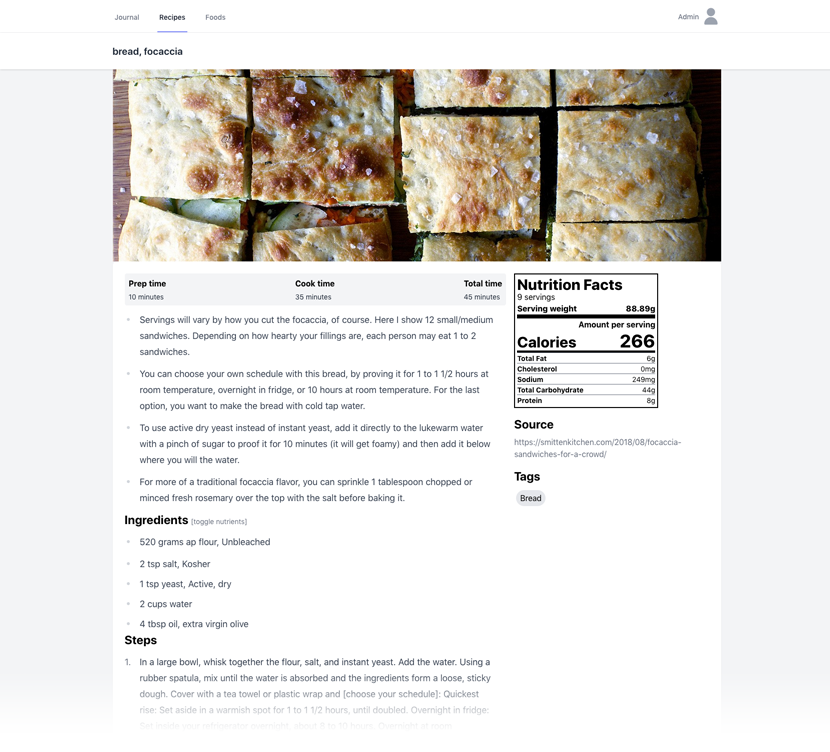
Screenshots

Deployment
Docker
There is a Dockerfile and automated build process to create builds
at kcalapp/kcal on Docker Hub.
See the kcal-app/kcal-docker repository
for a Docker Compose based template and instructions.
Heroku

The default username and password for a Heroku deployment is kcal/kcal.
Using Heroku CLI
For a manual deploy using Heroku CLI, execute the following after initial deployment:
heroku run php artisan migrate
heroku run php artisan user:add
heroku config:set APP_KEY=$(php artisan --no-ansi key:generate --show)
Media storage
Heroku uses an ephemeral disk. In order to maintain recipe and/or user images between app restarts AWS can be used. See Media Storage - AWS S3 for additional guidance.
Search drivers
See the Search section for information about supported drivers. Additional environment variable configuration is necessary when using any search driver other than the default ("null").
Redis Add-on
The Heroku Redis add-on can be added to the app and will work without any configuration changes. It is left out of the default build only because it takes a very long time to provision.
Manual
This deployment process has been tested with an Ubuntu 20.04 LTS instance with 2GB of memory which should be enough to host the app for a few regular users. The memory is primarily needed for Elasticsearch -- See the Search section for other options if lower memory support is needed.
-
Add PHP 8.x repository.
sudo apt-get install software-properties-common sudo add-apt-repository ppa:ondrej/php -
wget -qO - https://artifacts.elastic.co/GPG-KEY-elasticsearch | sudo apt-key add - echo "deb https://artifacts.elastic.co/packages/7.x/apt stable main" | sudo tee /etc/apt/sources.list.d/elastic-7.x.list -
Update available packages.
sudo apt-get update -
Install dependencies.
sudo apt-get install elasticsearch mysql-server-8.0 ngingx-full php8.0 php8.0-bcmath php8.0-cli php8.0-curl php8.0-gd php8.0-intl php8.0-mbstring php8.0-mysql php8.0-redis php8.0-xml php8.0-zip redis -
Configure Elasticsearch to run at start up.
sudo systemctl start elasticsearch sudo systemctl enable elasticsearch -
Install Composer.
curl -s https://getcomposer.org/installer | sudo php -- --install-dir=/usr/local/bin/ --filename=composer -
Clone the app repository.
cd /var/www sudo mkdir kcal sudo chown $USER:`id -gn $USER` kcal cd kcal git clone https://github.com/kcal-app/kcal.git . -
Configure nginx to serve the app public files.
 sudo vim /etc/nginx/conf.d/kcal.conf
 sudo service nginx restart
Example config:
server { listen 80; server_name 2gb.kcal.cooking; root /var/www/kcal/public; add_header X-Frame-Options "SAMEORIGIN"; add_header X-Content-Type-Options "nosniff"; index index.php; charset utf-8; location / { try_files $uri $uri/ /index.php?$query_string; } location = /favicon.ico { access_log off; log_not_found off; } location = /robots.txt { access_log off; log_not_found off; } error_page 404 /index.php; location ~ \.php$ { fastcgi_pass unix:/var/run/php/php8.0-fpm.sock; fastcgi_param SCRIPT_FILENAME $realpath_root$fastcgi_script_name; include fastcgi_params; } location ~ /\.(?!well-known).* { deny all; } } -
Create database user (with secure credentials!).
sudo mysql -u root CREATE DATABASE `kcal`; CREATE USER 'kcal'@'localhost' IDENTIFIED BY 'kcal'; GRANT ALL ON `kcal`.* TO 'kcal'@'localhost'; FLUSH PRIVILEGES; -
Generate an app key to use in the next step.
php artisan --no-ansi key:generate --show -
Copy environment config file and adjust as desired.
cp .env.example .envSet the
APP_KEYto the value generated in the previous step and theAPP_URLto match the host configured in nginx. -
Run initial app installation/bootstrap commands.
cd /var/www/kcal composer install --optimize-autoloader --no-dev php artisan migrate php artisan elastic:migrate php artisan config:cache php artisan route:cache php artisan view:cache php artisan user:add --admin -
Visit the
APP_URLand log in!
Configuration
Media Storage
Recipes and users can have associated media (images) that by default are stored
on a local disk under the path {app}/public/media. If a local disk solution is
not feasible, an AWS S3 bucket can be used instead.
AWS S3
Use the general guidance below to create an AWS S3 bucket and IAM user for media storage in AWS S3.
-
Create a bucket that allows objects to be configured with public access.
-
Create an IAM user with access to the bucket.
Use this example policy to grant necessary permissions to a specific bucket:
{ "Version": "2012-10-17", "Statement": [ { "Sid": "VisualEditor0", "Effect": "Allow", "Action": [ "s3:GetBucketPublicAccessBlock", "s3:GetBucketPolicyStatus", "s3:GetAccountPublicAccessBlock", "s3:ListAllMyBuckets", "s3:GetBucketAcl", "s3:GetBucketLocation" ], "Resource": "*" }, { "Sid": "VisualEditor1", "Effect": "Allow", "Action": "s3:ListBucket", "Resource": "arn:aws:s3:::REPLACE_WITH_S3_BUCKET_NAME" }, { "Sid": "VisualEditor2", "Effect": "Allow", "Action": ["s3:*Object", "s3:*ObjectAcl*"], "Resource": "arn:aws:s3:::REPLACE_WITH_S3_BUCKET_NAME/*" } ] } -
Set necessary environment variables (via
.envor some other mechanism).MEDIA_DISK=s3-public AWS_ACCESS_KEY_ID=REPLACE_WITH_IAM_KEY AWS_SECRET_ACCESS_KEY=REPLACE_WITH_IAM_SECRET AWS_DEFAULT_REGION=REPLACE_WITH_S3_BUCKET_NAME AWS_BUCKET=REPLACE_WITH_S3_BUCKET_REGION
Search 🔍
The "ingredient" (food or recipe) search for journal entries and recipe ingredients
supports three different backends using the SCOUT_DRIVER environment variable.
In all cases, always ensure that the SCOUT_DRIVER environment variable is only
set once in kcal's .env file.
Currently, the food and recipe list searches do not take advantage of these search drivers. Support for those searches will be added if the Laravel JSON:API adds support for Scout (see: laravel-json-api/laravel#32).
Algolia (algolia)
-
Create and/or log in to an Algolia account.
-
Create an application for kcal.
-
Navigate to the application's "API Keys" section.
-
Using the Application ID and Admin API Key values, update kcal's
.envfile:SCOUT_DRIVER=algolia ALGOLIA_APP_ID=<APPLICATION_ID> ALGOLIA_SECRET=<ADMIN_API_KEY>
ElasticSearch (elastic)
-
Determine the ElasticSearch service host and port.
-
Update kcal's
.envfile.SCOUT_DRIVER=elastic ELASTIC_HOST=<HOST:PORT> ELASTIC_PORT=<PORT>Note: The
ELASTIC_PORTvariable is a convenience option specifically for Docker Compose configurations and is not strictly required. -
Run Elastic's migrations.
php artisan elastic:migrate
Fallback (null)
The fallback driver is a simple WHERE ... LIKE clause search on a couple of key
fields. Results will not be ordered by relevance, and some fields will not be
searched (e.g. the tags fields). Using one of the other options is highly recommended.
Set SCOUT_DRIVER=null in kcal's .env file to use the fallback driver.
Development
Laravel Sail
Prerequisites
Steps
-
Clone the repository.
git clone https://github.com/kcal-app/kcal.git cd kcal -
Install development dependencies.
composer install -
Create a local
.envfile.cp .env.local.example .env -
Generate an app key.
php artisan key:generateVerify that the
APP_KEYvariable has been set in.env. If has not, runphp artisan key:generate --showand copy the key and append it to theAPP_KEY=line manually. -
Run it! ⛵
vendor/bin/sail up -
(On first run) Run migrations.
vendor/bin/sail artisan migrate vendor/bin/sail artisan elastic:migrate -
(On first run) Seed the database.
vendor/bin/sail artisan db:seedThe default username and password is
kcal/kcal.
Navigate to http://127.0.0.1:8080 to log in!
Create a docker-compose.override.yml file to override any of the default settings
provided for this environment.
Testing
Ensure that Sail is running (primarily to provide ElasticSearch):
vendor/bin/sail up -d
Execute tests.
vendor/bin/sail artisan test --parallel
Caveats
In order to support parallel testing, tests are run using sqlite (even though Sail
provides MySQL). To test with MySQL make a copy of phpunit.xml.dist as phpunit.xml
and change:
<server name="DB_CONNECTION" value="sqlite"/>
<server name="DB_DATABASE" value=":memory:"/>
to
<server name="DB_CONNECTION" value="mysql"/>
<server name="DB_HOST" value="db"/>
Now running vendor/bin/sail artisan test will run tests with MySQL but tests
cannot be run in parallel.