## Why merge this

Production bug
**[PHP-LARAVEL-1B](https://whisper-money.sentry.io/issues/PHP-LARAVEL-1B)**
— `/budgets/{budget}` throws a 500 (`UniqueConstraintViolationException`
on `budget_periods_budget_id_start_date_unique`) for the affected user.
Page is unusable for them until fixed.

## Root cause

The Custom period type let users create budgets with arbitrary
`period_duration`. Combined with `calculatePeriodDates()`'s day-of-month
snap (`startDate->day(period_start_day)`), short durations produced
periods where `end_date == start_date == period_start_day`. On the next
visit after that day, regeneration computed a new period whose start
snapped backward to the same day → unique key collision.

Concrete trace from the Sentry event:

- Budget: `Seguro de Salud`, `period_type=custom, period_duration=1,
period_start_day=1`, created `2026-05-05`.
- Initial period created at budget creation: `start=2026-05-01,
end=2026-05-01` (already 4 days stale because Custom snapped
`now()=05-05` back to day 1, then `addDays(1).subDay()` produced same
date).
- Today `05-05` → `getCurrentPeriod()` returns null → `generatePeriod()`
snaps back to `05-01` again → `INSERT (budget_id, 05-01)` → 1062.

Verified in prod DB: this is the **only** budget in the entire database
with `period_type='custom'` and the only period row with `end_date <=
start_date`.

## Fix

Custom is the only period type that exposes this snap-back collision
(Monthly/Weekly/Biweekly all use a self-consistent advance). It also has
no defensible UX — every legitimate use case is covered by
Monthly/Weekly/Biweekly. So we remove it end-to-end:

- `BudgetPeriodType::Custom` enum case dropped.
- `BudgetPeriodService`: Custom branches removed from
`calculatePeriodDates()` and `calculateNextPeriodStartDate()`.
- `Budget` model: `period_duration` removed from `$fillable` and
`casts()`.
- `StoreBudgetRequest` / `UpdateBudgetRequest`: `period_duration` rule
removed.
- `BudgetController`: `period_duration` no longer passed in
store/update.
- Create + edit budget dialogs: Custom option and `period_duration`
input removed.
- `ResetDemoAccountCommand`: Custom switch case removed.
- `BudgetFactory`: `custom()` state and `period_duration` default
removed.
- `types/budget.ts`: `'custom'` removed from `BUDGET_PERIOD_TYPES` and
`Budget.period_duration` field dropped.
- Migration `2026_05_05_132023_convert_custom_budgets_to_monthly`:
rewrites any existing `custom` rows to `monthly` with
`period_duration=null, period_start_day=1` so the dropped enum case
can't crash on hydration.

Period generation logic for Monthly/Weekly/Biweekly is **unchanged**.

## Manual prod cleanup (separate, after merge)

The single buggy budget in prod will be deleted manually:

```sql
DELETE FROM budget_periods WHERE id = '019df7fd-6073-731b-9c08-f3723515292b';
DELETE FROM budgets WHERE id = '019df7fd-6071-7219-b190-ece22ccdb63f';
```

## Tests

`tests/Feature/BudgetPeriodServiceTest.php` covers Monthly + Weekly
advance and Monthly first-period generation. Existing
`BudgetPeriodDateTest` unaffected.

## Risk

- `period_duration` column kept in DB (nullable) to avoid data loss; no
migration needed.
- Migration ensures any environment with `period_type='custom'` rows is
converted before the enum case is removed, preventing hydration errors.
- No customers actively rely on Custom: prod query confirmed only the
single broken budget uses it, and that one is being deleted.

Fixes PHP-LARAVEL-1B
## Why

### Problem

Users viewing a budget had no way to look back at historical periods —
the show page always displayed the current period with no navigation.
The cashflow page's period selector also used a different visual style
(loose buttons with gaps) compared to the new grouped button pattern
established for budgets.

## What

### Changes

- **Budget period navigation**: new `BudgetPeriodNavigation` component
renders a `ButtonGroup` with `[<] [date range] [>]` buttons. Clicking
the label returns to the current period; arrows navigate between
existing periods.
- **Backend**: `BudgetController::show` accepts an optional
`?period=<uuid>` query param to serve a specific period. Future periods
are blocked at the query level on both direct access and `nextPeriod`
resolution.
- **Dropdown**: removed the split `ButtonGroup` from the budget header;
"Edit budget" and "Delete budget" now live together in a single `˅`
dropdown.
- **Cashflow period selector**: updated `PeriodNavigation` to use
`ButtonGroup` + `size="icon"` buttons to match the same visual style.
- **Tests**: 4 new feature tests covering period navigation,
future-period blocking, cross-budget access (404), and `nextPeriod`
boundary behaviour.

## Verification
<img width="921" height="683" alt="image"
src="https://github.com/user-attachments/assets/ceb5f70b-a15a-4a36-ae49-5d84054a62f9"
/>
## Summary

- Store account names in plaintext instead of encrypting them
client-side. Encryption remains only for transaction descriptions and
notes.
- Existing encrypted account names are silently migrated when the user
unlocks their encryption key, via a new `useDecryptAccountNames` hook
that calls API endpoints to update each account.
- New `AccountName` component handles rendering both encrypted (legacy)
and plaintext accounts across the app.

## Test plan

- [x] Create a new account — name should be stored in plaintext
(`encrypted = false`, `name_iv = null`)
- [x] Unlock encryption key with existing encrypted accounts — they
should auto-migrate silently
- [x] After migration, verify accounts show `encrypted = false` in DB
and names are readable plaintext
- [x] Edit a migrated account — should work without encryption
- [x] Verify all account name displays work across dashboard, account
details, transactions, settings
## Summary
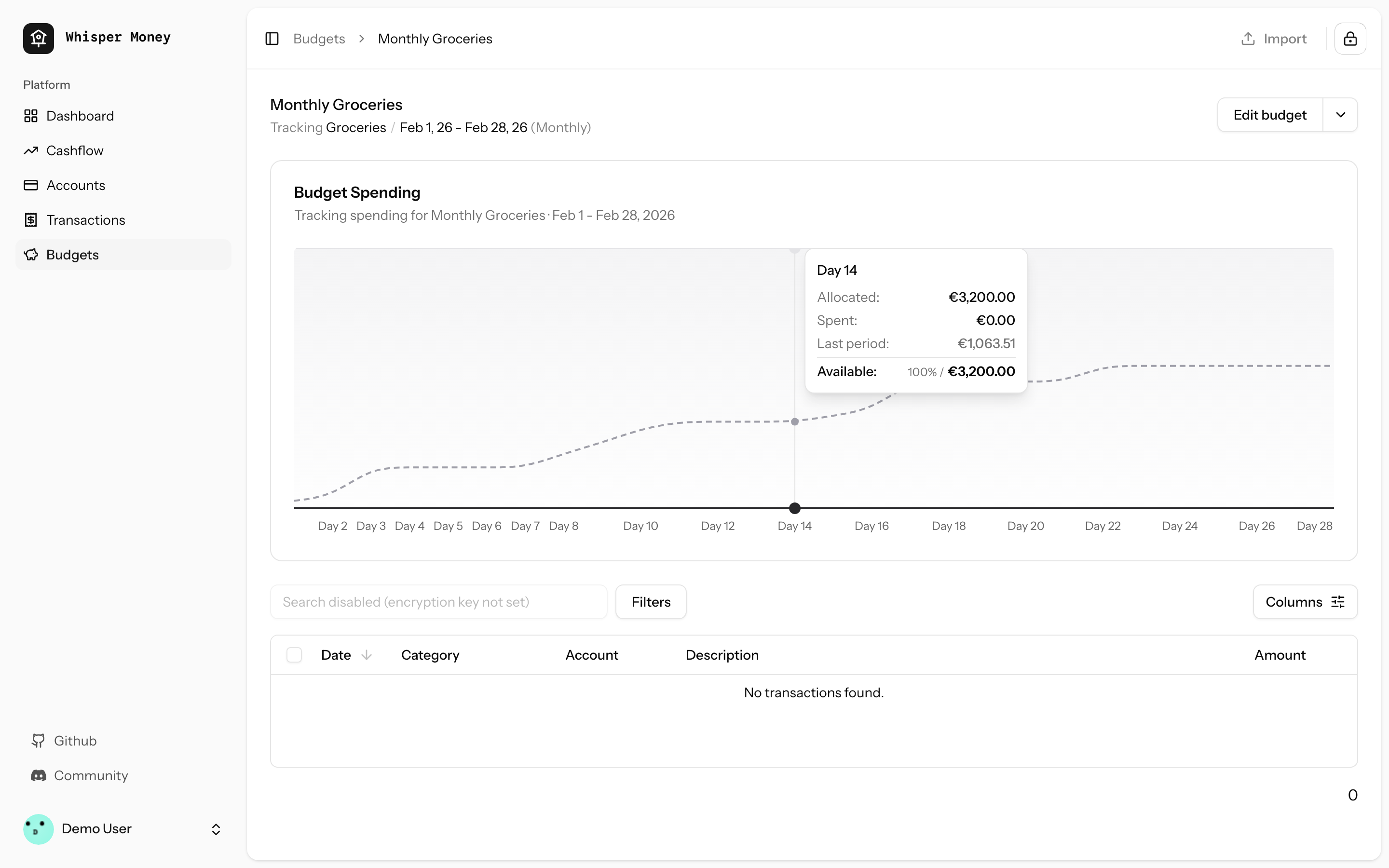
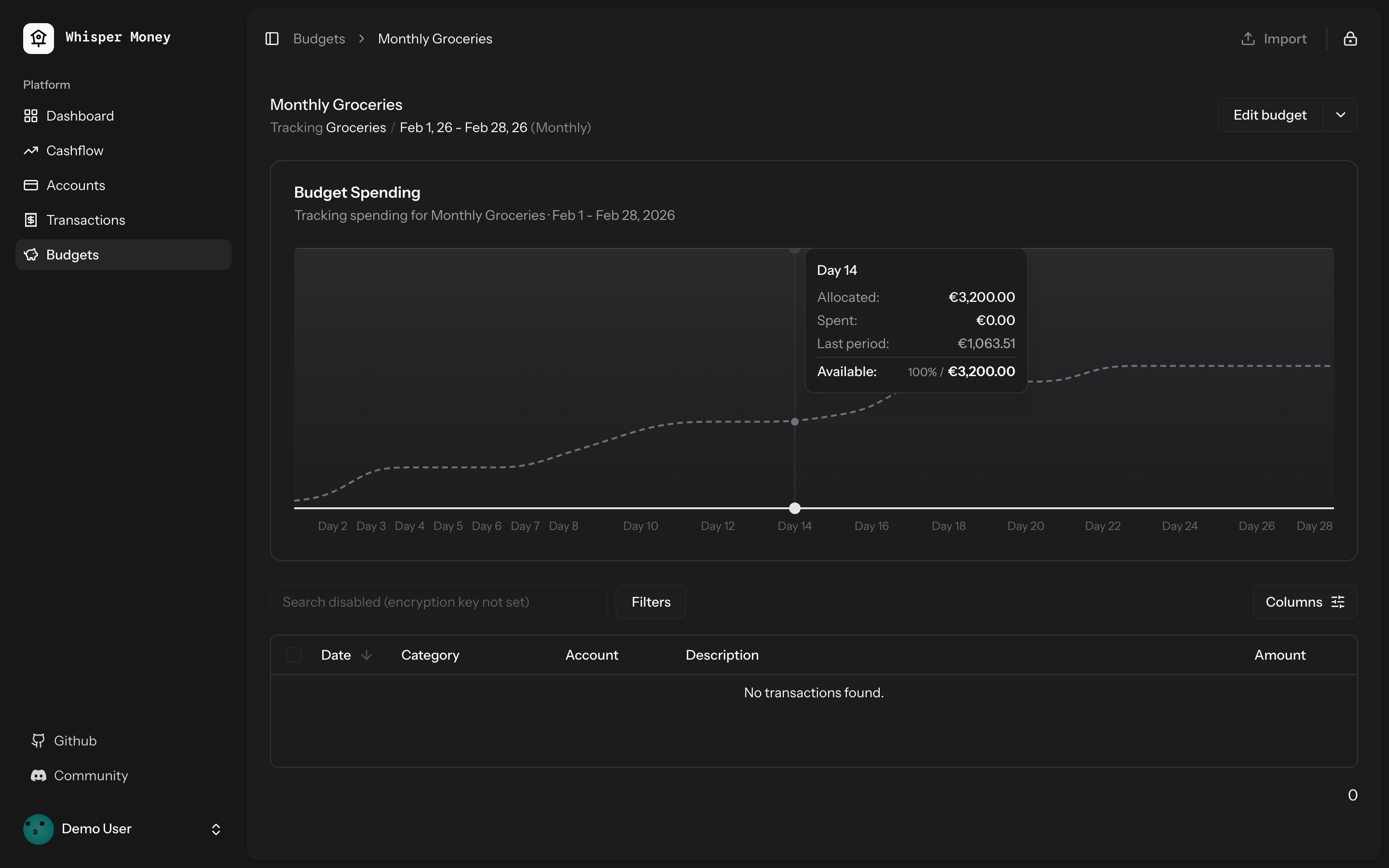
- Load the previous budget period (with transactions) in
`BudgetController::show()` and pass it to the frontend
- Overlay previous period's cumulative spending as a dashed line on the
budget spending chart
- Use day-of-period alignment (Day 1, Day 2...) when comparing so
periods of different lengths align
- Tooltip shows both "Spent" (current) and "Last period" values when
hovering
- Chart now shows the full period timeline (not just up to today)
- When no previous period exists, chart behavior is unchanged
## Screenshots
### Light mode
### Dark mode
## Test plan
- [x] Tests pass: `php artisan test --compact
tests/Feature/BudgetTest.php` (9 tests)
- [x] Pint formatting passes
- [x] ESLint + Prettier pass
- [ ] Manual: view a budget with a prior period — dashed line appears
- [ ] Manual: view a budget with no prior period — chart unchanged
## Summary

- Budget periods use `date` columns (`start_date`, `end_date`) but
queries compared them against `now()` which includes a time component
(e.g. `2026-01-31 15:30:00`). MySQL converts the date to midnight for
comparison, so `end_date >= now()` evaluates to `'2026-01-31 00:00:00'
>= '2026-01-31 15:30:00'` → **false** — causing "No active period" on
the last day of every period.
- Replaced `now()` with `today()` (date-only) in all budget period date
comparisons across `Budget::getCurrentPeriod()`,
`BudgetController::index()`, and `GenerateBudgetPeriods` command.

## Test plan

- [x] Added 4 Pest tests covering the edge case (last day at various
times, first day at end of day, index/show endpoints)
- [x] All existing budget tests pass
## Overview

We're excited to introduce budgeting capabilities to Whisper Money! This
feature helps you take control of your finances by setting spending
limits and tracking your progress over time.

## Screenshots
<img width="1316" height="793" alt="image"
src="https://github.com/user-attachments/assets/ac394d36-cded-4ea4-9883-120785e260f1"
/>
<img width="1315" height="907" alt="image"
src="https://github.com/user-attachments/assets/7c682474-5aa7-4388-b626-29b56f5ebbef"
/>
<img width="1315" height="992" alt="image"
src="https://github.com/user-attachments/assets/21eace45-23c6-472d-9aa0-0feb6db3fba4"
/>

## What's New

### Create Flexible Budgets
- Set budgets for specific categories or labels
- Choose from monthly, weekly, bi-weekly, or custom periods
- Set your own budget start date for better alignment with your pay
schedule

### Track Your Spending
- Visual spending charts show how much you've spent vs. your budget
- See at a glance which budgets are on track and which need attention
- View all transactions that count toward each budget

### Smart Budget Management
- **Carry Over**: Unused budget amounts automatically roll into the next
period
- **Reset**: Unused amounts return to your available money pool
- Edit or delete budgets anytime as your needs change

### Easy Access
- New Budgets section in the main navigation
- Quick overview cards showing budget status
- Detailed budget pages with spending history and transaction lists

## How It Works

1. Create a budget by selecting a category or label and setting your
spending limit
2. Your transactions are automatically matched to relevant budgets
3. Track your progress with visual charts and spending summaries
4. Adjust your budgets as needed to stay on track with your financial
goals

This feature is now available behind a feature flag and can be enabled
for users who want to start budgeting their expenses.
 Víctor Falcón

