## Why merge this

Production bug
**[PHP-LARAVEL-1B](https://whisper-money.sentry.io/issues/PHP-LARAVEL-1B)**
— `/budgets/{budget}` throws a 500 (`UniqueConstraintViolationException`
on `budget_periods_budget_id_start_date_unique`) for the affected user.
Page is unusable for them until fixed.

## Root cause

The Custom period type let users create budgets with arbitrary
`period_duration`. Combined with `calculatePeriodDates()`'s day-of-month
snap (`startDate->day(period_start_day)`), short durations produced
periods where `end_date == start_date == period_start_day`. On the next
visit after that day, regeneration computed a new period whose start
snapped backward to the same day → unique key collision.

Concrete trace from the Sentry event:

- Budget: `Seguro de Salud`, `period_type=custom, period_duration=1,
period_start_day=1`, created `2026-05-05`.
- Initial period created at budget creation: `start=2026-05-01,
end=2026-05-01` (already 4 days stale because Custom snapped
`now()=05-05` back to day 1, then `addDays(1).subDay()` produced same
date).
- Today `05-05` → `getCurrentPeriod()` returns null → `generatePeriod()`
snaps back to `05-01` again → `INSERT (budget_id, 05-01)` → 1062.

Verified in prod DB: this is the **only** budget in the entire database
with `period_type='custom'` and the only period row with `end_date <=
start_date`.

## Fix

Custom is the only period type that exposes this snap-back collision
(Monthly/Weekly/Biweekly all use a self-consistent advance). It also has
no defensible UX — every legitimate use case is covered by
Monthly/Weekly/Biweekly. So we remove it end-to-end:

- `BudgetPeriodType::Custom` enum case dropped.
- `BudgetPeriodService`: Custom branches removed from
`calculatePeriodDates()` and `calculateNextPeriodStartDate()`.
- `Budget` model: `period_duration` removed from `$fillable` and
`casts()`.
- `StoreBudgetRequest` / `UpdateBudgetRequest`: `period_duration` rule
removed.
- `BudgetController`: `period_duration` no longer passed in
store/update.
- Create + edit budget dialogs: Custom option and `period_duration`
input removed.
- `ResetDemoAccountCommand`: Custom switch case removed.
- `BudgetFactory`: `custom()` state and `period_duration` default
removed.
- `types/budget.ts`: `'custom'` removed from `BUDGET_PERIOD_TYPES` and
`Budget.period_duration` field dropped.
- Migration `2026_05_05_132023_convert_custom_budgets_to_monthly`:
rewrites any existing `custom` rows to `monthly` with
`period_duration=null, period_start_day=1` so the dropped enum case
can't crash on hydration.

Period generation logic for Monthly/Weekly/Biweekly is **unchanged**.

## Manual prod cleanup (separate, after merge)

The single buggy budget in prod will be deleted manually:

```sql
DELETE FROM budget_periods WHERE id = '019df7fd-6073-731b-9c08-f3723515292b';
DELETE FROM budgets WHERE id = '019df7fd-6071-7219-b190-ece22ccdb63f';
```

## Tests

`tests/Feature/BudgetPeriodServiceTest.php` covers Monthly + Weekly
advance and Monthly first-period generation. Existing
`BudgetPeriodDateTest` unaffected.

## Risk

- `period_duration` column kept in DB (nullable) to avoid data loss; no
migration needed.
- Migration ensures any environment with `period_type='custom'` rows is
converted before the enum case is removed, preventing hydration errors.
- No customers actively rely on Custom: prod query confirmed only the
single broken budget uses it, and that one is being deleted.

Fixes PHP-LARAVEL-1B
## Summary

- Wraps the budget name in `BudgetListCard` with an Inertia `<Link>`
that navigates to the budget detail page
- Applies the same `-my-1 -ml-1.5 ... rounded-md px-1.5 py-1
transition-colors hover:bg-muted` hover effect used on dashboard account
card titles
- The existing "View Details" button in the card footer is unchanged
## Summary

- The `__()` call in `create-budget-dialog.tsx` contained an embedded
newline and indentation whitespace in the string literal, causing the
translation key to not match the clean key in `lang/es.json`
- Collapsed the multi-line call into a single line with the clean string
- Removed the stale duplicate key with the malformed `\n` + whitespace
from `lang/es.json`
## 🚪 Why?

### Problem
Privacy mode — which masks financial amounts so users can share their
screen without leaking account balances — was previously gated behind an
admin-only check. Regular users had no way to toggle it from the UI.
Additionally, several places in the app (chart tooltips, budget pages)
were rendering raw amounts via \`formatCurrency\` directly, bypassing
the privacy mode check entirely.

## 🔑 What?

### Changes
- Remove the \`isAdmin()\` guard from the privacy mode toggle in the
user menu, making it available to all users
- Mask digits with \`*\` in \`AmountDisplay\` when privacy mode is
enabled (e.g. \`$1,234.56\` → \`$*,***.**\`)
- Apply the same digit masking to the net worth chart tooltip totals in
\`chart.tsx\` (both single-currency and multi-currency paths)
- Replace raw \`formatCurrency\` calls with \`AmountDisplay\` in
\`budget-list-card.tsx\` (spent, allocated, remaining)
- Add a \`maskIfPrivate\` helper in \`budget-spending-chart.tsx\`
CustomTooltip to mask allocated, spent, last period, and available
amounts when privacy mode is active

## ✅ Verification
<img width="1858" height="1193" alt="image"
src="https://github.com/user-attachments/assets/ec734841-c5cb-44e9-a9f5-ddee7a53a78c"
/>
<img width="1255" height="762" alt="image"
src="https://github.com/user-attachments/assets/b1b93615-41a0-4e8d-8dea-7b27e227181c"
/>
## Summary

- Wrap all hardcoded strings in `create-budget-dialog.tsx` and
`edit-budget-dialog.tsx` with `__()` so they pass through the i18n
system (submit button label, start day labels, helper text for
carry-over/reset, and the selection-required validation message)
- Update `getBudgetPeriodTypeLabel` and `getRolloverTypeLabel` in
`budget.ts` to use `__()` so period type options (Monthly, Weekly,
Bi-weekly, Custom) and rollover types (Carry Over, Reset/Pool) are
translated
- Add all missing Spanish translations to `lang/es.json`: period type
labels, rollover type labels, start-day helpers, carry-over/reset
descriptions, and validation messages
## Why

### Problem

Users viewing a budget had no way to look back at historical periods —
the show page always displayed the current period with no navigation.
The cashflow page's period selector also used a different visual style
(loose buttons with gaps) compared to the new grouped button pattern
established for budgets.

## What

### Changes

- **Budget period navigation**: new `BudgetPeriodNavigation` component
renders a `ButtonGroup` with `[<] [date range] [>]` buttons. Clicking
the label returns to the current period; arrows navigate between
existing periods.
- **Backend**: `BudgetController::show` accepts an optional
`?period=<uuid>` query param to serve a specific period. Future periods
are blocked at the query level on both direct access and `nextPeriod`
resolution.
- **Dropdown**: removed the split `ButtonGroup` from the budget header;
"Edit budget" and "Delete budget" now live together in a single `˅`
dropdown.
- **Cashflow period selector**: updated `PeriodNavigation` to use
`ButtonGroup` + `size="icon"` buttons to match the same visual style.
- **Tests**: 4 new feature tests covering period navigation,
future-period blocking, cross-budget access (404), and `nextPeriod`
boundary behaviour.

## Verification
<img width="921" height="683" alt="image"
src="https://github.com/user-attachments/assets/ceb5f70b-a15a-4a36-ae49-5d84054a62f9"
/>
## Summary

- Add a top-right **Create Budget** / **Create Account** button (using
the existing `CreateButton` component) to the budgets and accounts index
pages, matching the UI pattern already used in Settings > Bank accounts
- Add a card-style **Create Account** trigger at the end of the accounts
grid, mirroring the existing card-style **Create Budget** trigger in the
budgets grid
- Refactor `CreateBudgetDialog` and `CreateAccountDialog` to accept an
optional `trigger` prop, keeping existing usages as-is (no breaking
changes)

### Video

https://github.com/user-attachments/assets/37322387-720a-4b07-b3af-b43cd897ba5a
## Why

### Problem
Cards across the app lacked visual interactivity. Adding a
cursor-tracking glowing border effect improves the UI polish and makes
the dashboard and other card-heavy pages feel more dynamic.

## What

### Changes
- Install `motion` package (required for the `animate()` call in the
effect)
- Add `GlowingEffect` component at
`resources/js/components/ui/glowing-effect.tsx` — tracks pointer
position and renders an animated conic gradient border that follows the
cursor
- Update the base `Card` primitive to include `<GlowingEffect>` as the
first child with `spread=40`, `proximity=64`, `inactiveZone=0.01`,
`glow=true` — all consumers inherit the effect automatically
- Remove `overflow-hidden` from the net-worth chart's `<Card>` (it was
clipping the effect) and move it to `<CardContent>` where it's actually
needed to contain the chart

## Verification

### Tests
No new logic was introduced — this is a purely visual enhancement to an
existing UI primitive. Existing tests remain unaffected.

### Manual
Move the cursor near and over any card (dashboard stats, account
balances, net worth chart, cashflow, budgets) to see the gradient border
glow follow the cursor.
## Why

### Problem

Two small locale bugs in the Spanish UI:

1. **Budgets — Tracking label**: The translated string `Seguimiento:`
was rendered immediately adjacent to the tracking label value (e.g.
`Seguimiento:Padel`) due to a missing whitespace between the two JSX
expressions.
2. **Settings > Connections — account count**: The lowercase keys
`account` and `accounts` used for the singular/plural account count
badge (`ES · 1 account`) had no Spanish translations, so the English
fallback was always shown instead of `1 cuenta` / `X cuentas`.

## What

- `resources/js/components/budgets/budget-list-card.tsx`: Added `{' '}`
between `{__('Tracking:')}` and `{trackingLabel}` to ensure a space is
always rendered.
- `lang/es.json`: Added missing lowercase translation keys `"account":
"cuenta"` and `"accounts": "cuentas"`.

## Verification

### Tests

No dedicated tests exist for rendered translation strings. Changes are
mechanical (whitespace and JSON key additions) with no logic involved.

### Manual

- Switch locale to Spanish (`es`).
- Navigate to Budgets — confirm the tracking label reads `Seguimiento:
Padel` (with space).
- Navigate to Settings > Connections — confirm the account count reads
`1 cuenta` / `X cuentas`.
## Why

### Problem
The app had two categories of localization gaps:
1. Many UI strings were not translated — Spanish users saw raw English
text because keys were missing from `lang/es.json`.
2. All currency and number formatting was hardcoded to `'en-US'` (or
`undefined`), so amounts always formatted in English style regardless of
the user's locale setting.

## What

### Changes
- **`lang/es.json`** — Added 22 missing Spanish translation keys
covering onboarding, automation rules, balance history, dashboard, and
more.
- **`utils/currency.ts`** — Added `locale` parameter (default `'en-US'`)
to `formatCurrency`.
- **`utils/chart.tsx`** — Added `locale` parameter to
`formatCurrencyWithCode`; replaced `.toLocaleString()` calls with
locale-aware versions.
- **`hooks/use-dashboard-data.ts`** — Added `locale` param to
`formatMonth` and `deriveAccountMetrics`; wired `useLocale()` inside
`useDashboardData`.
- **`pages/dashboard.tsx`** — Added `useLocale()` and passed `locale` to
`deriveAccountMetrics`.
- **`components/charts/sankey-chart.tsx`** — Added `locale` param to
`formatAmount` and threaded it through `OtherCategoriesBreakdown`.
- **`components/charts/mom-chart.tsx`** — Replaced hardcoded `'en-US'`
in YAxis tickFormatter with `useLocale()`.
- **`components/budgets/budget-list-card.tsx`** — Passed `locale` to all
`formatCurrency` calls.
- **`components/budgets/budget-spending-chart.tsx`** — Passed `locale`
to all `formatCurrency` calls in `CustomTooltip`.
- **`components/ui/amount-display.tsx`** — Added `useLocale()` and
passed to `Intl.NumberFormat`.
- **`components/ui/amount-input.tsx`** — Added `useLocale()` and passed
to `Intl.NumberFormat` used for display formatting.
- **`components/accounts/balances-modal.tsx`** — Added `useLocale()` for
both the balance formatter and `formatDate`.
- **`components/transactions/edit-transaction-dialog.tsx`** — Replaced
hardcoded `'en-US'` with `useLocale()`.
-
**`components/accounts/import-balances/import-balance-step-mapping.tsx`**
— Replaced `'en-US'` with `useLocale()` in preview formatting.
- **`components/transactions/import-step-mapping.tsx`** — Replaced
`'en-US'` with `useLocale()` in preview formatting.
- **`components/onboarding/step-create-account.tsx`** — Fixed garbled
Spanish caused by 3-part JSX string concatenation; replaced with single
translation key.
- **`components/automation-rules/create-automation-rule-dialog.tsx`** —
Fixed multiline description key mismatch with `es.json`.

## Verification

### Tests
- TypeScript check (`npx tsc --noEmit`) passes with no new errors
introduced by these changes.
- `lang/es.json` validated as well-formed JSON.

### Manual
- With locale set to `es`, all previously untranslated strings now
render in Spanish.
- Currency amounts format according to the user's locale (e.g.,
`1.234,56 €` in `es` vs `$1,234.56` in `en-US`).
## Summary

- Adds a vertical dashed reference line on the budget spending chart
indicating the current day within the period
- The marker only appears when today falls within the budget period date
range
- Adapts to both display modes: uses the day index (`Day N`) when a
previous period is shown, or the ISO date when showing a single period

## Screenshot

<!-- Add screenshot here -->
## Summary
- Load the previous budget period (with transactions) in
`BudgetController::show()` and pass it to the frontend
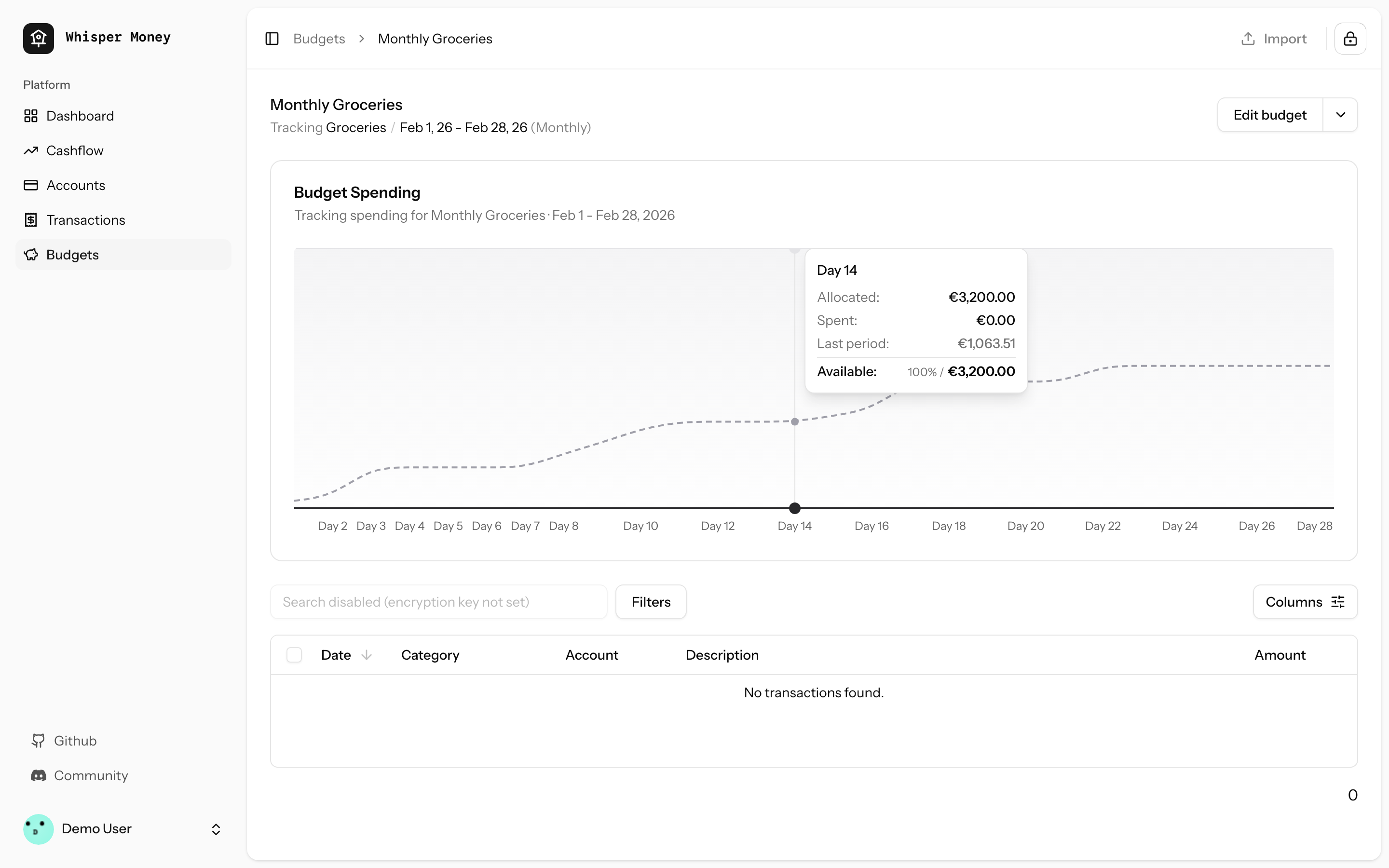
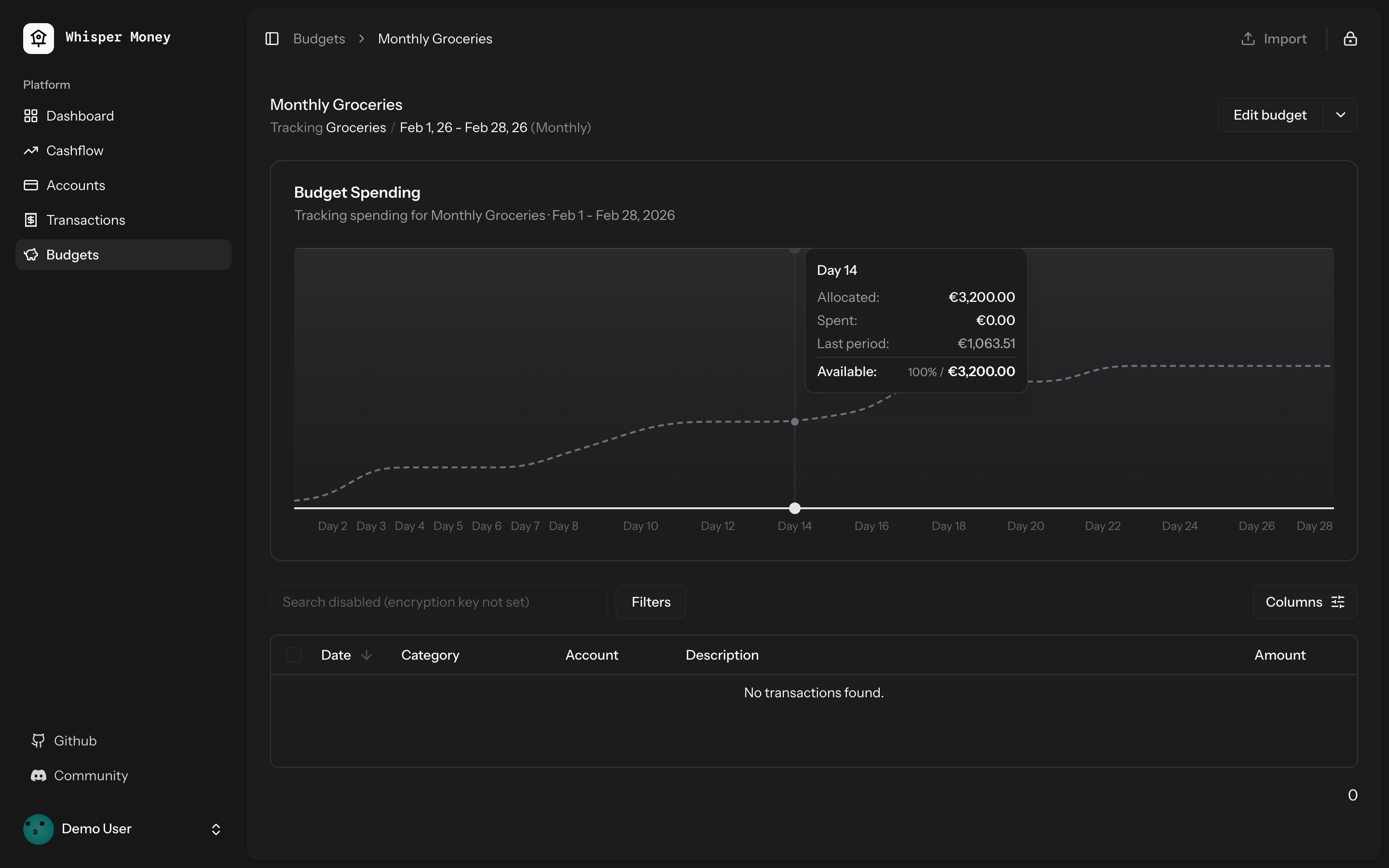
- Overlay previous period's cumulative spending as a dashed line on the
budget spending chart
- Use day-of-period alignment (Day 1, Day 2...) when comparing so
periods of different lengths align
- Tooltip shows both "Spent" (current) and "Last period" values when
hovering
- Chart now shows the full period timeline (not just up to today)
- When no previous period exists, chart behavior is unchanged
## Screenshots
### Light mode
### Dark mode
## Test plan
- [x] Tests pass: `php artisan test --compact
tests/Feature/BudgetTest.php` (9 tests)
- [x] Pint formatting passes
- [x] ESLint + Prettier pass
- [ ] Manual: view a budget with a prior period — dashed line appears
- [ ] Manual: view a budget with no prior period — chart unchanged
## Overview

We're excited to introduce budgeting capabilities to Whisper Money! This
feature helps you take control of your finances by setting spending
limits and tracking your progress over time.

## Screenshots
<img width="1316" height="793" alt="image"
src="https://github.com/user-attachments/assets/ac394d36-cded-4ea4-9883-120785e260f1"
/>
<img width="1315" height="907" alt="image"
src="https://github.com/user-attachments/assets/7c682474-5aa7-4388-b626-29b56f5ebbef"
/>
<img width="1315" height="992" alt="image"
src="https://github.com/user-attachments/assets/21eace45-23c6-472d-9aa0-0feb6db3fba4"
/>

## What's New

### Create Flexible Budgets
- Set budgets for specific categories or labels
- Choose from monthly, weekly, bi-weekly, or custom periods
- Set your own budget start date for better alignment with your pay
schedule

### Track Your Spending
- Visual spending charts show how much you've spent vs. your budget
- See at a glance which budgets are on track and which need attention
- View all transactions that count toward each budget

### Smart Budget Management
- **Carry Over**: Unused budget amounts automatically roll into the next
period
- **Reset**: Unused amounts return to your available money pool
- Edit or delete budgets anytime as your needs change

### Easy Access
- New Budgets section in the main navigation
- Quick overview cards showing budget status
- Detailed budget pages with spending history and transaction lists

## How It Works

1. Create a budget by selecting a category or label and setting your
spending limit
2. Your transactions are automatically matched to relevant budgets
3. Track your progress with visual charts and spending summaries
4. Adjust your budgets as needed to stay on track with your financial
goals

This feature is now available behind a feature flag and can be enabled
for users who want to start budgeting their expenses.
 Víctor Falcón

