## Why

The `/accounts` page was making two extra client-side API calls via the
`useDashboardData()` hook:
- `/api/dashboard/net-worth-evolution` (~14.5s in dev)
- `/api/dashboard/top-categories` (~119ms, completely unused on this
page)

The backend logic itself is fast (~34ms), but the full middleware stack
cost of extra HTTP roundtrips in the dev environment was adding
significant overhead.

## What

### Backend (`AccountController.php`)
- Added `ExchangeRateService` constructor injection
- Added `Inertia::defer()` prop `accountMetrics` to the `index()` action
- Added `getAccountMetrics()`, `formatMonth()`, `convertBalance()`
private methods
- Uses `BalanceLookup::forAccounts()` for efficient batch loading (2 SQL
queries regardless of account count)

### Frontend (`Accounts/Index.tsx`)
- Removed `useDashboardData()` hook import and usage
- Added `accountMetrics` as an optional deferred prop (undefined until
resolved)
- Loading state derived from `!accountMetrics`, which naturally drives
the existing `loading` prop on `AccountListCard` (skeleton UI already
existed)
- Added `handleBalanceUpdated` callback using `router.reload({ only:
['accountMetrics'] })` for targeted refresh

## Verification

### Tests
- 3 new Pest tests covering deferred prop behavior:
- `accounts index defers account metrics` — verifies metrics are missing
from initial response, present after `loadDeferredProps()`, with correct
balance values
- `accounts index deferred metrics includes invested amount for
investment accounts` — verifies invested amount for investment account
types
- `accounts index deferred metrics returns null invested amount for
non-investment accounts` — verifies non-investment accounts get null
invested amount
- All 15 tests in `AccountControllerTest.php` pass
## Summary

- Adds `Savings` to the list of account types that support invested
amount tracking, alongside `Investment` and `Retirement`
- Decouples `supportsInvestedAmount()` from
`NON_TRANSACTIONAL_ACCOUNT_TYPES` in TypeScript, since savings accounts
are transactional but now also support invested amount tracking
- Updates unit tests to reflect savings accounts supporting invested
amounts

This enables remunerated savings accounts to track invested money vs.
current balance to visualize gains/losses — the same way investment and
pension accounts already do.
## Summary

- Subsequent syncs (every 6h) now only process recent data instead of
re-syncing full history, reducing unnecessary API calls and database
writes
- Full sync still runs automatically on first connection and can be
forced anytime with `banking:sync --full`
- Centralizes `isFirstSync` logic in `SyncBankingConnectionJob` and
propagates the `fullSync` flag through the entire chain: Command →
`SyncAllBankingConnectionsJob` → `SyncBankingConnectionJob` → provider
services

## Changes by provider

- **Indexa Capital**: Skips portfolio entries older than the last
recorded balance date on incremental syncs (the API doesn't support date
filtering, so filtering is done client-side)
- **Binance**: Reuses stored `invested_amount` from the database on
subsequent syncs instead of fetching up to 2 years of deposit/withdrawal
history in 90-day windows
- **EnableBanking / Bitpanda**: Already minimal — no changes needed

## Testing

- Fixed 6 existing Binance tests to pass `isFirstSync: true` for
invested amount calculation
- Added 7 new tests covering incremental sync behavior, full sync
override, and `--full` flag propagation
## Why

Investment and retirement accounts show balance over time, but there's
no way to see how much money was actually put in versus how much is
current value. Users can't tell at a glance whether their investments
are up or down.

## What

Adds an "invested amount" tracking system across the full stack:

**Backend**
- New `invested_amount` column on `account_balances` (nullable
bigInteger, cents, per-date)
- Auto-sync from providers: Indexa Capital (instruments_cost +
cash_amount), Bitpanda (fiat deposit/withdrawal history), Binance
(90-day windowed deposit/withdrawal with crypto→fiat conversion)
- Manual input support via Update Balance dialog
- Historical invested amount data in all balance evolution APIs (net
worth, account detail)

**Frontend**
- Dashed line on sparkline charts (dashboard + accounts page) showing
per-point historical invested amount alongside balance
- Dashed line on account detail charts (daily AreaChart + monthly
ComposedChart)
- Tooltips with labeled rows: Balance, Invested, Gain/loss (color-coded)
- Invested amount column in balances history modal
- Invested amount field in balance import wizard (CSV mapping)
- Demo account seeder updated with invested amount data

## Screenshots
<img width="1301" height="750" alt="image"
src="https://github.com/user-attachments/assets/0f05ecd0-8b98-47b4-9fa4-027f0311e3bb"
/>
<img width="744" height="374" alt="image"
src="https://github.com/user-attachments/assets/c4daa816-dee0-4f94-957f-317a13bc80d5"
/>
<img width="1267" height="738" alt="image"
src="https://github.com/user-attachments/assets/21df350c-6954-4ff5-8b3c-b858df3a8b3a"
/>
<img width="1301" height="828" alt="image"
src="https://github.com/user-attachments/assets/16f5f021-a926-4e8e-a999-c4ca32d1ea3d"
/>
<img width="1274" height="845" alt="image"
src="https://github.com/user-attachments/assets/62f2dfc0-04f0-4bdb-b072-cf7cd1be77d3"
/>
## Why

### Problem

Users with accounts in multiple currencies see raw balances on the net
worth chart without any conversion. A user with a USD-denominated
profile who also holds EUR and GBP accounts sees misleading totals — the
chart simply sums cents across currencies as if they were the same unit.

## What

### Changes

- **`ExchangeRateService`** — New service that wraps
`CurrencyConversionService` with DB-level caching. Checks the
`exchange_rates` table first, falls back to the external CDN API on
cache miss, and stores the full rate blob for future lookups.
- **`exchange_rates` migration + model** — New table with
`(base_currency, date)` unique constraint storing JSON rate blobs.
Includes factory.
- **`CurrencyConversionService`** — Made `getRatesForCurrency()` public
so `ExchangeRateService` can delegate to it.
- **`DashboardAnalyticsController`** — `netWorthEvolution` and
`netWorthDailyEvolution` endpoints now convert every account balance
from `account.currency_code` to `user.currency_code`. Response includes
`currency_code` field and `_original` data for foreign-currency
accounts.
- **Future date capping** — `ExchangeRateService::getRates()` caps any
future date to today, since the currency API only serves historical
rates. Prevents 500 errors when the chart requests end-of-month rates
for the current (incomplete) month.
- **Frontend charts** — Simplified to single-currency display. Removed
multi-currency `TotalDisplay` component; the chart header and tooltip
now show amounts in the user's currency. Foreign-currency accounts show
their original amount inline in the tooltip (e.g., "€2,000.00 →
$2,222.22").
- **`valueFormatter` type fix** — Changed return type from `string` to
`React.ReactNode` in chart component interfaces to match actual usage
with `AmountDisplay`.

## Screenshot
<img width="1266" height="649" alt="image"
src="https://github.com/user-attachments/assets/6f661840-3f65-49fe-9948-d4cfd6c6ef0e"
/>
## Summary

Adds daily granularity support to the dashboard Net Worth Evolution
chart, mirroring the daily balance feature added for individual account
pages in #135.

## Why

The net worth chart only supported monthly granularity, making it
impossible to see short-term net worth fluctuations. Users who track
daily balances need a way to visualize day-over-day net worth changes
across all accounts.

## Screenshots
<img width="1263" height="714" alt="image"
src="https://github.com/user-attachments/assets/646e7e21-5c1b-42dc-9a20-5e9b6d5d72b4"
/>
<img width="1261" height="715" alt="image"
src="https://github.com/user-attachments/assets/b9fe5080-55f3-485a-a566-1d25d83518c7"
/>
## Summary

- Adds a **Monthly / Daily granularity toggle** to the account balance
evolution chart on account pages
- Daily view renders as an **area chart** (line with gradient fill)
showing the last 30 days, while monthly keeps the existing bar chart
- All 3 chart view modes (stacked, period-over-period,
period-over-period %) work in both granularities
- Chart view toggle **tooltips update dynamically** based on granularity
(e.g. "Month over month change" → "Day over day change")
- Backend fills gaps in sparse `account_balances` data by carrying
forward the last known balance day-by-day
- Includes 3 new Pest tests for the daily endpoint (data points,
gap-filling, forbidden access)

## Screenshot
<img width="1271" height="743" alt="image"
src="https://github.com/user-attachments/assets/cca7a7ad-bdcc-45d2-a5e1-47b1cb855d49"
/>
<img width="1274" height="755" alt="image"
src="https://github.com/user-attachments/assets/14e1f2d8-41cd-49cc-b0f4-307edb847af8"
/>
## Summary

- Add Bitpanda as a new exchange provider using a single API key
(`X-Api-Key` header) to sync crypto and fiat wallet balances
- Follow the same architecture as Binance: provider string on
`banking_connections`, dedicated API client, balance sync service,
controller, form request, job wiring, factory state, route, and frontend
dialog
- Convert crypto wallet balances to the user's target currency via
`CurrencyConversionService`; fiat wallets are added directly or
converted if in a different currency
- Bitpanda appears in all countries in the connect dialog (same as
Binance)
- 18 new tests covering controller validation, balance sync scenarios,
sync job delegation, expiry handling, and email suppression
## Summary

- Adds Binance as a third banking provider alongside EnableBanking and
Indexa Capital
- Binance appears in the institution list for **all countries**, with
the full list sorted alphabetically
- Creates a single "Crypto Portfolio" investment account with total
portfolio value converted to the user's preferred currency
- Supports direct fiat pairs (e.g. BTCEUR), USD stablecoin 1:1 mapping,
and USDT fallback conversion

## Changes

- **Migration**: adds encrypted `api_secret` column to
`banking_connections`
- **BinanceClient**: HMAC-SHA256 authenticated API client for account
data and ticker prices
- **BinanceBalanceSyncService**: converts all non-zero balances to fiat
via direct pairs or USDT fallback
- **BinanceController + ConnectBinanceRequest**: validates credentials,
creates connection and single account
- **SyncBankingConnectionJob**: new `syncBinance()` branch
- **AccountMappingController**: Binance uses Investment account type
- **Frontend**: Binance institution for all countries, API Key + Secret
form fields, alphabetically sorted list
- **Factory**: `binance()` state on `BankingConnectionFactory`

## Test plan

- [x] `BinanceControllerTest` — 6 tests (valid connection, invalid
credentials, account-mapping flag, feature flag, validation, user
currency)
- [x] `BinanceBalanceSyncTest` — 7 tests (direct EUR pair, USDT
fallback, USD stablecoins, locked balances, same-date update, empty
balances, missing external ID)
- [x] Full test suite passes (545 tests)
- [x] Manual: open connection dialog → select any country → Binance
appears alphabetically → select Binance → API Key + Secret form →
connect
## Summary

- Allow users to connect their Indexa Capital (Spanish robo-advisor)
account via API token
- Adds "Indexa Capital" option when selecting Spain in the bank
connection dialog
- Token-based auth flow: user enters API token (instead of OAuth
redirect), validated against Indexa API, stored encrypted
- Syncs portfolio balance only (no transactions) from the
`/accounts/{id}/performance` endpoint
- Accounts created as `Investment` type
- Reuses existing account mapping flow when the `account-mapping`
feature flag is active
- Disconnect flow skips session revocation for Indexa (no OAuth session
to revoke)

## New files
- `IndexaCapitalClient` — HTTP client for Indexa Capital API
(`X-AUTH-TOKEN`)
- `IndexaCapitalBalanceSyncService` — Syncs portfolio value into
`account_balances`
- `IndexaCapitalController` — Token validation + connection creation
- `ConnectIndexaCapitalRequest` — Form request validation
- Migration adding encrypted `api_token` column to `banking_connections`

## Test plan
- [x] 6 controller tests (connect, invalid token, mapping, feature flag,
validation, multi-account)
- [x] 4 balance sync tests (sync, update, skip, missing field)
- [x] 3 sync job tests (balance-only, no expire, no email for Indexa)
- [x] 1 disconnect test (no revokeSession for Indexa)
- [x] All 530 existing tests still pass
## Summary

- Removed all `setupEncryptionKey()` / `visitWithEncryptionKey()` calls
from browser tests — encryption key setup in localStorage is no longer
needed since new users don't have encryption
- Removed `encryption_salt` from `UserFactory::onboarded()` state and
`OnboardingFlowTest` user creation
- Removed `name_iv` from `Account::factory()` calls in
`BankAccountsTest`
- Deleted `DemoEncryptionService` and its unit test — demo command now
stores plaintext account names and transaction descriptions
- Removed `demoEncryptionKey` Inertia shared prop and `encryption_key`
from demo config
- Removed encryption helper methods from `TestCase.php` and global
`setupEncryptionKey()` from `Pest.php`

## Test plan

- [x] Run `php artisan test --exclude-testsuite=Browser` — all
non-browser tests pass
- [x] Run `php artisan test --testsuite=Browser` — browser tests pass
without encryption key setup
- [x] Run `php artisan demo:reset` — demo account created with plaintext
data
- [x] Verify existing encryption migration tests still pass
(`EncryptionTest`, `DecryptTransactionsTest`,
`PlaintextTransactionsTest`)
## Summary

- **Server-side filtering/sorting/search**: With encryption removed, all
transaction filtering, sorting, and full-text search (LIKE on
description + notes) now happens via SQL queries instead of client-side
IndexedDB with decryption
- **Cursor pagination**: Transactions are returned with cursor-based
pagination (default 50 per page, "Load More" pattern) instead of loading
all into IndexedDB
- **Removed IndexedDB dependency**: The main transactions page no longer
depends on Dexie/IndexedDB for data or sync — other pages (categorize,
accounts/show, budgets/show) are unaffected and will be migrated
separately

## Changes

| File | Change |
|------|--------|
| `app/Models/Transaction.php` | Added `scopeApplyFilters` query scope |
| `app/Http/Requests/IndexTransactionRequest.php` | New form request for
filter validation |
| `app/Http/Controllers/TransactionController.php` | Server-filtered
cursor-paginated index, refactored bulkUpdate to reuse scope |
| `resources/js/pages/transactions/index.tsx` | Major rewrite —
server-driven filtering, sorting, pagination via `router.visit()` |
| `resources/js/components/transactions/transaction-filters.tsx` |
Search always enabled (removed encryption key dependency) |
| `resources/js/types/transaction.ts` | Added `ServerTransaction` type |
| `resources/js/contexts/sync-context.tsx` | Simplified — removed
transaction sync service |
| `tests/Feature/TransactionFilterTest.php` | 20 new Pest tests for all
filter scenarios |

## Test plan

- [x] Run `php artisan test` — all 523+ tests pass
- [x] Navigate to `/transactions` — paginated results load from server
- [x] Apply each filter type (date, amount, category, account, label,
search) and verify server round-trip
- [x] Test "uncategorized" category filter
- [x] Test combined filters
- [x] Test sorting by date, amount, description (ascending/descending)
- [x] Test "Load More" button for cursor pagination
- [x] Test bulk operations (select some → update, select all filtered →
update)
- [x] Verify URL persistence (refresh page with filters in URL)
- [x] Test search on both description and notes fields
## Summary

- Add `GET /api/transactions?encrypted=true` endpoint for paginated
listing of encrypted transactions
- Add `PATCH /api/transactions/bulk` endpoint for batch-updating
decrypted transaction data (max 50 per request, bypasses model events)
- Add `useDecryptTransactions` hook that mirrors the existing account
name decryption flow: fetches encrypted transactions page-by-page,
decrypts `description`/`notes` client-side via Web Crypto API, sends
plaintext back and clears IVs
- Wire the hook into `AppSidebarLayout` so decryption runs automatically
when the user unlocks their encryption key
- Once all transactions (and accounts) are decrypted, the encryption key
button in the header disappears automatically

## Test plan

- [x] 11 Pest tests covering encrypted/plaintext filtering, pagination,
user scoping, bulk update, authorization, validation, nullable notes,
guest access, and no-model-events behavior
- [x] Manual: create encrypted transactions, unlock encryption key,
verify transactions get decrypted and the key button disappears
## Summary
- Added `--user={email}` option to filter sync by a specific user's
email address
- Added `--connection={id}` option to filter sync by a specific banking
connection ID
- Both filters can be combined; when neither is provided, the command
dispatches the bulk sync job as before
- Only active, non-expired connections are synced when filters are used

## Test plan
- [x] 7 new Pest tests covering all filter scenarios (all passing)
- [x] Pint formatting passes
## Summary

- Removes the `plaintext-transactions` Pennant feature flag — plaintext
is now the default for all users
- Removes encryption guards and `isPlaintext` conditionals from
transaction create/edit/import flows, keeping only the plaintext code
paths
- Makes `EncryptionKeyButton` conditional — only shown when user has
legacy encrypted accounts or transactions
- Removes encryption onboarding steps (`step-encryption-explained`,
`step-encryption-setup`) and related state/props
- Updates landing page to replace E2E encryption marketing with
privacy-first messaging ("Your Data, Your Rules" section)
- Updates privacy policy to replace E2E encryption claims with accurate
security language (encryption at rest, TLS in transit, no third-party
sharing)
- Cleans up tests to remove feature flag assertions and
`Feature::activate()` calls

**22 files changed, 145 insertions, 730 deletions**

## Test plan

- [x] Create a transaction without encryption key unlocked — should
succeed
- [x] EncryptionKeyButton should not appear in header for users with no
encrypted data
- [x] EncryptionKeyButton should appear for users with legacy encrypted
transactions/accounts
- [x] Landing page has no E2E encryption references, shows new privacy
section
- [x] Onboarding flow has no encryption setup steps
- [x] Privacy policy reflects accurate security language
- [x] Frontend builds successfully (`bun run build`)
- [x] All linting passes (`bun run lint`, `vendor/bin/pint --dirty`)
## Summary

- Adds a `BankFormatter` interface with a `BbvaFormatter` implementation
that transforms ALL CAPS `//`-separated BBVA descriptions into readable
Title Case (preserving acronyms like SEPA, S.A., BIZUM and Spanish
stopwords)
- Stores the raw description in a new `original_description` column when
formatting changes it, keeping sync matching intact
- Existing non-BBVA banks and null-bank transactions pass through
unchanged

## Test plan

- [x] Unit tests for `BbvaFormatter` (11 tests: title case, acronyms,
stopwords, reference numbers, mixed-case passthrough, whitespace)
- [x] Unit tests for `TransactionDescriptionFormatter` dispatcher (4
tests: BBVA match, no-match, null bank)
- [x] Feature tests for BBVA sync integration (formatted description +
original stored)
- [x] Feature tests for non-BBVA sync (description unchanged, original
null)
- [x] All 25 existing + new tests pass
- [x] Pint formatting clean
## Summary
- Ensure `email_verified_at` is set when the demo account is created or
already exists but is unverified
- `email_verified_at` is not in the User model's `$fillable` array, so
set it directly on the model instead of via `create()`/`update()`

## Test plan
- [x] Added test that an existing unverified demo user gets verified on
`demo:reset`
- [x] Added assertion that newly created demo user has
`email_verified_at` set
- [x] All 3 demo reset tests pass
## Summary
- Added `withTrashed()` to the duplicate check in
`TransactionSyncService::importTransaction()` so soft-deleted
transactions are not re-created on subsequent bank syncs.
- Added test covering the soft-deleted transaction deduplication
scenario.

## Test plan
- [x] `php artisan test --filter=TransactionSyncServiceTest` — all 8
tests pass
## Summary

- Send a queued email notification to users after subsequent bank syncs
when new transactions are found
- Email includes a per-bank breakdown of imported transaction counts
with a link to the transactions page
- Skips notification on first sync and when zero new transactions are
created

## Test plan

- [x] Sends email when new transactions are synced on subsequent sync
- [x] Does not send email on first sync
- [x] Does not send email when zero new transactions
- [x] Aggregates multiple accounts under same bank
- [x] Lists different banks separately in email
- [x] Existing sync job tests still pass
## Summary
- When a user cancels the bank authorization flow (e.g. clicks cancel on
the bank's page), the pending `BankingConnection` is now soft-deleted so
it doesn't remain stuck in `pending` status
- Flash messages (`success`/`error`) are now shared with the frontend
via Inertia shared data
- The connections settings page shows a toast notification with the
error message on redirect

## Test plan
- [ ] Start a bank connection flow, cancel on the bank's authorization
page, and verify:
  - A toast error appears on the connections page
  - The pending connection is removed from the list
- [x] Complete a successful bank connection and verify the success toast
appears
- [x] Run `php artisan test
tests/Feature/OpenBanking/AuthorizationControllerTest.php`
## Summary
- Remove the `budgets` Pennant feature flag — budgets is now enabled for
all users
- Delete `EnsureBudgetsFeature` middleware and its route guard
- Remove `budgets` from shared Inertia features and the `Features`
TypeScript interface
- Remove all `Feature::for($user)->activate('budgets')` calls from tests
- Delete `BudgetFeatureFlagTest` and feature-disabled test cases from
`BudgetsFeatureNavigationTest`
## Summary

- Adds **EnableBanking** as the first open banking provider, allowing
users to connect real bank accounts and automatically sync transactions
and balances
- Uses a **`BankingProviderInterface`** contract so future providers
(Plaid, GoCardless, etc.) can be added by implementing the same
interface
- Feature-flagged behind the **`open-banking`** Pennant flag (default:
off)
- Connected accounts are **unencrypted** and transactions have `source =
'enablebanking'`

### What's included

**Backend:**
- `BankingProviderInterface` contract + `EnableBankingProvider`
implementation (JWT RS256 auth)
- `BankingConnection` model with full lifecycle (pending →
awaiting_mapping → active → expired/revoked/error)
- `TransactionSyncService` — pagination, deduplication by
`external_transaction_id`, amount/date mapping
- `BalanceSyncService` — preferred balance type selection (CLBD → ITAV
fallback)
- Authorization flow: start auth → bank redirect → callback → session
creation → account mapping → sync
- `SyncBankingConnectionJob` (unique per connection, 3 retries) +
scheduled every 6 hours
- `banking:sync` artisan command
- 5 migrations: `banking_connections` table, account fields, transaction
`external_transaction_id`, `pending_accounts_data`, `linked_at`

**Frontend:**
- Manual vs Connected account choice in the create account dialog
- Multi-step bank connection dialog (country → bank selection →
confirmation → redirect)
- Account mapping page — map discovered bank accounts to existing
accounts, create new ones, or skip
- Settings/Connections page with status badges, sync/disconnect actions
- "Connected" badge on linked accounts in settings

**Tests:**
- 49 tests covering feature flags, controllers, account mapping,
transaction sync, balance sync, deduplication, and pagination

### Feature Flags

This PR introduces **two Pennant feature flags**:

1. **`open-banking`** — Gates the entire open banking feature
(institutions endpoint, authorization flow, connections page). When
disabled, all open banking routes return 404.

2. **`account-mapping`** — Controls whether users see an intermediate
account mapping step after connecting a bank. When **enabled**, users
are redirected to a mapping page where they can choose to create new
accounts, link to existing ones, or skip each discovered bank account.
When **disabled**, all discovered accounts are automatically created
(original behavior). Linked accounts only sync transactions from their
last transaction date and only update the current balance from the
provider (no historical balance calculation or daily balance tracking).

Enable per-user:
```bash
php artisan feature:enable open-banking user@example.com
php artisan feature:enable account-mapping user@example.com
```

Enable for all users:
```bash
php artisan feature:enable open-banking all
php artisan feature:enable account-mapping all
```

## Test plan

- [x] Enable feature flag: `php artisan feature:enable open-banking`
- [x] Verify "Connected" option appears in create account dialog
- [x] Start authorization flow and verify redirect to bank
- [x] With `account-mapping` **disabled**: verify callback creates
accounts directly and dispatches sync
- [x] With `account-mapping` **enabled**: verify callback redirects to
mapping page
- [x] Test mapping page: create new, link to existing, and skip actions
- [x] Verify linked accounts sync only from last transaction date and
only update current balance
- [x] Verify connections page shows "Setup Required" badge for
awaiting_mapping status
- [x] Run `php artisan banking:sync` and verify transactions sync
- [x] Verify connections page shows status, sync, and disconnect actions
- [x] Run full test suite: `php artisan test --compact`
## Summary

- Adds `plaintext-transactions` Pennant feature flag (defaults to
`false` / encryption ON)
- When active, new transactions are stored as plaintext (no client-side
encryption)
- Existing encrypted transactions continue to work — detection is based
on `description_iv` being NULL (plaintext) vs present (encrypted)
- Migration makes `description_iv` nullable on the transactions table

## Changes

**Backend:**
- Feature flag definition in `AppServiceProvider`, shared via
`HandleInertiaRequests`
- `StoreTransactionRequest` / `UpdateTransactionRequest` conditionally
require `description_iv`
- `TransactionFactory` gains a `plaintext()` state

**Frontend:**
- Edit dialog and import drawer skip encryption when flag is active
- `EncryptedTransactionDescription` renders plaintext directly when IV
is null
- All decryption loops handle both encrypted and plaintext transactions
- Rule re-evaluation stores notes as plaintext when flag is active

## Test plan

- [x] Run `php artisan migrate` to apply the migration
- [x] Activate flag: `php artisan feature:enable plaintext-transactions
all`
- [ ] Create a transaction — verify description is stored as plaintext
in DB (`description_iv` is NULL)
- [ ] Deactivate flag: `php artisan feature:disable
plaintext-transactions all`
- [ ] Create a transaction — verify encryption is still required (422
without IV)
- [x] Verify old encrypted transactions still display correctly
- [ ] Run `php artisan test --compact
tests/Feature/PlaintextTransactionsTest.php`
## Summary

- Store account names in plaintext instead of encrypting them
client-side. Encryption remains only for transaction descriptions and
notes.
- Existing encrypted account names are silently migrated when the user
unlocks their encryption key, via a new `useDecryptAccountNames` hook
that calls API endpoints to update each account.
- New `AccountName` component handles rendering both encrypted (legacy)
and plaintext accounts across the app.

## Test plan

- [x] Create a new account — name should be stored in plaintext
(`encrypted = false`, `name_iv = null`)
- [x] Unlock encryption key with existing encrypted accounts — they
should auto-migrate silently
- [x] After migration, verify accounts show `encrypted = false` in DB
and names are readable plaintext
- [x] Edit a migrated account — should work without encryption
- [x] Verify all account name displays work across dashboard, account
details, transactions, settings
## Summary
- Changed `SyncUserToResendListener` to listen to the `Verified` event
instead of `Registered`, so contacts are only created in Resend after
the user verifies their email address
- Updated corresponding tests to use the `Verified` event

## Test plan
- [x] `SyncUserToResendListenerTest` passes with `Verified` event
- [x] All auth and listener tests pass
## Summary
- Enables `MustVerifyEmail` on the `User` model so new users must verify
their email before accessing protected routes
- Unverified users are redirected to `/email/verify` when attempting to
access routes behind the `verified` middleware (subscribe, onboarding,
dashboard)
- A verification email is automatically sent on registration via Fortify
## Screenshot

## Video
https://github.com/whisper-money/whisper-money/raw/mail-verification/storage/videos/ac0945c527f014b9cd657f18c911f496.webm
## Test plan
- [x] New test: registration sends a `VerifyEmail` notification
- [x] New test: newly registered users have `email_verified_at` as null
- [x] New test: unverified users are redirected to `verification.notice`
from protected routes (subscribe, onboarding, dashboard)
- [x] New test: verified users are not redirected to verification notice
- [x] Existing email verification and notification tests still pass (31
auth tests, 52 settings tests)
- [x] Browser walkthrough: registration → redirected to `/email/verify`
page with "Resend verification email" button
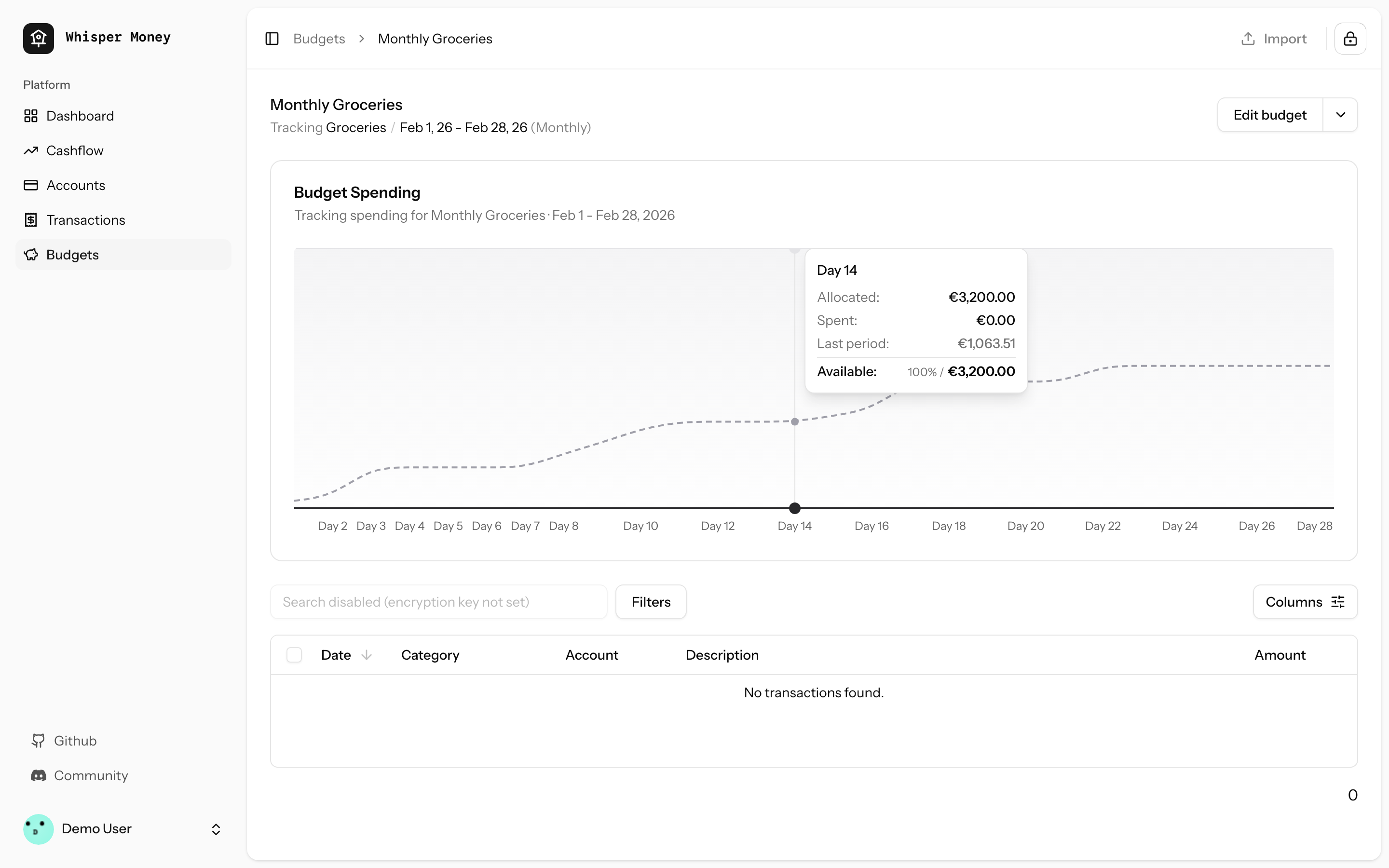
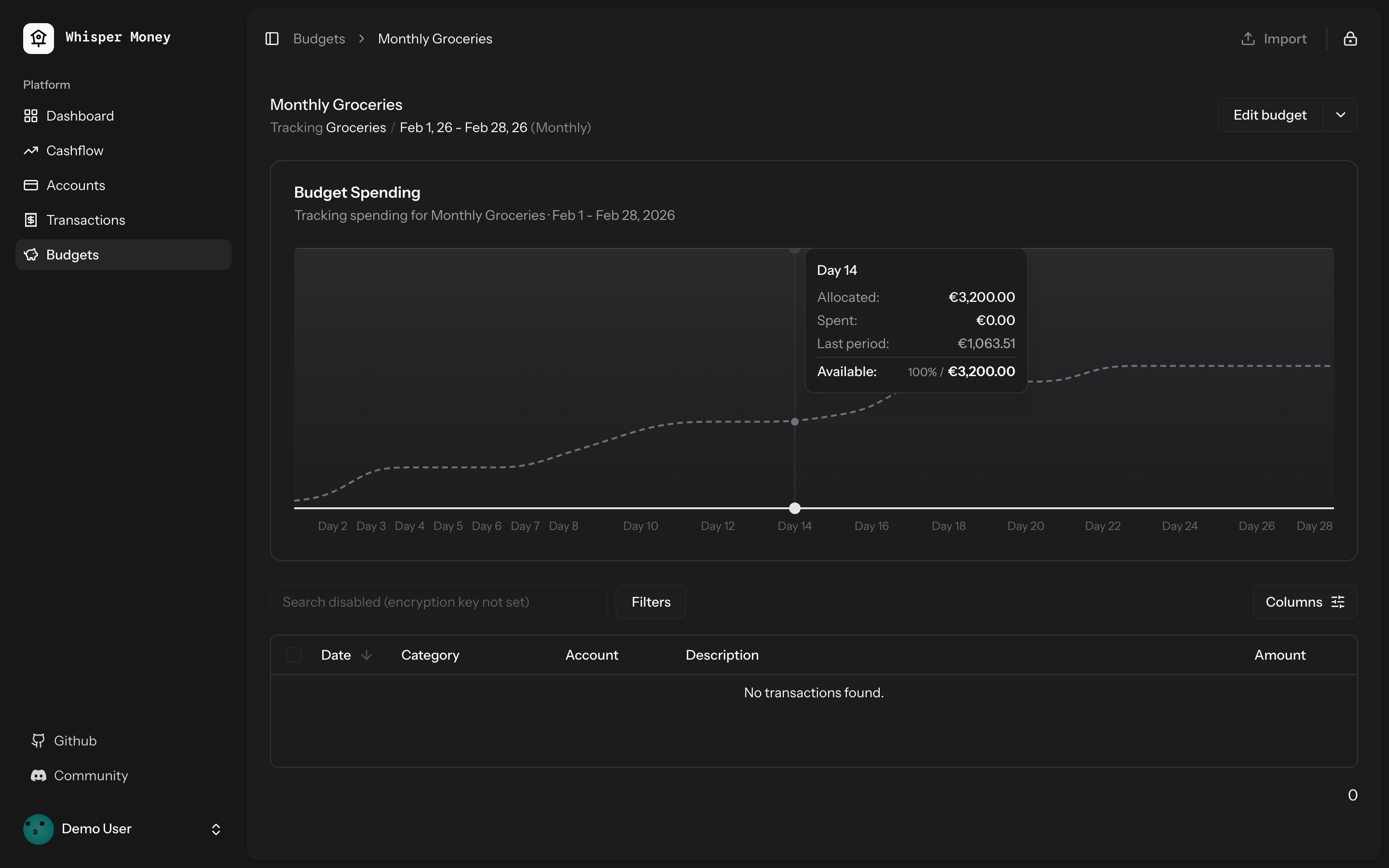
## Summary
- Load the previous budget period (with transactions) in
`BudgetController::show()` and pass it to the frontend
- Overlay previous period's cumulative spending as a dashed line on the
budget spending chart
- Use day-of-period alignment (Day 1, Day 2...) when comparing so
periods of different lengths align
- Tooltip shows both "Spent" (current) and "Last period" values when
hovering
- Chart now shows the full period timeline (not just up to today)
- When no previous period exists, chart behavior is unchanged
## Screenshots
### Light mode
### Dark mode
## Test plan
- [x] Tests pass: `php artisan test --compact
tests/Feature/BudgetTest.php` (9 tests)
- [x] Pint formatting passes
- [x] ESLint + Prettier pass
- [ ] Manual: view a budget with a prior period — dashed line appears
- [ ] Manual: view a budget with no prior period — chart unchanged
## Summary
- Detect standalone/PWA display mode (`display-mode: standalone` and iOS
`navigator.standalone`) on the welcome page
- Redirect to `/dashboard` immediately so the landing page is never
shown inside the installed app
- Unauthenticated PWA users go: open app → `/dashboard` → `/login` (via
auth middleware)

## Test plan
- [x] Install the PWA and open it — should go straight to
login/dashboard, never the landing page
- [x] Visit the website in a regular browser tab — landing page still
works normally
## Summary

- Budget periods use `date` columns (`start_date`, `end_date`) but
queries compared them against `now()` which includes a time component
(e.g. `2026-01-31 15:30:00`). MySQL converts the date to midnight for
comparison, so `end_date >= now()` evaluates to `'2026-01-31 00:00:00'
>= '2026-01-31 15:30:00'` → **false** — causing "No active period" on
the last day of every period.
- Replaced `now()` with `today()` (date-only) in all budget period date
comparisons across `Budget::getCurrentPeriod()`,
`BudgetController::index()`, and `GenerateBudgetPeriods` command.

## Test plan

- [x] Added 4 Pest tests covering the edge case (last day at various
times, first day at end of day, index/show endpoints)
- [x] All existing budget tests pass
## Summary
- Add service worker registration and `viewport-fit=cover` for proper
iOS standalone mode (no Safari chrome)
- Change manifest `start_url` to `/dashboard` so PWA users skip the
landing page
- Add tests for PWA configuration
## Test plan
- [x] Deploy and re-add PWA to iOS home screen — should open as
standalone (no address bar)
- [x] PWA launch should go to `/dashboard` instead of the landing page
- [x] Non-authenticated PWA users should be redirected to login
Closes#71
## Summary
- Replace `subMonths()` with `subMonthsNoOverflow()` across controllers,
commands, and tests to prevent date overflow on months with 31 days
- On Jan 31, `subMonths(2)` overflows: Nov 31 doesn't exist → Carbon
rolls forward to Dec 1, producing wrong date ranges and off-by-one month
counts

## Root cause
Carbon's `subMonths()` allows day overflow. When the target month has
fewer days than the source date, it rolls into the next month. For
example:
- `2026-01-31 subMonths(2)` → Nov 31 → **2025-12-01** (expected Nov 30)
- `2026-01-31 subMonths(11)` → Feb 31 → **2025-03-03** (expected Feb 28)

`subMonthsNoOverflow()` clamps to the last valid day of the target month
instead.

## Files changed
- `app/Http/Controllers/Api/CashflowAnalyticsController.php` — cashflow
trend start date calculation
- `app/Console/Commands/ResetDemoAccountCommand.php` — balance history
date generation (was causing duplicate `balance_date` entries)
- `tests/Feature/AccountControllerTest.php` — balance evolution `from`
param
- `tests/Feature/CashflowAnalyticsTest.php` — transaction date
generation in loop
- `tests/Feature/DashboardAnalyticsTest.php` — net worth evolution
`from` param

## Test plan
- [x] `account balance evolution returns data` — expects 3 months, was
getting 2
- [x] `cashflow trend returns monthly data` — expects 3 months, was
getting 2
- [x] `cashflow trend defaults to 12 months` — expects 12 months, was
getting 11
- [x] `net worth evolution returns monthly data points` — expects 3
months, was getting 2
- [x] `demo:reset creates demo user` — was throwing
UniqueConstraintViolation on duplicate balance dates
## Summary
- Add `SyncUserToResendListener` to automatically sync users to Resend
contacts on registration
- Add `ResendService` for Resend API interactions
- Add `resend:sync` command to bulk sync existing users

## Changes
- **New**: `app/Listeners/SyncUserToResendListener.php` -
Auto-discovered queued listener
- **New**: `app/Services/ResendService.php` - Service for Resend
contacts API
- **New**: `app/Console/Commands/ResendSyncCommand.php` - Bulk sync
command
- **New**: Tests for listener and command

## Usage
New users are automatically synced on registration. For existing users:
```bash
php artisan resend:sync
```

## Test plan
- [x] New user registration triggers contact sync
- [x] `resend:sync` command syncs all existing users
- [x] Graceful handling when API key is not configured
- [x] Duplicate contacts are handled by Resend (no errors)
## Summary
- Fixes automation rules not applying labels when creating transactions
manually or via CSV import
- Eager-loads the `labels` relationship on automation rules in both
`TransactionController` and `HandleInertiaRequests`
- Syncs `label_ids` on the transaction `store` endpoint (was accepted
but never persisted)
- Passes `automationRules` prop through the full component chain:
`index.tsx` → `TransactionActionsMenu` → `ImportTransactionsDrawer`, and
`index.tsx` → `EditTransactionDialog`
- Passes `automationRules` as the missing 5th argument to
`reEvaluateAll()`
Closes#61
## Test plan
- [x] Existing feature tests pass (`php artisan test
--filter=Transaction`, `--filter=AutomationRule`)
- [x] Pint, ESLint, and Prettier all pass
- [x] Manually verify: create a transaction matching an automation rule
with labels → labels are applied
- [x] Manually verify: import CSV with transactions matching rules with
labels → labels are applied
- [x] Manually verify: "Re-evaluate All" applies labels from matched
rules
## Summary
- Added label update support to the single transaction `update()`
endpoint
- Previously, labels could only be updated via the bulk update endpoint
- Now both endpoints support label updates with consistent behavior

## Changes
- **UpdateTransactionRequest**: Added `label_ids` validation (array of
UUIDs that must belong to user)
- **TransactionController@update**: Now handles label updates alongside
other attributes
  - Syncs labels when `label_ids` is provided
  - Reloads labels relationship for fresh data in events
  - Fires single `updated` event after all changes
- **AssignTransactionToBudget listener**: Ensures labels are loaded
fresh after queue serialization
- **Tests**: Added 6 comprehensive tests covering all label update
scenarios

## Behavior
- **Don't send `label_ids`** → labels unchanged (partial update)
- **Send `label_ids: []`** → removes all labels
- **Send `label_ids: [uuid1, uuid2]`** → replaces labels with these

## Testing
When labels are updated, the `TransactionUpdated` event fires and the
transaction is automatically assigned to matching budgets (via queued
listener).

All tests pass (29 tests, 134 assertions).

Fixes the issue where transactions wouldn't appear in budget after
adding a matching label via the single transaction update endpoint.
## Overview

We're excited to introduce budgeting capabilities to Whisper Money! This
feature helps you take control of your finances by setting spending
limits and tracking your progress over time.

## Screenshots
<img width="1316" height="793" alt="image"
src="https://github.com/user-attachments/assets/ac394d36-cded-4ea4-9883-120785e260f1"
/>
<img width="1315" height="907" alt="image"
src="https://github.com/user-attachments/assets/7c682474-5aa7-4388-b626-29b56f5ebbef"
/>
<img width="1315" height="992" alt="image"
src="https://github.com/user-attachments/assets/21eace45-23c6-472d-9aa0-0feb6db3fba4"
/>

## What's New

### Create Flexible Budgets
- Set budgets for specific categories or labels
- Choose from monthly, weekly, bi-weekly, or custom periods
- Set your own budget start date for better alignment with your pay
schedule

### Track Your Spending
- Visual spending charts show how much you've spent vs. your budget
- See at a glance which budgets are on track and which need attention
- View all transactions that count toward each budget

### Smart Budget Management
- **Carry Over**: Unused budget amounts automatically roll into the next
period
- **Reset**: Unused amounts return to your available money pool
- Edit or delete budgets anytime as your needs change

### Easy Access
- New Budgets section in the main navigation
- Quick overview cards showing budget status
- Detailed budget pages with spending history and transaction lists

## How It Works

1. Create a budget by selecting a category or label and setting your
spending limit
2. Your transactions are automatically matched to relevant budgets
3. Track your progress with visual charts and spending summaries
4. Adjust your budgets as needed to stay on track with your financial
goals

This feature is now available behind a feature flag and can be enabled
for users who want to start budgeting their expenses.
This PR simplifies the IndexedDB synchronization mechanism by removing
individual sync controllers and services, and instead using Inertia.js
shared props to provide data globally across the application.

## Benefits

1. **Simplified Architecture**: Removed complex sync logic for
static/semi-static data (accounts, categories, banks, labels, automation
rules)
2. **Better Performance**: Data is now shared via Inertia props,
eliminating unnecessary API calls and IndexedDB operations
3. **Reduced Complexity**: Significantly reduced codebase size (~2000
lines removed)
4. **Better UX**: Data is immediately available on page load without
waiting for sync operations
5. **Maintainability**: Fewer moving parts means easier to maintain and
debug

## Migration Notes

- Transaction syncing still uses IndexedDB for offline support
- All other data (accounts, categories, banks, labels, automation rules)
is now fetched via Inertia shared props
- Components automatically receive updated data on navigation without
manual sync operations
## Overview

This PR adds a flexible system for sending update emails to all Whisper
Money users. As the solo developer, you can now easily communicate
product updates, announcements, and news to your growing user base.

## Problem Solved

- **No easy way to send announcements**: Previously, there was no simple
way to broadcast important updates to all users
- **Manual process**: Would require writing custom scripts each time
- **No duplicate prevention**: Risk of accidentally sending the same
email multiple times
- **Version control**: Email content wasn't tracked in git

## Solution

A complete email system that lets you:
1. Write update emails as markdown templates (version controlled)
2. Send them with a single command
3. Automatic duplicate prevention (users only receive each update once)
4. Track who received what in the database

## How It Works

### 1. Create Email Template

Create a markdown file in `resources/views/mail/updates/`:

```blade
<x-mail::message>
# What's New in January 2026

Hi {{ $user->name }},

Your update content here...

<x-mail::button :url="'https://discord.gg/9UQWZECDDv'">
Join the Discord Community
</x-mail::button>

Víctor Falcón Ruíz
Founder & Solo Developer, Whisper Money
</x-mail::message>
```

### 2. Send to All Users

```bash
# Simple - one command
php artisan email:update first-update-jan-2026

# With options
php artisan email:update first-update-jan-2026 --subject="Personal Thank You" --exclude-demo
```

### 3. Automatic Tracking

- Users only receive each update once (tracked by identifier)
- Can send different updates to same users
- View history in `user_mail_logs` table

## First Email Included

The PR includes the first update email (`first-update-jan-2026`)
announcing:
- 240+ GitHub stars milestone
- First paying users
- Discord community invitation
- Canny roadmap links
- Personal message from Víctor as the solo developer

## Technical Details

### What's New

**Database:**
- Migration: Add `email_identifier` column to `user_mail_logs`
- Migration: Update unique constraint to `(user_id, email_type,
email_identifier)`

**Backend:**
- `DripEmailType` enum: Added `Update` case
- `UpdateEmail` mailable: Generic mailable accepting any view
- `SendUpdateEmailJob`: Handles sending + duplicate prevention
- `SendUpdateEmailCommand`: Artisan command with progress bar
- Updated all 6 drip email jobs to support new constraint

**Frontend:**
- Email template directory: `resources/views/mail/updates/`
- Comprehensive README with examples

**Tests:**
- Complete test suite: 11 tests covering all scenarios
- Tests duplicate prevention, filtering, queue behavior

### Command Options

```bash
php artisan email:update <view> [identifier] [options]

Arguments:
  view          Template name (e.g., "jan-2026-updates")
  identifier    Tracking ID (defaults to view name)

Options:
  --subject=    Custom email subject
  --exclude-demo   Skip demo account
  --force       Skip confirmation prompt
```

## Benefits

1. **Simple**: One command to send any update email
2. **Flexible**: Just create a new markdown view, no code changes needed
3. **Safe**: Confirmation prompt and duplicate prevention
4. **Fast**: Queued delivery, non-blocking
5. **Tracked**: Full audit trail in UserMailLog
6. **Consistent**: Follows existing drip email patterns
7. **Reusable**: Same command for all future update emails
8. **Version Controlled**: Email content is in git, reviewable

## Migration Path

To use in production:

```bash
# 1. Run migrations
php artisan migrate

# 2. Create your email template
vim resources/views/mail/updates/your-update.blade.php

# 3. Commit and deploy
git add resources/views/mail/updates/your-update.blade.php
git commit -m "Add update email"
git push

# 4. Send on production
php artisan email:update your-update
```

## Example Use Cases

- Product announcements
- New feature launches
- Community updates
- Milestone celebrations
- Important notifications
- Partnership announcements

## Files Changed

### Created
- `database/migrations/*_add_email_identifier_to_user_mail_logs.php`
- `database/migrations/*_update_user_mail_logs_unique_constraint.php`
- `app/Mail/UpdateEmail.php`
- `app/Jobs/SendUpdateEmailJob.php`
- `app/Console/Commands/SendUpdateEmailCommand.php`
- `resources/views/mail/updates/first-update-jan-2026.blade.php`
- `resources/views/mail/updates/README.md`
- `tests/Feature/Console/SendUpdateEmailCommandTest.php`

### Modified
- `app/Enums/DripEmailType.php` (added Update case)
- `app/Models/UserMailLog.php` (added email_identifier field)
- All 6 drip email jobs (added email_identifier support)

## Testing

All tests passing (11 tests, 27 assertions):
- ✅ Command dispatches jobs for all users
- ✅ Command excludes demo account when flag is set
- ✅ Command fails when view does not exist
- ✅ Command uses custom subject when provided
- ✅ Job is dispatched to emails queue
- ✅ Command handles empty user database gracefully
- ✅ Job skips users who already received the update
- ✅ Job creates mail log entry after sending
- ✅ Job sends email with correct view and user data
- ✅ Command requires confirmation by default
- ✅ Command skips confirmation with force flag
## Summary

<img width="1220" height="1001" alt="whispermoney test_"
src="https://github.com/user-attachments/assets/c35751d5-385b-449c-81d6-14b5b6577ff2"
/>

Introduces a fully-functional demo account that lets prospective users
explore Whisper Money without creating an account. Users can click
"Check Demo" on the welcome page to instantly access a pre-populated
account with realistic financial data spanning 12 months.

## What's New

**Try Before You Sign Up**
- New "Check Demo" button on the welcome page for instant access
- Pre-configured demo account with real-world financial scenarios
- 12 months of sample transactions across multiple account types
(checking, savings, credit cards, investments)
- Pre-built automation rules, labels, and categories to showcase the
full app experience

**Demo Account Limitations**
- Demo accounts are read-only for sensitive operations (can't change
password, email, or payment settings)
- Clear messaging throughout the UI when demo restrictions apply
- Settings pages show helpful notices about demo limitations
- Automatic daily reset to maintain fresh demo experience

**Developer Experience**
- `php artisan demo:reset` command for manual resets
- Configurable via environment variables (DEMO_EMAIL, DEMO_PASSWORD,
DEMO_ENCRYPTION_KEY)
- Comprehensive test coverage for demo restrictions and data generation

## User Impact

This feature removes the friction of signing up before understanding the
product's value. Users can:
- Explore all features with realistic data
- Test automation rules and see them in action
- View charts and insights based on a year of financial activity
- Experience the full privacy-first encryption workflow
- Understand the product before committing to create an account

Perfect for demos, screenshots, documentation, and helping users make
informed decisions about whether Whisper Money fits their needs.
Summary
- Add new Cashflow page with income/expense analytics, Sankey chart
visualization, and trend analysis
- Add Cashflow summary widget to the dashboard
- Implement feature flag system using Laravel Pennant to control feature
visibility per user
- Add artisan commands to enable/disable features: `php artisan
feature:enable/disable [feature] [email|all]`

## New Features
- **Cashflow Page**: Period-based income/expense breakdown with category
analysis
- **Sankey Chart**: Visual flow diagram showing money movement between
categories
- **Trend Chart**: 12-month historical cashflow visualization
- **Dashboard Widget**: Quick cashflow summary card
- **Feature Flags**: Cashflow feature hidden behind feature flag,
controllable per-user

## How to enable it
This feature it's under a feature flag until we are sure it's working
fine. If you want to test it, [send us a message on the general channel
in our discord](https://discord.gg/9UQWZECDDv). If you're self hosting
just run `php artisan feature:enable CashflowFeature {your_email}`.

## New Cashflow Page
<img width="1278" height="1185" alt="image"
src="https://github.com/user-attachments/assets/83469f24-9f96-4e5f-bef9-86c076d31243"
/>
<img width="1274" height="1035" alt="image"
src="https://github.com/user-attachments/assets/8949ff9d-c370-4fc4-81c6-268307c587a5"
/>

## New Dashboard Widget
<img width="1180" height="289" alt="image"
src="https://github.com/user-attachments/assets/ad984a66-9ffd-4079-85ce-0b2d28278d76"
/>
<img width="1179" height="286" alt="image"
src="https://github.com/user-attachments/assets/bff60286-8ea2-4e9c-8fa6-22755566648f"
/>
 Víctor Falcón


