## Summary
- Load the previous budget period (with transactions) in
`BudgetController::show()` and pass it to the frontend
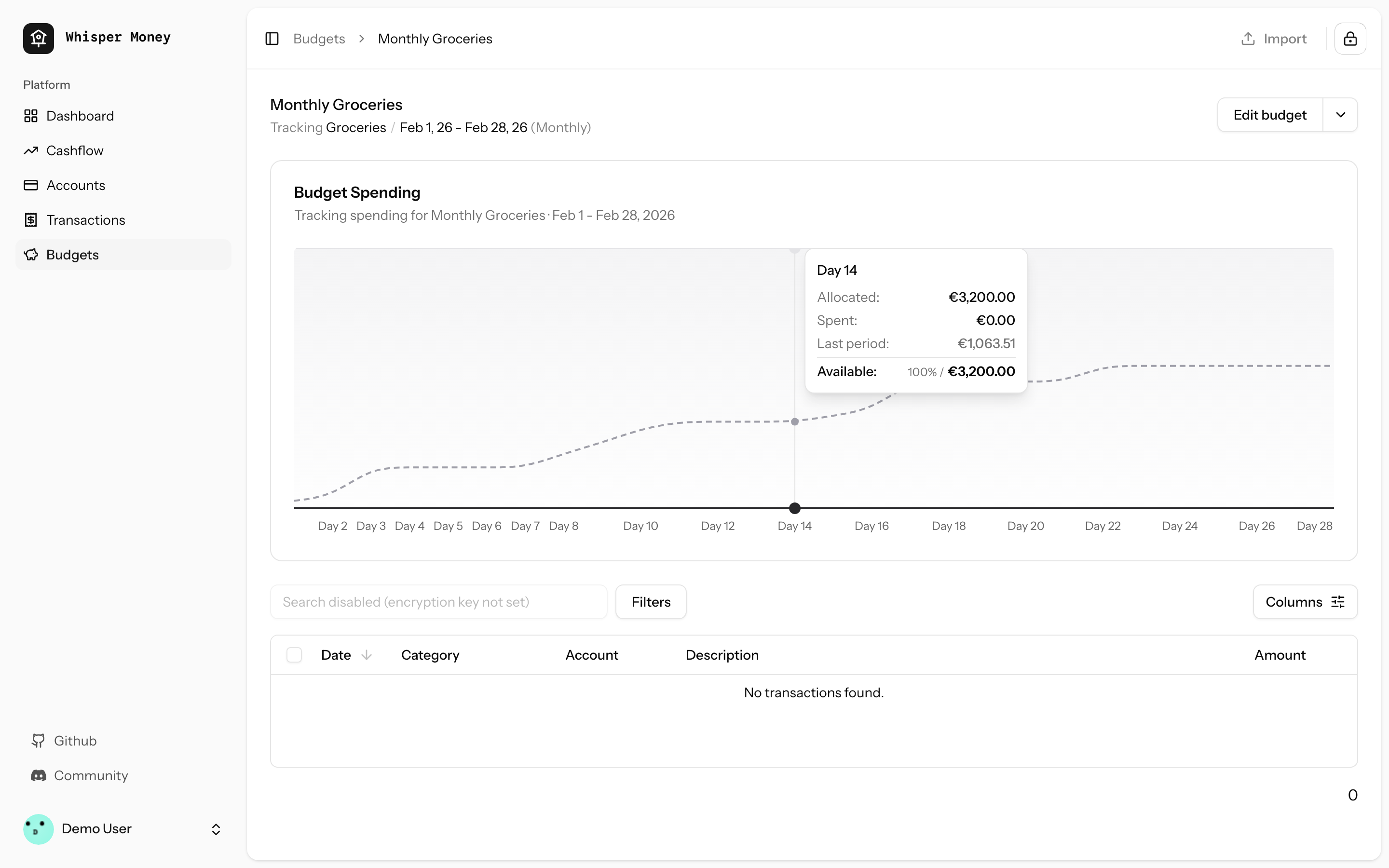
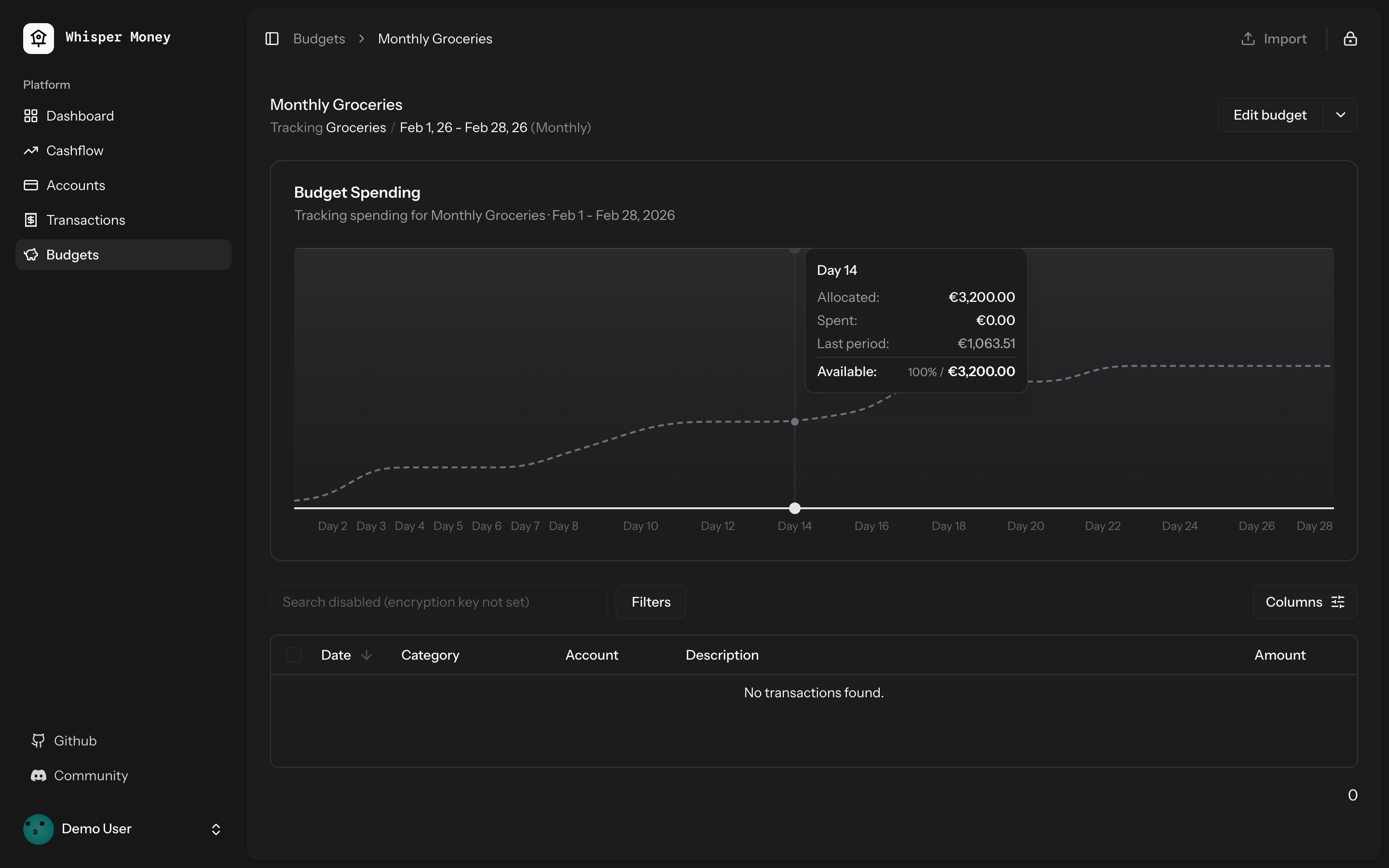
- Overlay previous period's cumulative spending as a dashed line on the
budget spending chart
- Use day-of-period alignment (Day 1, Day 2...) when comparing so
periods of different lengths align
- Tooltip shows both "Spent" (current) and "Last period" values when
hovering
- Chart now shows the full period timeline (not just up to today)
- When no previous period exists, chart behavior is unchanged
## Screenshots
### Light mode
### Dark mode
## Test plan
- [x] Tests pass: `php artisan test --compact
tests/Feature/BudgetTest.php` (9 tests)
- [x] Pint formatting passes
- [x] ESLint + Prettier pass
- [ ] Manual: view a budget with a prior period — dashed line appears
- [ ] Manual: view a budget with no prior period — chart unchanged
## Summary

- Budget periods use `date` columns (`start_date`, `end_date`) but
queries compared them against `now()` which includes a time component
(e.g. `2026-01-31 15:30:00`). MySQL converts the date to midnight for
comparison, so `end_date >= now()` evaluates to `'2026-01-31 00:00:00'
>= '2026-01-31 15:30:00'` → **false** — causing "No active period" on
the last day of every period.
- Replaced `now()` with `today()` (date-only) in all budget period date
comparisons across `Budget::getCurrentPeriod()`,
`BudgetController::index()`, and `GenerateBudgetPeriods` command.

## Test plan

- [x] Added 4 Pest tests covering the edge case (last day at various
times, first day at end of day, index/show endpoints)
- [x] All existing budget tests pass
## Summary
- Replace `subMonths()` with `subMonthsNoOverflow()` across controllers,
commands, and tests to prevent date overflow on months with 31 days
- On Jan 31, `subMonths(2)` overflows: Nov 31 doesn't exist → Carbon
rolls forward to Dec 1, producing wrong date ranges and off-by-one month
counts

## Root cause
Carbon's `subMonths()` allows day overflow. When the target month has
fewer days than the source date, it rolls into the next month. For
example:
- `2026-01-31 subMonths(2)` → Nov 31 → **2025-12-01** (expected Nov 30)
- `2026-01-31 subMonths(11)` → Feb 31 → **2025-03-03** (expected Feb 28)

`subMonthsNoOverflow()` clamps to the last valid day of the target month
instead.

## Files changed
- `app/Http/Controllers/Api/CashflowAnalyticsController.php` — cashflow
trend start date calculation
- `app/Console/Commands/ResetDemoAccountCommand.php` — balance history
date generation (was causing duplicate `balance_date` entries)
- `tests/Feature/AccountControllerTest.php` — balance evolution `from`
param
- `tests/Feature/CashflowAnalyticsTest.php` — transaction date
generation in loop
- `tests/Feature/DashboardAnalyticsTest.php` — net worth evolution
`from` param

## Test plan
- [x] `account balance evolution returns data` — expects 3 months, was
getting 2
- [x] `cashflow trend returns monthly data` — expects 3 months, was
getting 2
- [x] `cashflow trend defaults to 12 months` — expects 12 months, was
getting 11
- [x] `net worth evolution returns monthly data points` — expects 3
months, was getting 2
- [x] `demo:reset creates demo user` — was throwing
UniqueConstraintViolation on duplicate balance dates
## Summary
- Fixes automation rules not applying labels when creating transactions
manually or via CSV import
- Eager-loads the `labels` relationship on automation rules in both
`TransactionController` and `HandleInertiaRequests`
- Syncs `label_ids` on the transaction `store` endpoint (was accepted
but never persisted)
- Passes `automationRules` prop through the full component chain:
`index.tsx` → `TransactionActionsMenu` → `ImportTransactionsDrawer`, and
`index.tsx` → `EditTransactionDialog`
- Passes `automationRules` as the missing 5th argument to
`reEvaluateAll()`
Closes#61
## Test plan
- [x] Existing feature tests pass (`php artisan test
--filter=Transaction`, `--filter=AutomationRule`)
- [x] Pint, ESLint, and Prettier all pass
- [x] Manually verify: create a transaction matching an automation rule
with labels → labels are applied
- [x] Manually verify: import CSV with transactions matching rules with
labels → labels are applied
- [x] Manually verify: "Re-evaluate All" applies labels from matched
rules
## Summary
- Added label update support to the single transaction `update()`
endpoint
- Previously, labels could only be updated via the bulk update endpoint
- Now both endpoints support label updates with consistent behavior

## Changes
- **UpdateTransactionRequest**: Added `label_ids` validation (array of
UUIDs that must belong to user)
- **TransactionController@update**: Now handles label updates alongside
other attributes
  - Syncs labels when `label_ids` is provided
  - Reloads labels relationship for fresh data in events
  - Fires single `updated` event after all changes
- **AssignTransactionToBudget listener**: Ensures labels are loaded
fresh after queue serialization
- **Tests**: Added 6 comprehensive tests covering all label update
scenarios

## Behavior
- **Don't send `label_ids`** → labels unchanged (partial update)
- **Send `label_ids: []`** → removes all labels
- **Send `label_ids: [uuid1, uuid2]`** → replaces labels with these

## Testing
When labels are updated, the `TransactionUpdated` event fires and the
transaction is automatically assigned to matching budgets (via queued
listener).

All tests pass (29 tests, 134 assertions).

Fixes the issue where transactions wouldn't appear in budget after
adding a matching label via the single transaction update endpoint.
## Overview

We're excited to introduce budgeting capabilities to Whisper Money! This
feature helps you take control of your finances by setting spending
limits and tracking your progress over time.

## Screenshots
<img width="1316" height="793" alt="image"
src="https://github.com/user-attachments/assets/ac394d36-cded-4ea4-9883-120785e260f1"
/>
<img width="1315" height="907" alt="image"
src="https://github.com/user-attachments/assets/7c682474-5aa7-4388-b626-29b56f5ebbef"
/>
<img width="1315" height="992" alt="image"
src="https://github.com/user-attachments/assets/21eace45-23c6-472d-9aa0-0feb6db3fba4"
/>

## What's New

### Create Flexible Budgets
- Set budgets for specific categories or labels
- Choose from monthly, weekly, bi-weekly, or custom periods
- Set your own budget start date for better alignment with your pay
schedule

### Track Your Spending
- Visual spending charts show how much you've spent vs. your budget
- See at a glance which budgets are on track and which need attention
- View all transactions that count toward each budget

### Smart Budget Management
- **Carry Over**: Unused budget amounts automatically roll into the next
period
- **Reset**: Unused amounts return to your available money pool
- Edit or delete budgets anytime as your needs change

### Easy Access
- New Budgets section in the main navigation
- Quick overview cards showing budget status
- Detailed budget pages with spending history and transaction lists

## How It Works

1. Create a budget by selecting a category or label and setting your
spending limit
2. Your transactions are automatically matched to relevant budgets
3. Track your progress with visual charts and spending summaries
4. Adjust your budgets as needed to stay on track with your financial
goals

This feature is now available behind a feature flag and can be enabled
for users who want to start budgeting their expenses.
This PR simplifies the IndexedDB synchronization mechanism by removing
individual sync controllers and services, and instead using Inertia.js
shared props to provide data globally across the application.

## Benefits

1. **Simplified Architecture**: Removed complex sync logic for
static/semi-static data (accounts, categories, banks, labels, automation
rules)
2. **Better Performance**: Data is now shared via Inertia props,
eliminating unnecessary API calls and IndexedDB operations
3. **Reduced Complexity**: Significantly reduced codebase size (~2000
lines removed)
4. **Better UX**: Data is immediately available on page load without
waiting for sync operations
5. **Maintainability**: Fewer moving parts means easier to maintain and
debug

## Migration Notes

- Transaction syncing still uses IndexedDB for offline support
- All other data (accounts, categories, banks, labels, automation rules)
is now fetched via Inertia shared props
- Components automatically receive updated data on navigation without
manual sync operations
## Summary

This PR implements automatic opening of the encryption key unlock modal
immediately after user login when they visit the dashboard. The modal
will only appear once per login session and will not show up on
subsequent dashboard visits or if the user manually clears their
encryption key.

## Problem

Previously, users had to manually click the encryption key button in the
sidebar after logging in to unlock their encrypted data. This extra step
could be confusing for new users and added friction to the login flow.

## Solution

The encryption key modal now automatically opens when users visit the
dashboard immediately after logging in, but **only if**:
1. The user just completed a login (session flag is set)
2. Their encryption key is not already in browser storage
3. Encrypted challenge data is available

## Implementation Details

### Backend Changes

#### 1. Custom Login Response Classes
Created two new response classes that override Fortify's default login
responses:

**`app/Http/Responses/LoginResponse.php`**
- Implements `LoginResponse` contract
- Sets `show_encryption_prompt` session flash variable after successful
login
- Handles both regular login and JSON API responses

**`app/Http/Responses/TwoFactorLoginResponse.php`**
- Implements `TwoFactorLoginResponse` contract
- Sets the same session flag after successful 2FA authentication
- Ensures the modal appears for 2FA users as well

#### 2. Service Provider Registration
**`app/Providers/FortifyServiceProvider.php`**
- Registered custom response classes as singletons in the container
- Fortify now uses our custom responses instead of defaults

#### 3. Dashboard Controller
**`app/Http/Controllers/DashboardController.php`**
- Passes `showEncryptionPrompt` flag from session to frontend
- Uses `session('show_encryption_prompt', false)` which automatically
consumes the flash data

### Frontend Changes

**`resources/js/pages/dashboard.tsx`**
- Added `DashboardProps` interface extending `SharedData` with
`showEncryptionPrompt` boolean
- Updated `useEffect` hook to check three conditions before auto-opening
modal:
1. `props.showEncryptionPrompt` - User just logged in (from session
flash)
  2. `!isKeySet` - Encryption key not in browser storage
  3. `encryptedMessageData` - Encrypted challenge data loaded
- Includes `UnlockMessageDialog` component that conditionally renders

## How It Works

### User Flow

1. **User logs in** → Custom `LoginResponse` or `TwoFactorLoginResponse`
sets `show_encryption_prompt` flash session variable
2. **Redirect to dashboard** → `DashboardController` retrieves and
passes the flag to frontend (consuming it)
3. **Dashboard loads** → React component checks all three conditions
4. **Modal appears** → If conditions are met, `UnlockMessageDialog`
opens automatically
5. **Session flag consumed** → Subsequent page loads won't trigger the
modal

### Why Session Flash?

Laravel's session flash data is perfect for this use case because:
- It's automatically removed after being accessed once
- It survives redirects (crucial for post-login flow)
- It's server-side, so it can't be manipulated by client-side code
- No database changes or additional state management needed

### Edge Cases Handled

✅ **User clears encryption key manually** → Modal won't auto-open on
dashboard visit (no session flag)
✅ **User refreshes dashboard** → Modal won't re-appear (flash data
consumed)
✅ **User logs out and back in** → Modal appears again (new session flag)
✅ **2FA enabled users** → Modal appears after successful 2FA challenge
✅ **Key already in browser** → Modal doesn't appear (key check passes)

## Testing

- ✅ All existing dashboard tests pass (2 tests)
- ✅ All authentication tests pass (58 tests)
- ✅ Code formatted with Laravel Pint
- ✅ Code formatted with Prettier
- ✅ ESLint validation passes

## Files Changed

- `app/Http/Responses/LoginResponse.php` (new)
- `app/Http/Responses/TwoFactorLoginResponse.php` (new)
- `app/Providers/FortifyServiceProvider.php` (modified)
- `app/Http/Controllers/DashboardController.php` (modified)
- `resources/js/pages/dashboard.tsx` (modified)

## Breaking Changes

None. This is an additive feature that enhances the existing
authentication flow without breaking any existing functionality.
## Summary

<img width="1220" height="1001" alt="whispermoney test_"
src="https://github.com/user-attachments/assets/c35751d5-385b-449c-81d6-14b5b6577ff2"
/>

Introduces a fully-functional demo account that lets prospective users
explore Whisper Money without creating an account. Users can click
"Check Demo" on the welcome page to instantly access a pre-populated
account with realistic financial data spanning 12 months.

## What's New

**Try Before You Sign Up**
- New "Check Demo" button on the welcome page for instant access
- Pre-configured demo account with real-world financial scenarios
- 12 months of sample transactions across multiple account types
(checking, savings, credit cards, investments)
- Pre-built automation rules, labels, and categories to showcase the
full app experience

**Demo Account Limitations**
- Demo accounts are read-only for sensitive operations (can't change
password, email, or payment settings)
- Clear messaging throughout the UI when demo restrictions apply
- Settings pages show helpful notices about demo limitations
- Automatic daily reset to maintain fresh demo experience

**Developer Experience**
- `php artisan demo:reset` command for manual resets
- Configurable via environment variables (DEMO_EMAIL, DEMO_PASSWORD,
DEMO_ENCRYPTION_KEY)
- Comprehensive test coverage for demo restrictions and data generation

## User Impact

This feature removes the friction of signing up before understanding the
product's value. Users can:
- Explore all features with realistic data
- Test automation rules and see them in action
- View charts and insights based on a year of financial activity
- Experience the full privacy-first encryption workflow
- Understand the product before committing to create an account

Perfect for demos, screenshots, documentation, and helping users make
informed decisions about whether Whisper Money fits their needs.
Summary
- Add new Cashflow page with income/expense analytics, Sankey chart
visualization, and trend analysis
- Add Cashflow summary widget to the dashboard
- Implement feature flag system using Laravel Pennant to control feature
visibility per user
- Add artisan commands to enable/disable features: `php artisan
feature:enable/disable [feature] [email|all]`

## New Features
- **Cashflow Page**: Period-based income/expense breakdown with category
analysis
- **Sankey Chart**: Visual flow diagram showing money movement between
categories
- **Trend Chart**: 12-month historical cashflow visualization
- **Dashboard Widget**: Quick cashflow summary card
- **Feature Flags**: Cashflow feature hidden behind feature flag,
controllable per-user

## How to enable it
This feature it's under a feature flag until we are sure it's working
fine. If you want to test it, [send us a message on the general channel
in our discord](https://discord.gg/9UQWZECDDv). If you're self hosting
just run `php artisan feature:enable CashflowFeature {your_email}`.

## New Cashflow Page
<img width="1278" height="1185" alt="image"
src="https://github.com/user-attachments/assets/83469f24-9f96-4e5f-bef9-86c076d31243"
/>
<img width="1274" height="1035" alt="image"
src="https://github.com/user-attachments/assets/8949ff9d-c370-4fc4-81c6-268307c587a5"
/>

## New Dashboard Widget
<img width="1180" height="289" alt="image"
src="https://github.com/user-attachments/assets/ad984a66-9ffd-4079-85ce-0b2d28278d76"
/>
<img width="1179" height="286" alt="image"
src="https://github.com/user-attachments/assets/bff60286-8ea2-4e9c-8fa6-22755566648f"
/>
- Add version field to package.json (0.1.0)
- Install release-it for automated releases with conventional changelog
- Create .release-it.json configuration
- Create initial CHANGELOG.md
- Share version via Inertia (reads from package.json)
- Display version in user dropdown menu
## Summary

- Add four view modes for net worth and account balance charts:
- **Stacked Accounts**: existing stacked bar chart showing balances by
account
  - **Line**: net worth line chart with linear/log scale toggle
  - **Change**: bar chart showing MoM%, YoY%, Rolling 12M changes
- **Waterfall**: bridge chart showing Start -> Change -> End transition

- Add Vitest for frontend unit testing with 52 tests covering all
calculation functions
- Proper sign handling for liabilities (credit cards and loans subtract
from net worth)
- Log scale disabled with warning when net worth includes zero or
negative values
- Shared components and logic between dashboard and account detail
charts

## New Files

- `vitest.config.ts` - Vitest configuration
- `resources/js/lib/chart-calculations.ts` - Pure computation functions
- `resources/js/lib/chart-calculations.test.ts` - 52 unit tests
- `resources/js/hooks/use-chart-views.ts` - Shared chart view state hook
- `resources/js/components/charts/` - Reusable chart components

## Test plan

- [x] Dashboard net worth chart shows view toggle and all four views
work
- [ ] Account detail page chart shows view toggle and three views work
(no stacked)
- [x] Line chart scale toggle works (log disabled with warning when
applicable)
- [x] Change chart series toggle (MoM, YoY, 12M EUR, 12M %) works
- [x] Waterfall chart month selector works
- [x] All 52 unit tests pass (`bun run test`)
- [x] Build succeeds (`bun run build`)
- [x] Dark mode styling correct
## Summary
- When a transaction ID is provided during sync, check if it already
exists before creating
- If it exists, return the existing transaction with 200 status instead
of failing with duplicate key error
- Prevents duplicate transactions when sync retries occur due to network
issues

## Test plan
- [x] Attempt to create a transaction with a specific ID
- [x] Attempt to create another transaction with the same ID
- [x] Verify the second request returns the existing transaction instead
of an error
## Summary

- Implement event-driven drip email campaign system for new user signups
- Add 5 targeted emails based on user journey (welcome, onboarding
reminder, promo code, import help, feedback)
- Configure Laravel Horizon with Redis queue for reliable job processing
- Track sent emails in `user_mail_logs` table to prevent duplicates

## Email Schedule

| Email | Timing | Condition |
|-------|--------|-----------|
| Welcome | 30 min after signup | All users |
| Onboarding Reminder | 1 day after signup | Not onboarded |
| Promo Code (FOUNDER) | 1 day after signup | Onboarded + has
transactions + not subscribed |
| Import Help | 1 day after signup | Onboarded + no transactions + not
subscribed |
| Feedback | 5 days after signup | Not subscribed |

## Architecture

```
User Registers → ScheduleDripEmailsListener
    ├─> SendWelcomeEmailJob (30 min delay)
    ├─> SendOnboardingReminderEmailJob (1 day delay)
    ├─> SendPromoCodeEmailJob (1 day delay)
    ├─> SendImportHelpEmailJob (1 day delay)
    └─> SendFeedbackEmailJob (5 days delay)
```

Each job checks conditions at execution time and either sends the email
+ logs it, or silently completes.

## Test plan

- [x] All 23 drip email tests pass
- [x] Migration creates `user_mail_logs` table
- [x] Jobs dispatch with correct delays
- [x] Emails only sent when conditions are met
- [x] Duplicate emails prevented via UserMailLog check
- [ ] Verify Horizon processes jobs in production
## Summary

Add a labeling system for transactions that differs from categories in
that labels are ephemeral and created on-the-fly when assigned (no
pre-creation required). A transaction can have multiple labels
(many-to-many relationship), and labels can be used for filtering in the
transaction table and as actions in automation rules.

<img width="1372" height="484" alt="image"
src="https://github.com/user-attachments/assets/fd342b11-dafb-44ed-b818-578e1ea856e6"
/>
<img width="1373" height="613" alt="image"
src="https://github.com/user-attachments/assets/aa5cfb8b-50b7-4101-a872-54904924f234"
/>
<img width="1035" height="594" alt="image"
src="https://github.com/user-attachments/assets/ffa946b2-b01f-496b-8cb8-ab55ab5b79ed"
/>


## Changes

### Backend (Laravel)

- Add `labels` table with user_id, name, color, and soft deletes
- Add `label_transaction` pivot table for transaction-label many-to-many
- Add `automation_rule_labels` pivot table for automation rule-label
many-to-many
- Create Label model with relationships to User, Transaction, and
AutomationRule
- Add LabelController for CRUD operations (returns JSON for on-the-fly
creation)
- Add LabelSyncController for frontend sync
- Add LabelPolicy for authorization
- Update TransactionController to handle bulk label updates
- Update AutomationRuleController to handle label actions
- Add validation for label_ids in transactions and automation rules

### Frontend (React/TypeScript)

- Add Label type and color utilities
- Add labels table to IndexedDB (Dexie version 6)
- Create label-sync service with findOrCreate functionality
- Create LabelCombobox component with multi-select and create-on-type
- Add labels column to transactions table
- Add labels filter to transaction filters
- Add bulk label assignment in bulk actions bar
- Add labels action in create automation rule dialog
- Update rule engine to include labels in evaluation results

## Testing

- 11 feature tests for label CRUD
- 3 tests for label sync
- All 241 feature tests pass

## Screenshots

N/A - UI changes can be reviewed in browser
## Summary

Implements a complete user onboarding flow that guides new users through
setting up their account after registration.

## Features

- **Step-by-step wizard UI** with progress indicator and smooth
animations
- **E2E Encryption setup** with password strength indicator and
explanation of how encryption works
- **Account creation** supporting all account types (checking, savings,
credit card, investment, pension)
- **Category customization** with explanation of category types
(expenses, income, transfer)
- **Smart rules explanation** covering why there is no AI
auto-categorization (privacy & E2EE)
- **Transaction/balance import** based on account type
- **Sync integration** to ensure data consistency with backend

## Flow Diagram

```mermaid
flowchart TD
    A[User Registration] --> B[Welcome]

    B --> E[Encryption Explained]

    E --> C{Has encryption key?}

    C -->|No|F[Encryption Setup]
    C -->|Yes|G{Has Existing Accounts?}
    G -->|Yes| H[Show Existing Accounts]
    G -->|No| I[Create First Account]

    H --> J[Continue]
    I --> K{Account Type?}

    K -->|Checking/Savings/Credit Card| L[Import Transactions]
    K -->|Investment/Pension| M[Import Balances]

    J --> N[Category Types Explanation]
    L --> N
    M --> N

    N --> O[Customize Categories]
    O --> P[Smart Rules Explanation]
    P --> Q[More Accounts?]

    Q -->|Add More| I
    Q -->|Finish| R[Complete]

    R --> S[Redirect to Dashboard]
    S --> T{Subscribed?}
    T -->|No| U[Subscribe Page]
    T -->|Yes| V[Dashboard]
```

## Technical Changes

### Backend
- Added `onboarded_at` field to users table with migration
- Created `EnsureOnboardingComplete` middleware for redirect logic
- Created `OnboardingController` with index and complete actions
- Custom `RegisterResponse` to redirect new users to onboarding
- Updated `AccountController::store` to return JSON for fetch requests

### Frontend
- `OnboardingLayout` - fullscreen layout with step progress
- `useOnboardingState` hook - manages step navigation and state
- 12 step components for each onboarding screen
- Backend sync after account creation and imports

### Tests
- Feature tests for onboarding middleware
- Updated existing tests to use `onboarded()` factory state
## Summary

Add a new quick categorization page that allows users to categorize
transactions without categories one by one, in a game-like interface.


https://github.com/user-attachments/assets/14fd7386-e87e-4a75-ae94-e487e3a48112

## Features

- **Quick Categorization Page**: A clean, focused interface for
categorizing transactions
  - White screen with centered transaction card
  - Categories sorted by usage frequency (stored in localStorage)
- Smooth animations when categorizing (card exits, success feedback,
next card enters)
  - Progress indicator showing remaining transactions

- **Keyboard Shortcuts**:
  - `Ctrl+R`: Open automation rules dialog
  - `Ctrl+N`: Skip current transaction
  - `Escape`: Go back to transactions page
  - Arrow keys + Enter: Navigate and select categories

- **Automation Rules Integration**:
  - Rules button in header to manage automation rules
- When closing the rules dialog, all remaining transactions are checked
against rules
  - Matching transactions are automatically categorized

- **UI/UX**:
  - Command component for category search and selection
  - Encrypted text component for account names
  - Responsive amount display with positive/negative styling
  - Skip button moved to header for cleaner card design

## Access

New "Categorize" button added to the transactions page toolbar (left of
"Add Transaction" button) showing the count of uncategorized
transactions.
## Summary

Centralizes all pricing/subscription plan configuration in a single PHP
config file, making it easy to modify prices, features, and promotional
codes from one place.

## Changes

### Config (`config/subscriptions.php`)
- Added `plans` array with support for multiple billing cycles (monthly,
yearly, lifetime)
- Each plan includes: name, price, original_price (for discounts),
stripe_price_id, billing_period, and features
- Added `default_plan` setting to control which plan is highlighted
- Added `promo` config with enabled flag, code, description, and badge

### Frontend
- Created TypeScript types for `Plan`, `PromoConfig`, and
`PricingConfig`
- Updated `welcome.tsx` to display all plans in a responsive grid layout
- Updated `paywall.tsx` to show all plans with "Most Popular" and "Best
Value" badges
- Promo code section is now conditionally rendered based on
`promo.enabled`

### Backend
- Updated `HandleInertiaRequests.php` to share pricing config globally
- Removed redundant props from routes

### Tests
- Added test to verify pricing config structure is passed correctly

## How to Use

To modify pricing, edit `config/subscriptions.php`:
- Change `default_plan` to highlight a different plan
- Set `promo.enabled` to `false` (or `PROMO_ENABLED=false` in `.env`) to
hide promo codes
- Add/remove/modify plans as needed
## Summary

- Add `WithoutSsr` middleware to disable SSR per route
- Extract API endpoints to `routes/api.php` for better organization
- Apply `WithoutSsr` to dashboard, accounts, and transactions routes

## Changes

### New Files
- `app/Http/Middleware/WithoutSsr.php` - Middleware that disables SSR
for specific routes
- `routes/api.php` - Dedicated file for API endpoints

### Modified Files
- `bootstrap/app.php` - Register API routes
- `routes/web.php` - Remove API routes, apply WithoutSsr middleware

## Route Structure

- **routes/web.php** - Page routes only (Inertia pages)
- **routes/api.php** - All `/api/*` endpoints
- **routes/settings.php** - Settings routes (existing)
* Improve net worth chart

* feat: Add current net worth display to dashboard chart

* Handle different currencies

* Add account balance sync service and update SyncProvider

* Remove redundant transaction filters in DashboardAnalyticsController
* Add category type field support

- Remove default value from type column in migration
- Add type validation to StoreCategoryRequest and UpdateCategoryRequest
- Include type field in CategoryController index response
- Assign proper types to all default categories (income/expense/transfer)
- Update CategoryFactory to include type field
- Add type field to TypeScript Category interface
- Add type select field to create and edit category dialogs
- Update all category tests to include type field
- Add new tests for type field validation

All tests passing (27 category-related tests)

* Add CategoryColor enum and update validation rules

* Remove unused AccountType enum class

* Add category type column to settings page

* Remove obsolete import screenshots, add new category edit screenshot

* feat(ui): add transfer type description alerts

* feat(tests): Add .gitignore and update CategoriesTest.php for Browser tests

* fix: update transfer category UI and test

* chore: update .gitignore to include Screenshots directory

* Change category type from income to expense
- Create DashboardAnalyticsController with 6 analytics endpoints:
  - Net worth calculation and comparison
  - Monthly spending with period comparison
  - Cash flow (income vs expenses)
  - Net worth evolution over time
  - Account balance history
  - Top spending categories
- Add PeriodComparator service for date range comparisons
- Update DashboardController to pass categories, accounts, and banks
- Add comprehensive feature tests for all analytics endpoints
- Register analytics routes under /api/dashboard
 Víctor Falcón

