## Summary

- Detects Android and iOS visitors on the landing page hero section
- Replaces the **Get Started** and **Check Demo** buttons with a single
**Install App** button on mobile
- **Android**: Captures the `beforeinstallprompt` event and triggers the
native PWA installation prompt when tapped
- **iOS**: Opens a dialog with step-by-step instructions (tap Share icon
→ Add to Home Screen)
- Desktop visitors see the original buttons unchanged

## New files

- `resources/js/hooks/use-pwa-install.ts` — Hook that detects platform
(Android/iOS), captures the `beforeinstallprompt` event, and exposes
`promptInstall()`
- `resources/js/components/landing/install-app-button.tsx` — Install
button component with iOS instructions dialog

## Screenshots
| Android & iOS | iOS Instructions |
|--------|--------|
| <img width="1082" height="2402" alt="localhost_8000_(Pixel 7)"
src="https://github.com/user-attachments/assets/bd42c24a-8a82-4f42-9f5f-c13bd5505836"
/> | <img width="1170" height="2532" alt="localhost_8000_(iPhone 12
Pro)"
src="https://github.com/user-attachments/assets/c4ec136f-46f1-44a5-a96a-d7afd41c6015"
/> |
## Summary
- Enables `MustVerifyEmail` on the `User` model so new users must verify
their email before accessing protected routes
- Unverified users are redirected to `/email/verify` when attempting to
access routes behind the `verified` middleware (subscribe, onboarding,
dashboard)
- A verification email is automatically sent on registration via Fortify
## Screenshot

## Video
https://github.com/whisper-money/whisper-money/raw/mail-verification/storage/videos/ac0945c527f014b9cd657f18c911f496.webm
## Test plan
- [x] New test: registration sends a `VerifyEmail` notification
- [x] New test: newly registered users have `email_verified_at` as null
- [x] New test: unverified users are redirected to `verification.notice`
from protected routes (subscribe, onboarding, dashboard)
- [x] New test: verified users are not redirected to verification notice
- [x] Existing email verification and notification tests still pass (31
auth tests, 52 settings tests)
- [x] Browser walkthrough: registration → redirected to `/email/verify`
page with "Resend verification email" button
## Summary
- Prevents the landing page from briefly flashing before redirecting to
`/dashboard` when accessing from an installed PWA
- Detects standalone mode synchronously via a `useState` initializer so
the spinner renders on the very first paint
- Shows a centered loading spinner instead of the full landing page
while the redirect happens

## Test plan
- [x] Open the app as an installed PWA and verify a spinner shows
instead of the landing page before redirecting to dashboard
- [x] Open the landing page in a regular browser and verify the full
landing page renders normally with no spinner
## Summary

- Replaced the broken `fade-bottom` header with a floating **pill menu**
on mobile (matching the dashboard bottom nav style)
- Fixed landing screenshot images using `w-full` instead of `h-full
w-auto` for proper aspect ratio on mobile
- Reduced skew/rotation transforms on mobile for better readability
- Removed unused `fade-bottom` CSS class

## Changes

### Header (`header.tsx`)
- **Mobile** (`< sm`): Floating pill with `rounded-full`, glassmorphism
(`bg-background/70 backdrop-blur-xl`), positioned at `top-4` with
margin. Compact logo + auth buttons with `size="sm"` and `rounded-full`.
- **Desktop** (`sm+`): Clean fixed header with `bg-background/5
backdrop-blur-lg` (unchanged from original). All nav items (Github,
Discord, auth) preserved.

### Landing images (`welcome.tsx`)
- Changed images from `h-full w-auto` to `w-full` for proper responsive
aspect ratio
- Added `max-sm:` variants to reduce rotation/skew on mobile (`-16deg/8`
instead of `-24deg/12`)

### CSS (`app.css`)
- Removed unused `.fade-bottom` class

## Screenshots

### Mobile (390x844) — Pill Header
<img
src="https://raw.githubusercontent.com/whisper-money/whisper-money/fix/welcome-page-mobile-ios/.github/pr-screenshots/pr-mobile-hero.png"
width="300" />

### Mobile — Images Section
<img
src="https://raw.githubusercontent.com/whisper-money/whisper-money/fix/welcome-page-mobile-ios/.github/pr-screenshots/pr-mobile-images.png"
width="300" />

### Desktop (1440x900)
<img
src="https://raw.githubusercontent.com/whisper-money/whisper-money/fix/welcome-page-mobile-ios/.github/pr-screenshots/pr-desktop.png"
width="800" />

## Test plan

- [ ] Verify pill header displays correctly on iOS Safari (physical
device or simulator)
- [ ] Verify header buttons (Log in, Register) work on mobile
- [ ] Verify desktop header is unchanged with all buttons (Github,
Discord, Log in, Register)
- [ ] Verify landing images display with correct aspect ratio on mobile
- [ ] Verify dark mode works for both mobile pill header and desktop
header
## Summary
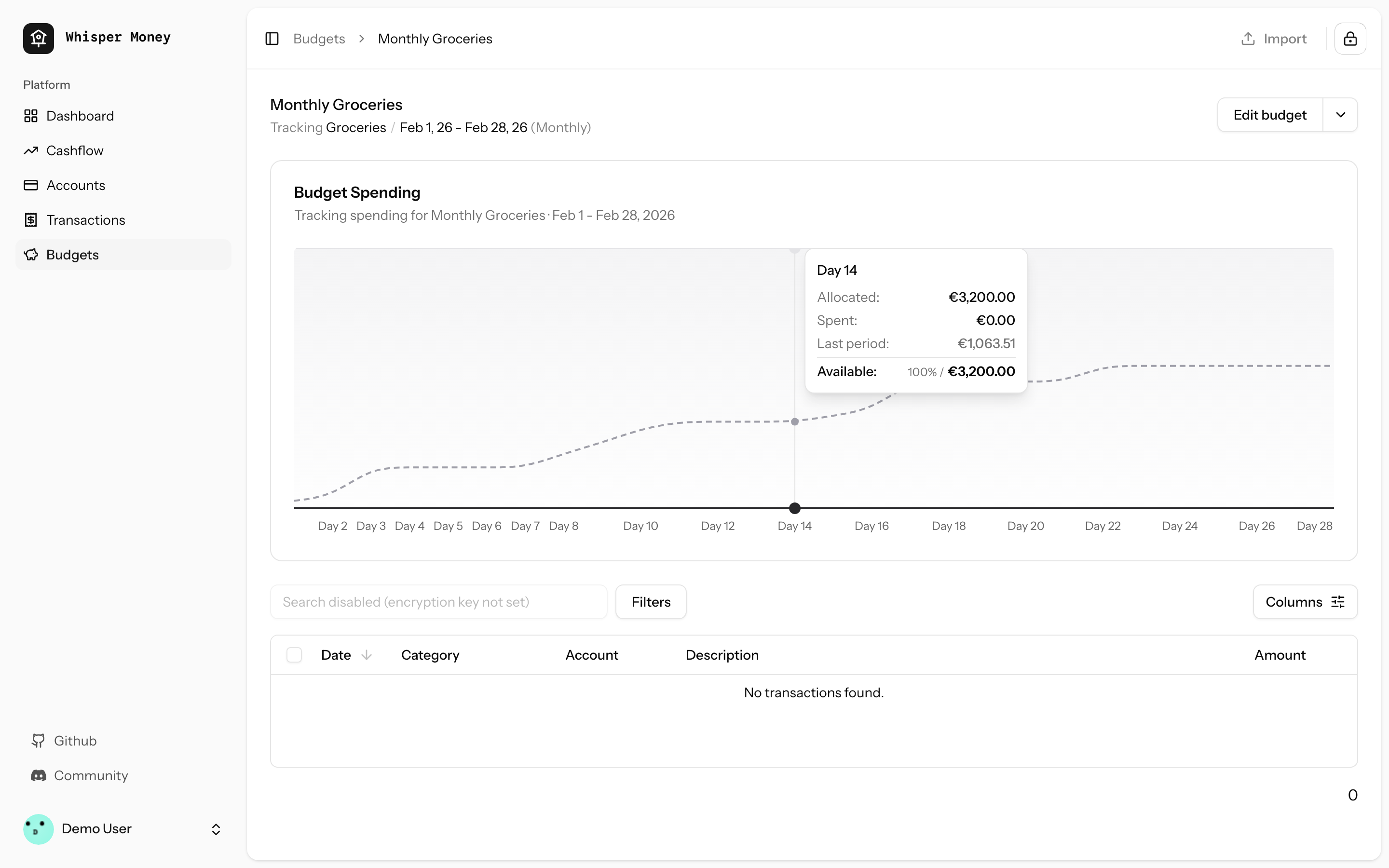
- Load the previous budget period (with transactions) in
`BudgetController::show()` and pass it to the frontend
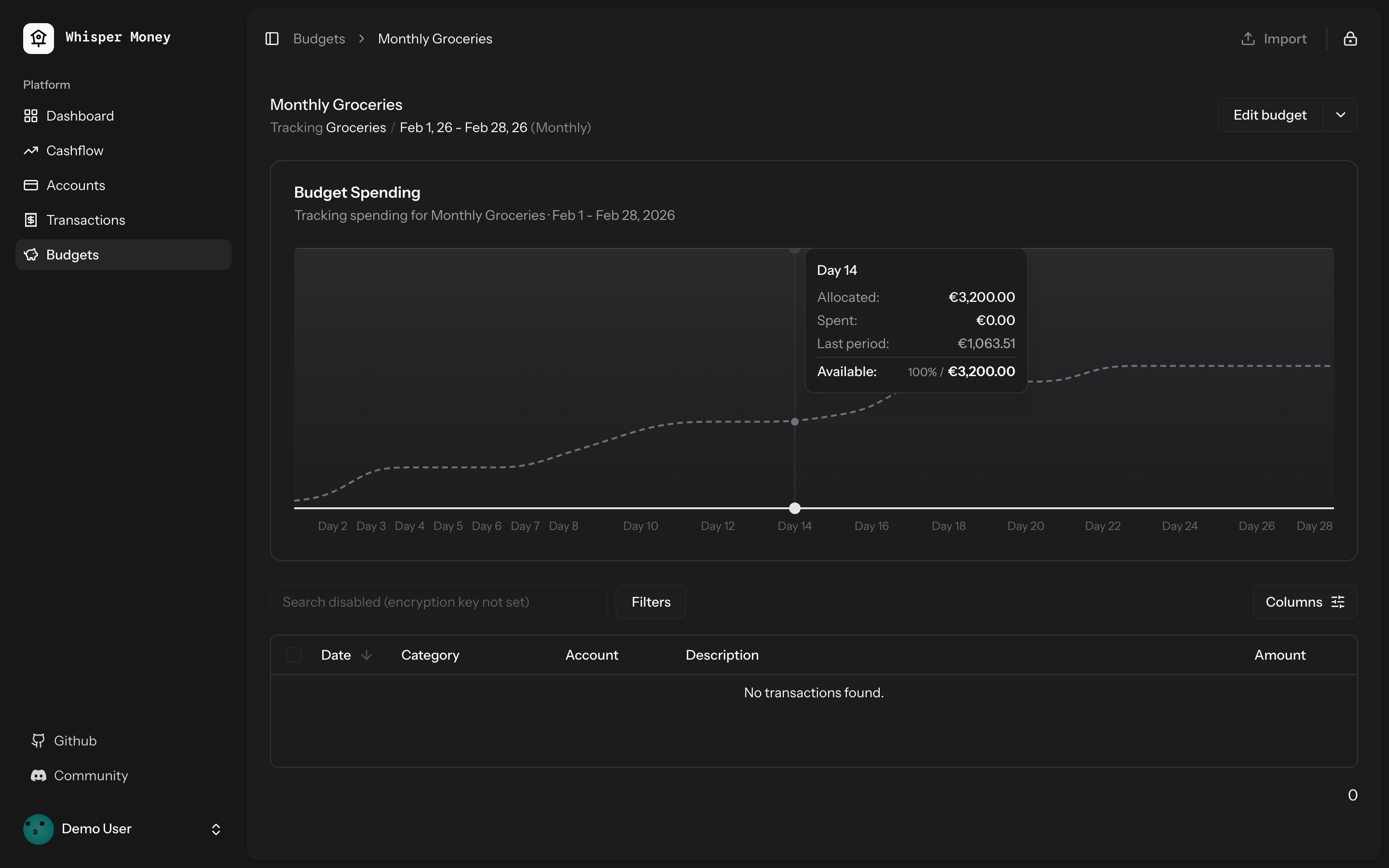
- Overlay previous period's cumulative spending as a dashed line on the
budget spending chart
- Use day-of-period alignment (Day 1, Day 2...) when comparing so
periods of different lengths align
- Tooltip shows both "Spent" (current) and "Last period" values when
hovering
- Chart now shows the full period timeline (not just up to today)
- When no previous period exists, chart behavior is unchanged
## Screenshots
### Light mode
### Dark mode
## Test plan
- [x] Tests pass: `php artisan test --compact
tests/Feature/BudgetTest.php` (9 tests)
- [x] Pint formatting passes
- [x] ESLint + Prettier pass
- [ ] Manual: view a budget with a prior period — dashed line appears
- [ ] Manual: view a budget with no prior period — chart unchanged
## Summary
- Detect standalone/PWA display mode (`display-mode: standalone` and iOS
`navigator.standalone`) on the welcome page
- Redirect to `/dashboard` immediately so the landing page is never
shown inside the installed app
- Unauthenticated PWA users go: open app → `/dashboard` → `/login` (via
auth middleware)

## Test plan
- [x] Install the PWA and open it — should go straight to
login/dashboard, never the landing page
- [x] Visit the website in a regular browser tab — landing page still
works normally
## Summary
- Add service worker registration and `viewport-fit=cover` for proper
iOS standalone mode (no Safari chrome)
- Change manifest `start_url` to `/dashboard` so PWA users skip the
landing page
- Add tests for PWA configuration
## Test plan
- [x] Deploy and re-add PWA to iOS home screen — should open as
standalone (no address bar)
- [x] PWA launch should go to `/dashboard` instead of the landing page
- [x] Non-authenticated PWA users should be redirected to login
Closes#71
## Summary
- Replaced the default initials-based avatar fallback with
[Facehash](https://facehash.dev/) — deterministic, unique avatar faces
generated from the user's name
- Same name always produces the same face, no API calls needed
- Fully rounded with `rounded-full` styling
## Preview
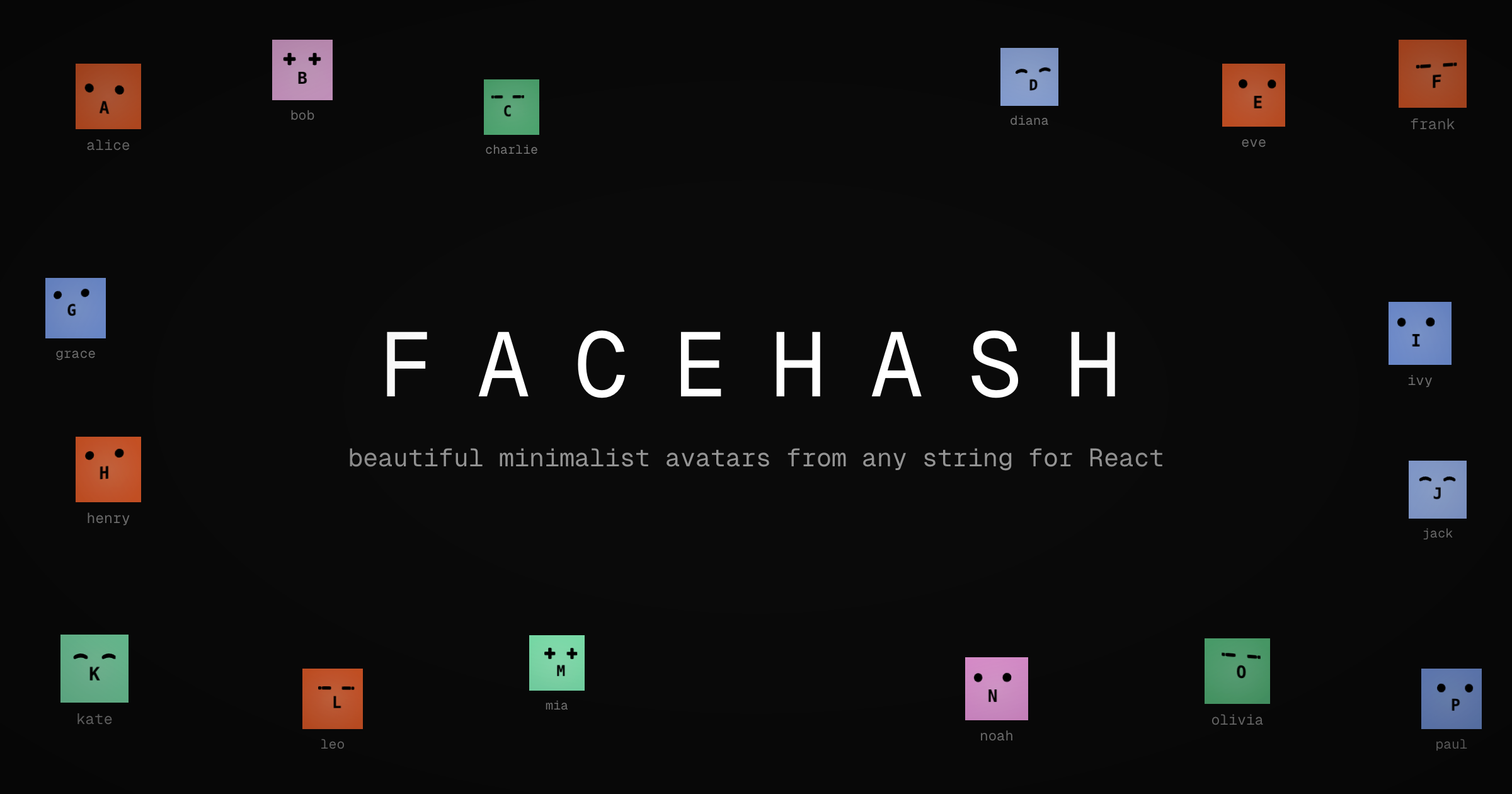
Each user gets a unique, consistent face based on their name — no more
generic initials.
## Changes
- Installed `facehash` package
- Updated `resources/js/components/user-info.tsx` to use `<Facehash>`
instead of `<Avatar>` with initials fallback
## Test plan
- [x] Verify avatar renders correctly in the sidebar footer (desktop)
- [x] Verify avatar renders correctly in the mobile header
- [x] Verify avatar renders correctly in the user dropdown menu
- [x] Confirm the same user always gets the same face
- [x] Check dark mode appearance
## Summary
- Fixed hover background color in dark mode to improve visibility and
contrast with chart bars
- Changed from `fill-muted` (oklch(0.269 0 0)) to `fill-white/5` in dark
mode for a lighter, more transparent background
- Resolves issue where hover background was too similar to bar colors in
dark mode
## Changes
- Updated `ChartContainer` component to use `dark:fill-white/5` for the
recharts tooltip cursor in dark mode
- Maintains existing `fill-muted` behavior for light mode
Closes#66
## Summary
- Removed explicit `gap-6` from the mobile bottom navigation bar so
`justify-evenly` distributes items naturally
- Reduced horizontal padding from `px-8` to `px-4` to give items more
room when 5 are present (e.g., when Cashflow and Budgets features are
enabled)
Closes#77
## Test plan
- [x] Verify the bottom nav looks correct with 4 items (Cashflow or
Budgets feature disabled)
- [x] Verify the bottom nav looks correct with 5 items (all features
enabled)
- [x] Confirm items are evenly spaced and none are clipped on small
screens
## Summary
- Fixes automation rules not applying labels when creating transactions
manually or via CSV import
- Eager-loads the `labels` relationship on automation rules in both
`TransactionController` and `HandleInertiaRequests`
- Syncs `label_ids` on the transaction `store` endpoint (was accepted
but never persisted)
- Passes `automationRules` prop through the full component chain:
`index.tsx` → `TransactionActionsMenu` → `ImportTransactionsDrawer`, and
`index.tsx` → `EditTransactionDialog`
- Passes `automationRules` as the missing 5th argument to
`reEvaluateAll()`
Closes#61
## Test plan
- [x] Existing feature tests pass (`php artisan test
--filter=Transaction`, `--filter=AutomationRule`)
- [x] Pint, ESLint, and Prettier all pass
- [x] Manually verify: create a transaction matching an automation rule
with labels → labels are applied
- [x] Manually verify: import CSV with transactions matching rules with
labels → labels are applied
- [x] Manually verify: "Re-evaluate All" applies labels from matched
rules
## Overview

We're excited to introduce budgeting capabilities to Whisper Money! This
feature helps you take control of your finances by setting spending
limits and tracking your progress over time.

## Screenshots
<img width="1316" height="793" alt="image"
src="https://github.com/user-attachments/assets/ac394d36-cded-4ea4-9883-120785e260f1"
/>
<img width="1315" height="907" alt="image"
src="https://github.com/user-attachments/assets/7c682474-5aa7-4388-b626-29b56f5ebbef"
/>
<img width="1315" height="992" alt="image"
src="https://github.com/user-attachments/assets/21eace45-23c6-472d-9aa0-0feb6db3fba4"
/>

## What's New

### Create Flexible Budgets
- Set budgets for specific categories or labels
- Choose from monthly, weekly, bi-weekly, or custom periods
- Set your own budget start date for better alignment with your pay
schedule

### Track Your Spending
- Visual spending charts show how much you've spent vs. your budget
- See at a glance which budgets are on track and which need attention
- View all transactions that count toward each budget

### Smart Budget Management
- **Carry Over**: Unused budget amounts automatically roll into the next
period
- **Reset**: Unused amounts return to your available money pool
- Edit or delete budgets anytime as your needs change

### Easy Access
- New Budgets section in the main navigation
- Quick overview cards showing budget status
- Detailed budget pages with spending history and transaction lists

## How It Works

1. Create a budget by selecting a category or label and setting your
spending limit
2. Your transactions are automatically matched to relevant budgets
3. Track your progress with visual charts and spending summaries
4. Adjust your budgets as needed to stay on track with your financial
goals

This feature is now available behind a feature flag and can be enabled
for users who want to start budgeting their expenses.
https://github.com/user-attachments/assets/a80966de-b282-4ba0-9431-2cfbcfddc023

Every detail is important. Now, when you are about to update the balance
of an account, the current balance is pre-filled, and you can even do
simple math operations.

If you just receive 1,000 dollars, you can just type `+ 1000` and press
enter.

No need to do the maths by your self.
This PR simplifies the IndexedDB synchronization mechanism by removing
individual sync controllers and services, and instead using Inertia.js
shared props to provide data globally across the application.

## Benefits

1. **Simplified Architecture**: Removed complex sync logic for
static/semi-static data (accounts, categories, banks, labels, automation
rules)
2. **Better Performance**: Data is now shared via Inertia props,
eliminating unnecessary API calls and IndexedDB operations
3. **Reduced Complexity**: Significantly reduced codebase size (~2000
lines removed)
4. **Better UX**: Data is immediately available on page load without
waiting for sync operations
5. **Maintainability**: Fewer moving parts means easier to maintain and
debug

## Migration Notes

- Transaction syncing still uses IndexedDB for offline support
- All other data (accounts, categories, banks, labels, automation rules)
is now fetched via Inertia shared props
- Components automatically receive updated data on navigation without
manual sync operations
## Summary
- Fixed top spending categories card to display amounts in the user's
currency instead of hardcoded USD
- Uses `auth.user.currency_code` from page props, consistent with other
dashboard components

Issue: #56
## Summary

This PR implements automatic opening of the encryption key unlock modal
immediately after user login when they visit the dashboard. The modal
will only appear once per login session and will not show up on
subsequent dashboard visits or if the user manually clears their
encryption key.

## Problem

Previously, users had to manually click the encryption key button in the
sidebar after logging in to unlock their encrypted data. This extra step
could be confusing for new users and added friction to the login flow.

## Solution

The encryption key modal now automatically opens when users visit the
dashboard immediately after logging in, but **only if**:
1. The user just completed a login (session flag is set)
2. Their encryption key is not already in browser storage
3. Encrypted challenge data is available

## Implementation Details

### Backend Changes

#### 1. Custom Login Response Classes
Created two new response classes that override Fortify's default login
responses:

**`app/Http/Responses/LoginResponse.php`**
- Implements `LoginResponse` contract
- Sets `show_encryption_prompt` session flash variable after successful
login
- Handles both regular login and JSON API responses

**`app/Http/Responses/TwoFactorLoginResponse.php`**
- Implements `TwoFactorLoginResponse` contract
- Sets the same session flag after successful 2FA authentication
- Ensures the modal appears for 2FA users as well

#### 2. Service Provider Registration
**`app/Providers/FortifyServiceProvider.php`**
- Registered custom response classes as singletons in the container
- Fortify now uses our custom responses instead of defaults

#### 3. Dashboard Controller
**`app/Http/Controllers/DashboardController.php`**
- Passes `showEncryptionPrompt` flag from session to frontend
- Uses `session('show_encryption_prompt', false)` which automatically
consumes the flash data

### Frontend Changes

**`resources/js/pages/dashboard.tsx`**
- Added `DashboardProps` interface extending `SharedData` with
`showEncryptionPrompt` boolean
- Updated `useEffect` hook to check three conditions before auto-opening
modal:
1. `props.showEncryptionPrompt` - User just logged in (from session
flash)
  2. `!isKeySet` - Encryption key not in browser storage
  3. `encryptedMessageData` - Encrypted challenge data loaded
- Includes `UnlockMessageDialog` component that conditionally renders

## How It Works

### User Flow

1. **User logs in** → Custom `LoginResponse` or `TwoFactorLoginResponse`
sets `show_encryption_prompt` flash session variable
2. **Redirect to dashboard** → `DashboardController` retrieves and
passes the flag to frontend (consuming it)
3. **Dashboard loads** → React component checks all three conditions
4. **Modal appears** → If conditions are met, `UnlockMessageDialog`
opens automatically
5. **Session flag consumed** → Subsequent page loads won't trigger the
modal

### Why Session Flash?

Laravel's session flash data is perfect for this use case because:
- It's automatically removed after being accessed once
- It survives redirects (crucial for post-login flow)
- It's server-side, so it can't be manipulated by client-side code
- No database changes or additional state management needed

### Edge Cases Handled

✅ **User clears encryption key manually** → Modal won't auto-open on
dashboard visit (no session flag)
✅ **User refreshes dashboard** → Modal won't re-appear (flash data
consumed)
✅ **User logs out and back in** → Modal appears again (new session flag)
✅ **2FA enabled users** → Modal appears after successful 2FA challenge
✅ **Key already in browser** → Modal doesn't appear (key check passes)

## Testing

- ✅ All existing dashboard tests pass (2 tests)
- ✅ All authentication tests pass (58 tests)
- ✅ Code formatted with Laravel Pint
- ✅ Code formatted with Prettier
- ✅ ESLint validation passes

## Files Changed

- `app/Http/Responses/LoginResponse.php` (new)
- `app/Http/Responses/TwoFactorLoginResponse.php` (new)
- `app/Providers/FortifyServiceProvider.php` (modified)
- `app/Http/Controllers/DashboardController.php` (modified)
- `resources/js/pages/dashboard.tsx` (modified)

## Breaking Changes

None. This is an additive feature that enhances the existing
authentication flow without breaking any existing functionality.
## Overview

This PR adds a flexible system for sending update emails to all Whisper
Money users. As the solo developer, you can now easily communicate
product updates, announcements, and news to your growing user base.

## Problem Solved

- **No easy way to send announcements**: Previously, there was no simple
way to broadcast important updates to all users
- **Manual process**: Would require writing custom scripts each time
- **No duplicate prevention**: Risk of accidentally sending the same
email multiple times
- **Version control**: Email content wasn't tracked in git

## Solution

A complete email system that lets you:
1. Write update emails as markdown templates (version controlled)
2. Send them with a single command
3. Automatic duplicate prevention (users only receive each update once)
4. Track who received what in the database

## How It Works

### 1. Create Email Template

Create a markdown file in `resources/views/mail/updates/`:

```blade
<x-mail::message>
# What's New in January 2026

Hi {{ $user->name }},

Your update content here...

<x-mail::button :url="'https://discord.gg/9UQWZECDDv'">
Join the Discord Community
</x-mail::button>

Víctor Falcón Ruíz
Founder & Solo Developer, Whisper Money
</x-mail::message>
```

### 2. Send to All Users

```bash
# Simple - one command
php artisan email:update first-update-jan-2026

# With options
php artisan email:update first-update-jan-2026 --subject="Personal Thank You" --exclude-demo
```

### 3. Automatic Tracking

- Users only receive each update once (tracked by identifier)
- Can send different updates to same users
- View history in `user_mail_logs` table

## First Email Included

The PR includes the first update email (`first-update-jan-2026`)
announcing:
- 240+ GitHub stars milestone
- First paying users
- Discord community invitation
- Canny roadmap links
- Personal message from Víctor as the solo developer

## Technical Details

### What's New

**Database:**
- Migration: Add `email_identifier` column to `user_mail_logs`
- Migration: Update unique constraint to `(user_id, email_type,
email_identifier)`

**Backend:**
- `DripEmailType` enum: Added `Update` case
- `UpdateEmail` mailable: Generic mailable accepting any view
- `SendUpdateEmailJob`: Handles sending + duplicate prevention
- `SendUpdateEmailCommand`: Artisan command with progress bar
- Updated all 6 drip email jobs to support new constraint

**Frontend:**
- Email template directory: `resources/views/mail/updates/`
- Comprehensive README with examples

**Tests:**
- Complete test suite: 11 tests covering all scenarios
- Tests duplicate prevention, filtering, queue behavior

### Command Options

```bash
php artisan email:update <view> [identifier] [options]

Arguments:
  view          Template name (e.g., "jan-2026-updates")
  identifier    Tracking ID (defaults to view name)

Options:
  --subject=    Custom email subject
  --exclude-demo   Skip demo account
  --force       Skip confirmation prompt
```

## Benefits

1. **Simple**: One command to send any update email
2. **Flexible**: Just create a new markdown view, no code changes needed
3. **Safe**: Confirmation prompt and duplicate prevention
4. **Fast**: Queued delivery, non-blocking
5. **Tracked**: Full audit trail in UserMailLog
6. **Consistent**: Follows existing drip email patterns
7. **Reusable**: Same command for all future update emails
8. **Version Controlled**: Email content is in git, reviewable

## Migration Path

To use in production:

```bash
# 1. Run migrations
php artisan migrate

# 2. Create your email template
vim resources/views/mail/updates/your-update.blade.php

# 3. Commit and deploy
git add resources/views/mail/updates/your-update.blade.php
git commit -m "Add update email"
git push

# 4. Send on production
php artisan email:update your-update
```

## Example Use Cases

- Product announcements
- New feature launches
- Community updates
- Milestone celebrations
- Important notifications
- Partnership announcements

## Files Changed

### Created
- `database/migrations/*_add_email_identifier_to_user_mail_logs.php`
- `database/migrations/*_update_user_mail_logs_unique_constraint.php`
- `app/Mail/UpdateEmail.php`
- `app/Jobs/SendUpdateEmailJob.php`
- `app/Console/Commands/SendUpdateEmailCommand.php`
- `resources/views/mail/updates/first-update-jan-2026.blade.php`
- `resources/views/mail/updates/README.md`
- `tests/Feature/Console/SendUpdateEmailCommandTest.php`

### Modified
- `app/Enums/DripEmailType.php` (added Update case)
- `app/Models/UserMailLog.php` (added email_identifier field)
- All 6 drip email jobs (added email_identifier support)

## Testing

All tests passing (11 tests, 27 assertions):
- ✅ Command dispatches jobs for all users
- ✅ Command excludes demo account when flag is set
- ✅ Command fails when view does not exist
- ✅ Command uses custom subject when provided
- ✅ Job is dispatched to emails queue
- ✅ Command handles empty user database gracefully
- ✅ Job skips users who already received the update
- ✅ Job creates mail log entry after sending
- ✅ Job sends email with correct view and user data
- ✅ Command requires confirmation by default
- ✅ Command skips confirmation with force flag
## Summary

<img width="1220" height="1001" alt="whispermoney test_"
src="https://github.com/user-attachments/assets/c35751d5-385b-449c-81d6-14b5b6577ff2"
/>

Introduces a fully-functional demo account that lets prospective users
explore Whisper Money without creating an account. Users can click
"Check Demo" on the welcome page to instantly access a pre-populated
account with realistic financial data spanning 12 months.

## What's New

**Try Before You Sign Up**
- New "Check Demo" button on the welcome page for instant access
- Pre-configured demo account with real-world financial scenarios
- 12 months of sample transactions across multiple account types
(checking, savings, credit cards, investments)
- Pre-built automation rules, labels, and categories to showcase the
full app experience

**Demo Account Limitations**
- Demo accounts are read-only for sensitive operations (can't change
password, email, or payment settings)
- Clear messaging throughout the UI when demo restrictions apply
- Settings pages show helpful notices about demo limitations
- Automatic daily reset to maintain fresh demo experience

**Developer Experience**
- `php artisan demo:reset` command for manual resets
- Configurable via environment variables (DEMO_EMAIL, DEMO_PASSWORD,
DEMO_ENCRYPTION_KEY)
- Comprehensive test coverage for demo restrictions and data generation

## User Impact

This feature removes the friction of signing up before understanding the
product's value. Users can:
- Explore all features with realistic data
- Test automation rules and see them in action
- View charts and insights based on a year of financial activity
- Experience the full privacy-first encryption workflow
- Understand the product before committing to create an account

Perfect for demos, screenshots, documentation, and helping users make
informed decisions about whether Whisper Money fits their needs.
Summary
- Add new Cashflow page with income/expense analytics, Sankey chart
visualization, and trend analysis
- Add Cashflow summary widget to the dashboard
- Implement feature flag system using Laravel Pennant to control feature
visibility per user
- Add artisan commands to enable/disable features: `php artisan
feature:enable/disable [feature] [email|all]`

## New Features
- **Cashflow Page**: Period-based income/expense breakdown with category
analysis
- **Sankey Chart**: Visual flow diagram showing money movement between
categories
- **Trend Chart**: 12-month historical cashflow visualization
- **Dashboard Widget**: Quick cashflow summary card
- **Feature Flags**: Cashflow feature hidden behind feature flag,
controllable per-user

## How to enable it
This feature it's under a feature flag until we are sure it's working
fine. If you want to test it, [send us a message on the general channel
in our discord](https://discord.gg/9UQWZECDDv). If you're self hosting
just run `php artisan feature:enable CashflowFeature {your_email}`.

## New Cashflow Page
<img width="1278" height="1185" alt="image"
src="https://github.com/user-attachments/assets/83469f24-9f96-4e5f-bef9-86c076d31243"
/>
<img width="1274" height="1035" alt="image"
src="https://github.com/user-attachments/assets/8949ff9d-c370-4fc4-81c6-268307c587a5"
/>

## New Dashboard Widget
<img width="1180" height="289" alt="image"
src="https://github.com/user-attachments/assets/ad984a66-9ffd-4079-85ce-0b2d28278d76"
/>
<img width="1179" height="286" alt="image"
src="https://github.com/user-attachments/assets/bff60286-8ea2-4e9c-8fa6-22755566648f"
/>
While importing new transactions, sometimes is difficult to now which
ones are already imported, and which one are new.

With this importer update you can quickly view the transactions that
already exist in your account, and see which ones you have and which
ones you don't have to import again.

<img width="1220" height="1169" alt="image"
src="https://github.com/user-attachments/assets/38de3208-a7d4-4578-8683-753bd0bf7c93"
/>
 Víctor Falcón




