## Summary

Budgets previously tracked a single category **or** label (mutually
exclusive). This lets a budget span **multiple** categories and labels
at once, all pooling spend against one allocated amount per period.

Scope decided with the requester:
- **Shared pool** — one allocated amount; any tracked category/label
counts against it.
- **Multi categories + multi labels** on a single budget.
- **Create-only** — tracking is chosen at creation and locked afterward
(edit dialog shows it read-only).

## Changes

**Backend**
- New `budget_category` + `budget_label` pivot tables; data migration
copies existing `category_id`/`label_id` into them, then drops those
columns.
- `Budget` model: `categories()` / `labels()` belongsToMany.
- `BudgetTransactionService` matches transactions across **all** tracked
categories OR labels (live assignment + historical backfill).
- `StoreBudgetRequest` accepts `category_ids` / `label_ids` arrays,
requires ≥1 across both, validates ownership. `update` no longer touches
tracking.

**Frontend**
- Reusable `MultiSelect` (popover + command + badge).
- Create dialog uses multi-selects; cards and show page render tracked
categories/labels as badges; edit dialog shows them read-only.
- Dexie bumped to v10 (drops unused per-category allocations table, adds
`budget_labels`).

## Testing
- Updated all budget/transaction/listener/browser tests for the pivot
model; added cases for multi-category matching, mixed category+label
pooling, and store validation (empty selection + foreign-ownership).
- Added the new `__()` strings to `lang/es.json`.
- Local `pint`, `lint`, `format` pass. Relying on CI for the full suite.
## Summary
- Add yearly budget period option on backend and frontend
- Generate yearly budget periods for Jan 1 through Dec 31
- Add feature coverage for yearly budget creation and period generation

## Tests
- vendor/bin/pint --dirty --format agent
- php artisan test --compact tests/Feature/BudgetPeriodServiceTest.php
tests/Feature/BudgetTest.php

## Notes
- npm run types fails on existing unrelated TypeScript errors: missing
generated Wayfinder modules and pre-existing type mismatches
## Summary

- **Clickable toggle rows**: The full row in the chart settings popover
now toggles the checkbox, not just the checkbox itself.
- **Chart stacking order**: When toggling "Include loans" or "Include
real estate", the chart now re-mounts so accounts appear in the correct
sorted position (biggest at bottom) instead of being appended on top.
- **Scheme-aware liability dot**: The red liability indicator dot in the
chart tooltip now respects the user's chart color scheme (neutral, blue,
pink) instead of always using the destructive/red color.
## Why

### Problem

Users viewing a budget had no way to look back at historical periods —
the show page always displayed the current period with no navigation.
The cashflow page's period selector also used a different visual style
(loose buttons with gaps) compared to the new grouped button pattern
established for budgets.

## What

### Changes

- **Budget period navigation**: new `BudgetPeriodNavigation` component
renders a `ButtonGroup` with `[<] [date range] [>]` buttons. Clicking
the label returns to the current period; arrows navigate between
existing periods.
- **Backend**: `BudgetController::show` accepts an optional
`?period=<uuid>` query param to serve a specific period. Future periods
are blocked at the query level on both direct access and `nextPeriod`
resolution.
- **Dropdown**: removed the split `ButtonGroup` from the budget header;
"Edit budget" and "Delete budget" now live together in a single `˅`
dropdown.
- **Cashflow period selector**: updated `PeriodNavigation` to use
`ButtonGroup` + `size="icon"` buttons to match the same visual style.
- **Tests**: 4 new feature tests covering period navigation,
future-period blocking, cross-budget access (404), and `nextPeriod`
boundary behaviour.

## Verification
<img width="921" height="683" alt="image"
src="https://github.com/user-attachments/assets/ceb5f70b-a15a-4a36-ae49-5d84054a62f9"
/>
## Summary
- Remove the `budgets` Pennant feature flag — budgets is now enabled for
all users
- Delete `EnsureBudgetsFeature` middleware and its route guard
- Remove `budgets` from shared Inertia features and the `Features`
TypeScript interface
- Remove all `Feature::for($user)->activate('budgets')` calls from tests
- Delete `BudgetFeatureFlagTest` and feature-disabled test cases from
`BudgetsFeatureNavigationTest`
## Summary
- Load the previous budget period (with transactions) in
`BudgetController::show()` and pass it to the frontend
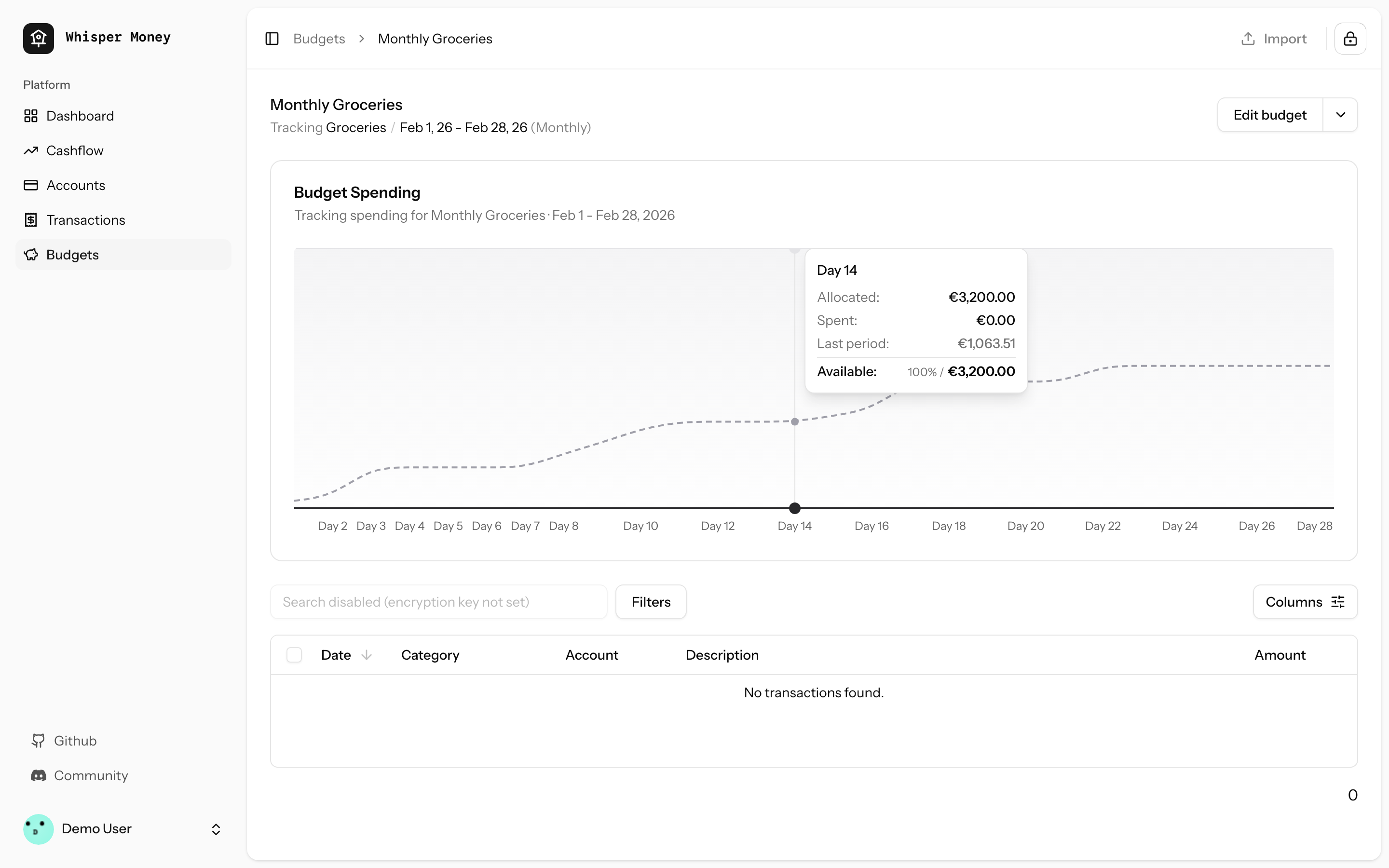
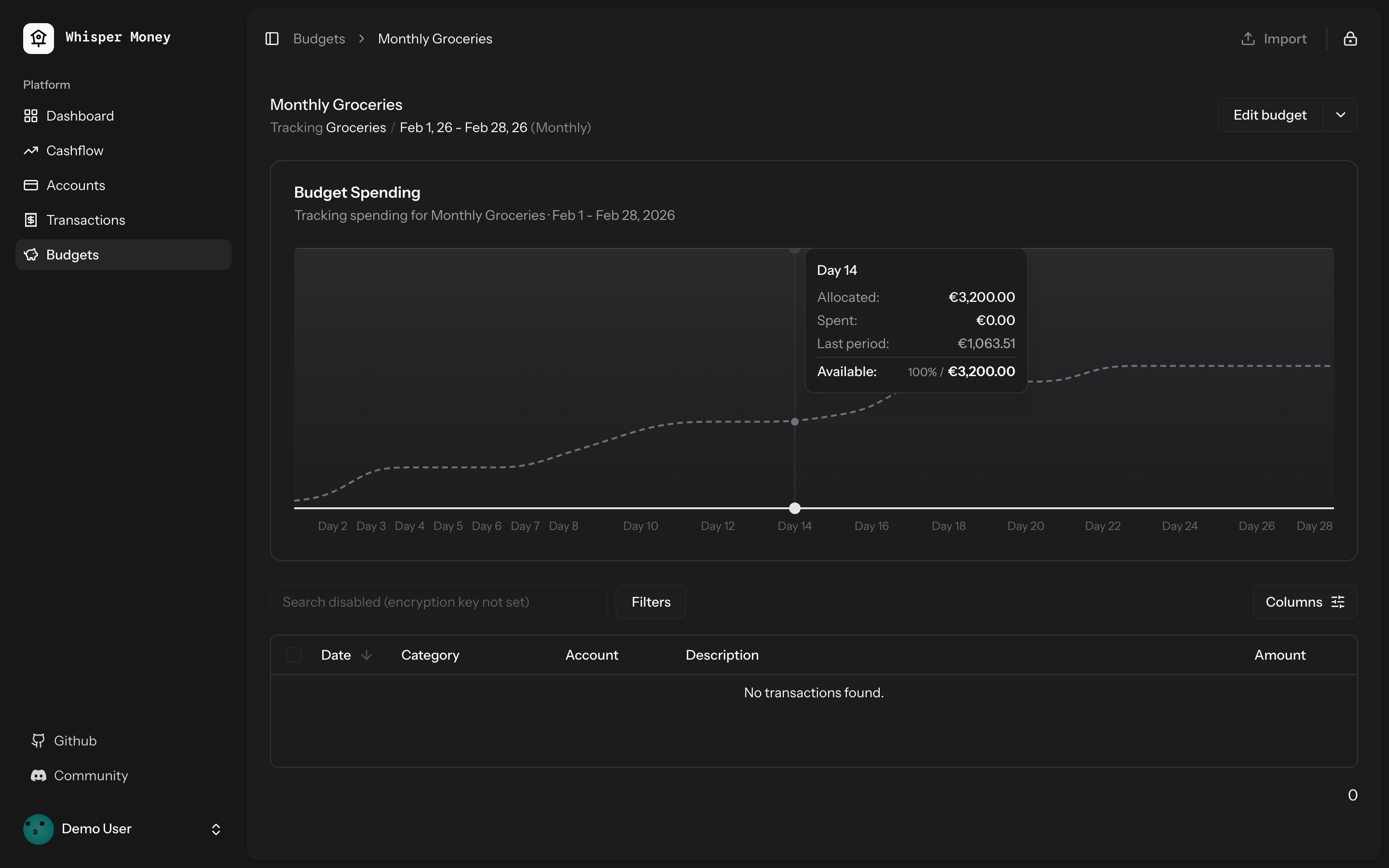
- Overlay previous period's cumulative spending as a dashed line on the
budget spending chart
- Use day-of-period alignment (Day 1, Day 2...) when comparing so
periods of different lengths align
- Tooltip shows both "Spent" (current) and "Last period" values when
hovering
- Chart now shows the full period timeline (not just up to today)
- When no previous period exists, chart behavior is unchanged
## Screenshots
### Light mode
### Dark mode
## Test plan
- [x] Tests pass: `php artisan test --compact
tests/Feature/BudgetTest.php` (9 tests)
- [x] Pint formatting passes
- [x] ESLint + Prettier pass
- [ ] Manual: view a budget with a prior period — dashed line appears
- [ ] Manual: view a budget with no prior period — chart unchanged
## Overview

We're excited to introduce budgeting capabilities to Whisper Money! This
feature helps you take control of your finances by setting spending
limits and tracking your progress over time.

## Screenshots
<img width="1316" height="793" alt="image"
src="https://github.com/user-attachments/assets/ac394d36-cded-4ea4-9883-120785e260f1"
/>
<img width="1315" height="907" alt="image"
src="https://github.com/user-attachments/assets/7c682474-5aa7-4388-b626-29b56f5ebbef"
/>
<img width="1315" height="992" alt="image"
src="https://github.com/user-attachments/assets/21eace45-23c6-472d-9aa0-0feb6db3fba4"
/>

## What's New

### Create Flexible Budgets
- Set budgets for specific categories or labels
- Choose from monthly, weekly, bi-weekly, or custom periods
- Set your own budget start date for better alignment with your pay
schedule

### Track Your Spending
- Visual spending charts show how much you've spent vs. your budget
- See at a glance which budgets are on track and which need attention
- View all transactions that count toward each budget

### Smart Budget Management
- **Carry Over**: Unused budget amounts automatically roll into the next
period
- **Reset**: Unused amounts return to your available money pool
- Edit or delete budgets anytime as your needs change

### Easy Access
- New Budgets section in the main navigation
- Quick overview cards showing budget status
- Detailed budget pages with spending history and transaction lists

## How It Works

1. Create a budget by selecting a category or label and setting your
spending limit
2. Your transactions are automatically matched to relevant budgets
3. Track your progress with visual charts and spending summaries
4. Adjust your budgets as needed to stay on track with your financial
goals

This feature is now available behind a feature flag and can be enabled
for users who want to start budgeting their expenses.
 Víctor Falcón

