mirror of https://github.com/fairyglade/ly.git
214 lines
5.1 KiB
Markdown
214 lines
5.1 KiB
Markdown
|
||
# Ly Display Manager (ly) - a TUI display manager
|
||
|
||
|
||
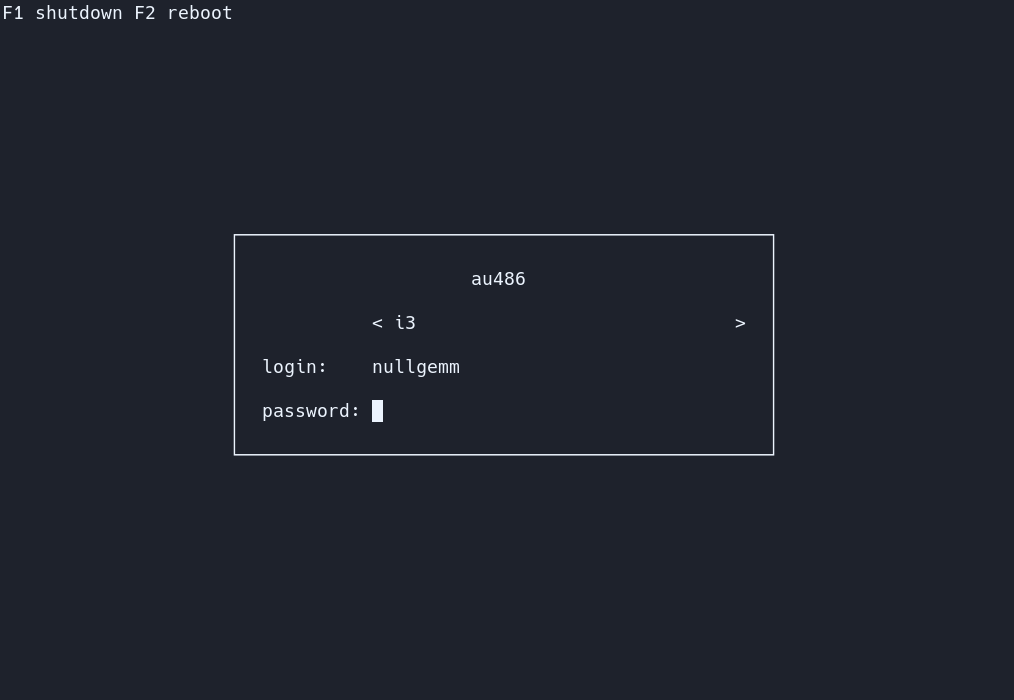
Ly Display Manager (ly for short) is a maintained fork of Ly with bug fixes and patches. Ly is a lightweight TUI (Text-based User Interface) display manager for Linux and BSD.
|
||
|
||
## Dependencies
|
||
- a C99 compiler (tested with tcc and gcc)
|
||
- a C standard library
|
||
- GNU make
|
||
- pam
|
||
- xcb
|
||
- xorg
|
||
- xorg-xauth
|
||
- mcookie
|
||
- tput
|
||
- shutdown
|
||
|
||
On Debian-based distros running `$ apt install build-essential libpam0g-dev libxcb-xkb-dev` as root should install all the dependencies for you.
|
||
For Fedora try running `$ dnf install make automake gcc gcc-c++ kernel-devel pam-devel libxcb-devel`
|
||
|
||
## Support
|
||
The following desktop environments were tested with success
|
||
|
||
- awesome
|
||
- bspwm
|
||
- budgie
|
||
- cinnamon
|
||
- deepin
|
||
- dwm
|
||
- enlightenment
|
||
- gnome
|
||
- i3
|
||
- kde
|
||
- lxde
|
||
- lxqt
|
||
- mate
|
||
- maxx
|
||
- pantheon
|
||
- qtile
|
||
- spectrwm
|
||
- sway
|
||
- windowmaker
|
||
- xfce
|
||
- xmonad
|
||
|
||
Ly should work with any X desktop environment, and provides
|
||
basic wayland support (sway works very well, for example).
|
||
|
||
## systemd?
|
||
Unlike what you may have heard, Ly does not require `systemd`,
|
||
and was even specifically designed not to depend on `logind`.
|
||
You should be able to make it work easily with a better init,
|
||
changing the source code won't be necessary :)
|
||
|
||
## Cloning and Compiling
|
||
Clone the repository
|
||
```
|
||
$ git clone --recurse-submodules https://github.com/gnsbriellh/ly-display-manager.git
|
||
```
|
||
|
||
Change the directory to ly-display-manager
|
||
```
|
||
$ cd ly-display-manager
|
||
```
|
||
|
||
Compile
|
||
```
|
||
$ make
|
||
```
|
||
|
||
Test in the configured tty (tty2 by default)
|
||
or a terminal emulator (but desktop environments won't start)
|
||
```
|
||
# make run
|
||
```
|
||
|
||
Install Ly and the provided systemd service file
|
||
```
|
||
$ make install installsystemd
|
||
```
|
||
|
||
Enable the service
|
||
```
|
||
$ systemctl enable ly.service
|
||
```
|
||
|
||
If you need to switch between ttys after Ly's start you also have to
|
||
disable getty on Ly's tty to prevent "login" from spawning on top of it
|
||
```
|
||
$ systemctl disable getty@tty2.service
|
||
```
|
||
|
||
### OpenRC
|
||
|
||
Clone, compile and test.
|
||
|
||
Install Ly and the provided OpenRC service
|
||
```
|
||
$ make install installopenrc
|
||
```
|
||
|
||
Enable the service
|
||
```
|
||
$ rc-update add ly
|
||
```
|
||
|
||
You can edit which tty Ly will start on by editing the `tty` option in the configuration file.
|
||
|
||
If you choose a tty that already has a login/getty running (has a basic login prompt), then you have to disable the getty so it doesn't respawn on top of ly
|
||
```
|
||
$ rc-update del agetty.tty2
|
||
```
|
||
|
||
### runit
|
||
|
||
```
|
||
$ make
|
||
$ make install installrunit
|
||
$ ln -s /etc/sv/ly /var/service/
|
||
```
|
||
|
||
Disable your existing display manager service if need be e.g.:
|
||
|
||
```
|
||
$ rm /var/service/lxdm
|
||
```
|
||
|
||
If you are running on `tty2` (check your `/etc/ly/config.ini`) you can disable e.g. `agetty` running there:
|
||
|
||
```
|
||
$ rm /var/service/agetty-tty2
|
||
```
|
||
|
||
## Arch Linux
|
||
Clone, compile and test.
|
||
|
||
### Dependencies
|
||
- make (include in "base-devel" -> RECOMMENDED)
|
||
|
||
### Installation
|
||
|
||
Clone the repository
|
||
```
|
||
$ git clone --recurse-submodules https://github.com/gnsbriellh/ly-display-manager.git ;
|
||
```
|
||
|
||
Change the directory to ly-display-manager
|
||
```
|
||
$ cd ly-display-manager ;
|
||
```
|
||
|
||
Compile
|
||
```
|
||
$ make ;
|
||
```
|
||
|
||
Test in the configured tty (tty2 by default)
|
||
or a terminal emulator (but desktop environments won't start)
|
||
```
|
||
$ make run ;
|
||
```
|
||
|
||
Install Ly and the provided systemd service file
|
||
```
|
||
$ make install installsystemd ;
|
||
```
|
||
|
||
Enable the service
|
||
```
|
||
$ systemctl enable ly.service ;
|
||
```
|
||
|
||
If you need to switch between ttys after Ly's start you also have to
|
||
disable getty on Ly's tty to prevent "login" from spawning on top of it
|
||
```
|
||
$ systemctl disable getty@tty2.service ´
|
||
```
|
||
|
||
## Configuration
|
||
You can find all the configuration in `/etc/ly/config.ini`.
|
||
The file is commented, and includes the default values.
|
||
|
||
## Controls
|
||
Use the up and down arrow keys to change the current field, and the
|
||
left and right arrow keys to change the target desktop environment
|
||
while on the desktop field (above the login field).
|
||
|
||
## .xinitrc
|
||
If your .xinitrc doesn't work make sure it is executable and includes a shebang.
|
||
This file is supposed to be a shell script! Quoting from xinit's man page:
|
||
|
||
> If no specific client program is given on the command line, xinit will look for a file in the user's home directory called .xinitrc to run as a shell script to start up client programs.
|
||
|
||
On Arch Linux, the example .xinitrc (/etc/X11/xinit/xinitrc) starts like this:
|
||
```
|
||
#!/bin/sh
|
||
```
|
||
|
||
## Tips
|
||
The numlock and capslock state is printed in the top-right corner.
|
||
Use the F1 and F2 keys to respectively shutdown and reboot.
|
||
Take a look at your .xsession if X doesn't start, as it can interfere
|
||
(this file is launched with X to configure the display properly).
|
||
|
||
## PSX DOOM fire animation
|
||
To enable the famous PSX DOOM fire described by [Fabien Sanglard](http://fabiensanglard.net/doom_fire_psx/index.html),
|
||
just uncomment `animate = true` in `/etc/ly/config.ini`. You may also
|
||
disable the main box borders with `hide_borders = true`.
|
||
|
||
## Additional Information
|
||
The name "Ly" is a tribute to the fairy from the game Rayman.
|
||
Ly was tested by oxodao, who is some seriously awesome dude.
|