## Summary
- Enables `MustVerifyEmail` on the `User` model so new users must verify
their email before accessing protected routes
- Unverified users are redirected to `/email/verify` when attempting to
access routes behind the `verified` middleware (subscribe, onboarding,
dashboard)
- A verification email is automatically sent on registration via Fortify
## Screenshot

## Video
https://github.com/whisper-money/whisper-money/raw/mail-verification/storage/videos/ac0945c527f014b9cd657f18c911f496.webm
## Test plan
- [x] New test: registration sends a `VerifyEmail` notification
- [x] New test: newly registered users have `email_verified_at` as null
- [x] New test: unverified users are redirected to `verification.notice`
from protected routes (subscribe, onboarding, dashboard)
- [x] New test: verified users are not redirected to verification notice
- [x] Existing email verification and notification tests still pass (31
auth tests, 52 settings tests)
- [x] Browser walkthrough: registration → redirected to `/email/verify`
page with "Resend verification email" button
## Summary

- Fixes a race condition where the automerge workflow merged PR #94
despite `browser-tests` failing
- Adds SHA verification to ensure the CI run matches the PR's latest
commit (prevents stale merges from earlier pushes)
- Adds a failed-checks guard that inspects all PR check statuses before
merging

## What happened

PR #94 had two CI runs: an earlier one that passed and a later one where
`browser-tests` failed. The automerge workflow triggered on the first
successful run and merged the PR before the second run completed,
because it only checked `workflow_run.conclusion == 'success'` without
verifying it was for the latest commit.

## Test plan

- [x] Push a PR with the Automerge label, verify it merges when all
checks pass
- [x] Push a follow-up commit that breaks browser-tests — verify the
earlier success doesn't trigger a merge
- [x] Verify PRs without the Automerge label are unaffected
## Summary
- Prevents the landing page from briefly flashing before redirecting to
`/dashboard` when accessing from an installed PWA
- Detects standalone mode synchronously via a `useState` initializer so
the spinner renders on the very first paint
- Shows a centered loading spinner instead of the full landing page
while the redirect happens

## Test plan
- [x] Open the app as an installed PWA and verify a spinner shows
instead of the landing page before redirecting to dashboard
- [x] Open the landing page in a regular browser and verify the full
landing page renders normally with no spinner
## Summary

- Replaced the broken `fade-bottom` header with a floating **pill menu**
on mobile (matching the dashboard bottom nav style)
- Fixed landing screenshot images using `w-full` instead of `h-full
w-auto` for proper aspect ratio on mobile
- Reduced skew/rotation transforms on mobile for better readability
- Removed unused `fade-bottom` CSS class

## Changes

### Header (`header.tsx`)
- **Mobile** (`< sm`): Floating pill with `rounded-full`, glassmorphism
(`bg-background/70 backdrop-blur-xl`), positioned at `top-4` with
margin. Compact logo + auth buttons with `size="sm"` and `rounded-full`.
- **Desktop** (`sm+`): Clean fixed header with `bg-background/5
backdrop-blur-lg` (unchanged from original). All nav items (Github,
Discord, auth) preserved.

### Landing images (`welcome.tsx`)
- Changed images from `h-full w-auto` to `w-full` for proper responsive
aspect ratio
- Added `max-sm:` variants to reduce rotation/skew on mobile (`-16deg/8`
instead of `-24deg/12`)

### CSS (`app.css`)
- Removed unused `.fade-bottom` class

## Screenshots

### Mobile (390x844) — Pill Header
<img
src="https://raw.githubusercontent.com/whisper-money/whisper-money/fix/welcome-page-mobile-ios/.github/pr-screenshots/pr-mobile-hero.png"
width="300" />

### Mobile — Images Section
<img
src="https://raw.githubusercontent.com/whisper-money/whisper-money/fix/welcome-page-mobile-ios/.github/pr-screenshots/pr-mobile-images.png"
width="300" />

### Desktop (1440x900)
<img
src="https://raw.githubusercontent.com/whisper-money/whisper-money/fix/welcome-page-mobile-ios/.github/pr-screenshots/pr-desktop.png"
width="800" />

## Test plan

- [ ] Verify pill header displays correctly on iOS Safari (physical
device or simulator)
- [ ] Verify header buttons (Log in, Register) work on mobile
- [ ] Verify desktop header is unchanged with all buttons (Github,
Discord, Log in, Register)
- [ ] Verify landing images display with correct aspect ratio on mobile
- [ ] Verify dark mode works for both mobile pill header and desktop
header
## Summary
- Load the previous budget period (with transactions) in
`BudgetController::show()` and pass it to the frontend
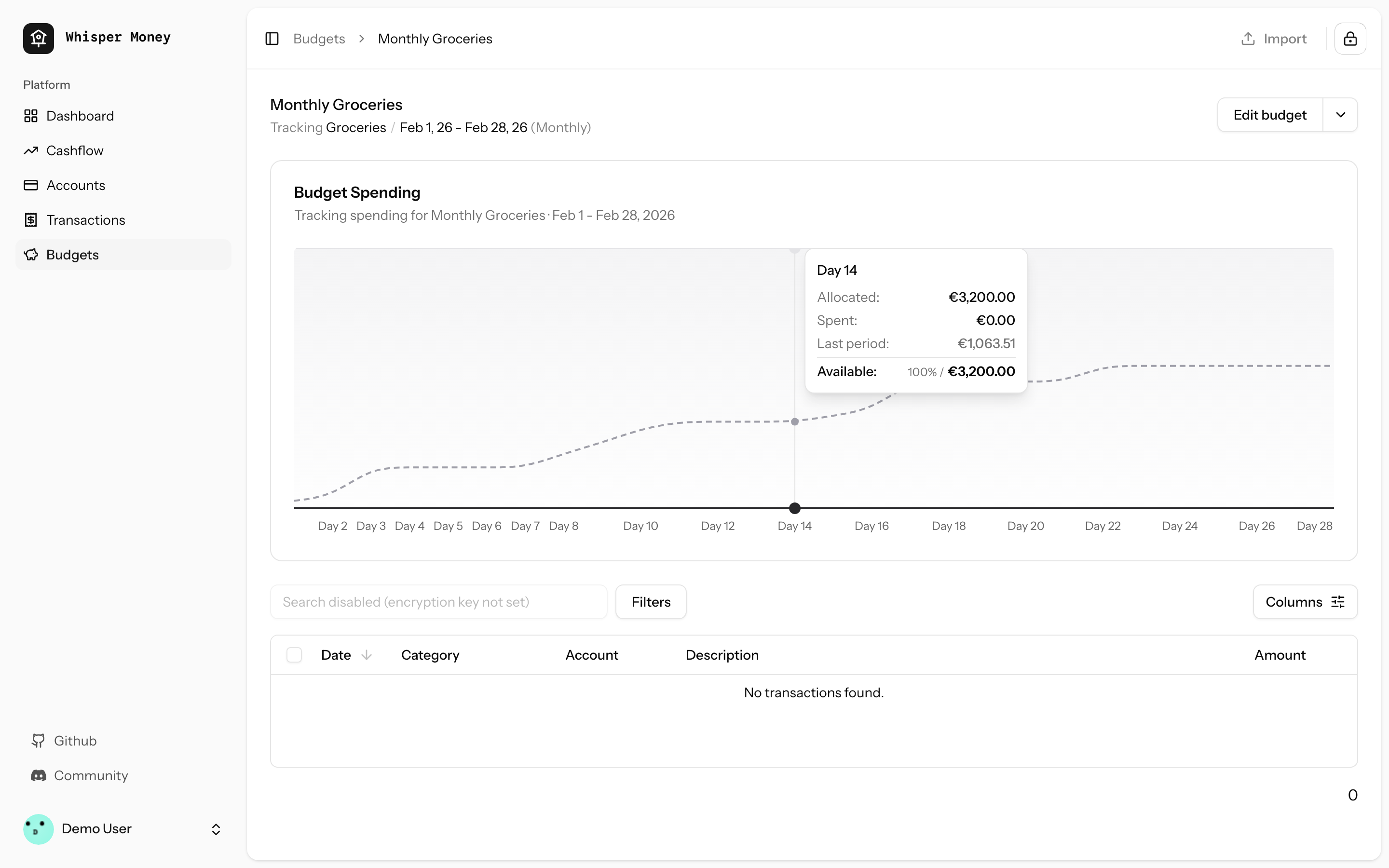
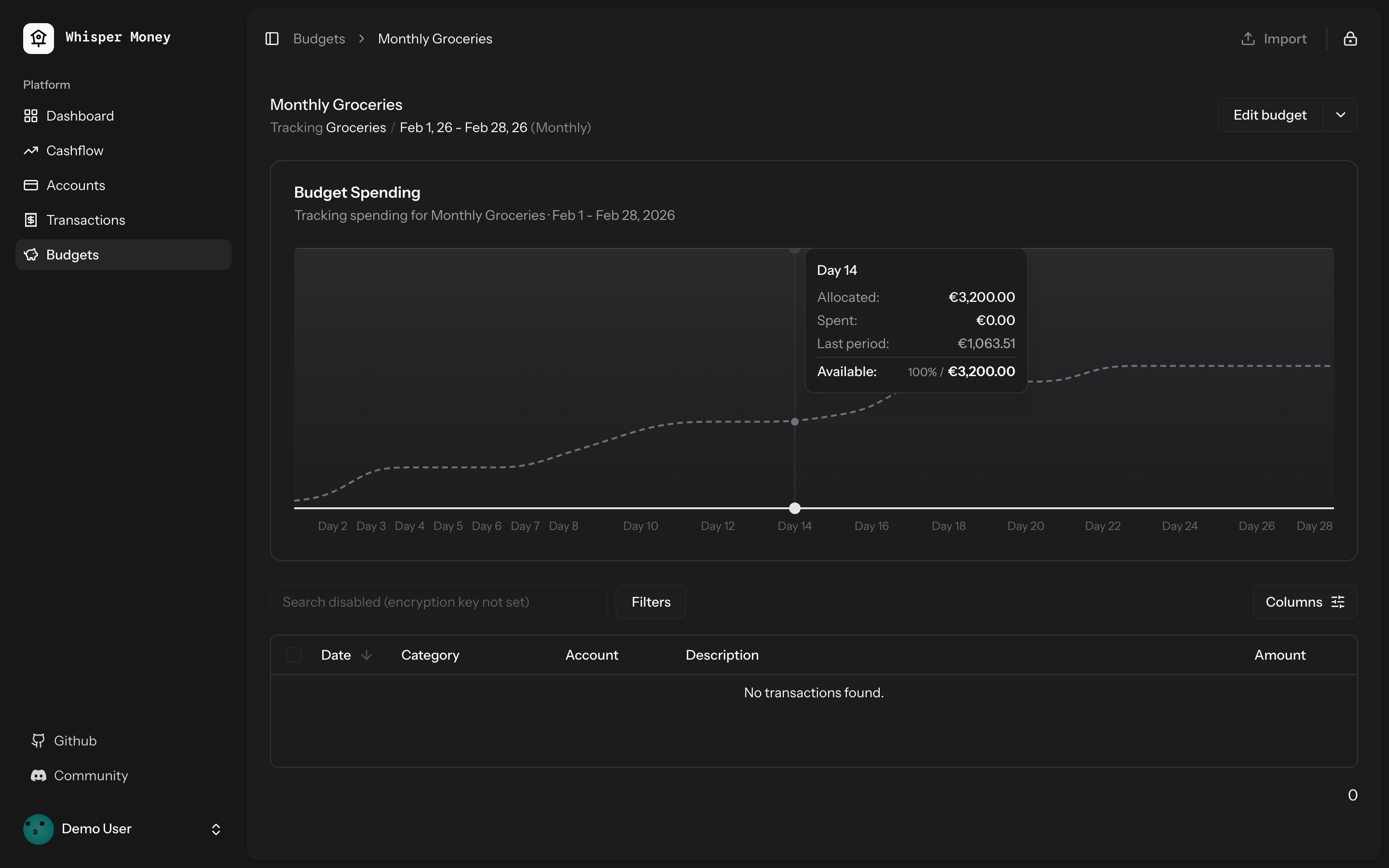
- Overlay previous period's cumulative spending as a dashed line on the
budget spending chart
- Use day-of-period alignment (Day 1, Day 2...) when comparing so
periods of different lengths align
- Tooltip shows both "Spent" (current) and "Last period" values when
hovering
- Chart now shows the full period timeline (not just up to today)
- When no previous period exists, chart behavior is unchanged
## Screenshots
### Light mode
### Dark mode
## Test plan
- [x] Tests pass: `php artisan test --compact
tests/Feature/BudgetTest.php` (9 tests)
- [x] Pint formatting passes
- [x] ESLint + Prettier pass
- [ ] Manual: view a budget with a prior period — dashed line appears
- [ ] Manual: view a budget with no prior period — chart unchanged
## Summary
- Detect standalone/PWA display mode (`display-mode: standalone` and iOS
`navigator.standalone`) on the welcome page
- Redirect to `/dashboard` immediately so the landing page is never
shown inside the installed app
- Unauthenticated PWA users go: open app → `/dashboard` → `/login` (via
auth middleware)

## Test plan
- [x] Install the PWA and open it — should go straight to
login/dashboard, never the landing page
- [x] Visit the website in a regular browser tab — landing page still
works normally
## Summary

- Budget periods use `date` columns (`start_date`, `end_date`) but
queries compared them against `now()` which includes a time component
(e.g. `2026-01-31 15:30:00`). MySQL converts the date to midnight for
comparison, so `end_date >= now()` evaluates to `'2026-01-31 00:00:00'
>= '2026-01-31 15:30:00'` → **false** — causing "No active period" on
the last day of every period.
- Replaced `now()` with `today()` (date-only) in all budget period date
comparisons across `Budget::getCurrentPeriod()`,
`BudgetController::index()`, and `GenerateBudgetPeriods` command.

## Test plan

- [x] Added 4 Pest tests covering the edge case (last day at various
times, first day at end of day, index/show endpoints)
- [x] All existing budget tests pass
## Summary
- Add service worker registration and `viewport-fit=cover` for proper
iOS standalone mode (no Safari chrome)
- Change manifest `start_url` to `/dashboard` so PWA users skip the
landing page
- Add tests for PWA configuration
## Test plan
- [x] Deploy and re-add PWA to iOS home screen — should open as
standalone (no address bar)
- [x] PWA launch should go to `/dashboard` instead of the landing page
- [x] Non-authenticated PWA users should be redirected to login
Closes#71
## Summary
- Fixes the automerge workflow that was merging PRs immediately without
waiting for CI
- Replaces `gh pr merge --auto` (requires branch protection) with a
`workflow_run` trigger that fires after CI completes
- When CI passes on a PR with the "Automerge" label, the PR is
squash-merged automatically

## Test plan
- [x] Merge this PR manually to get the workflow on `main`
- [x] Create a test PR, add the "Automerge" label, and verify it only
merges after CI passes
## Summary
- Replaced the default initials-based avatar fallback with
[Facehash](https://facehash.dev/) — deterministic, unique avatar faces
generated from the user's name
- Same name always produces the same face, no API calls needed
- Fully rounded with `rounded-full` styling
## Preview
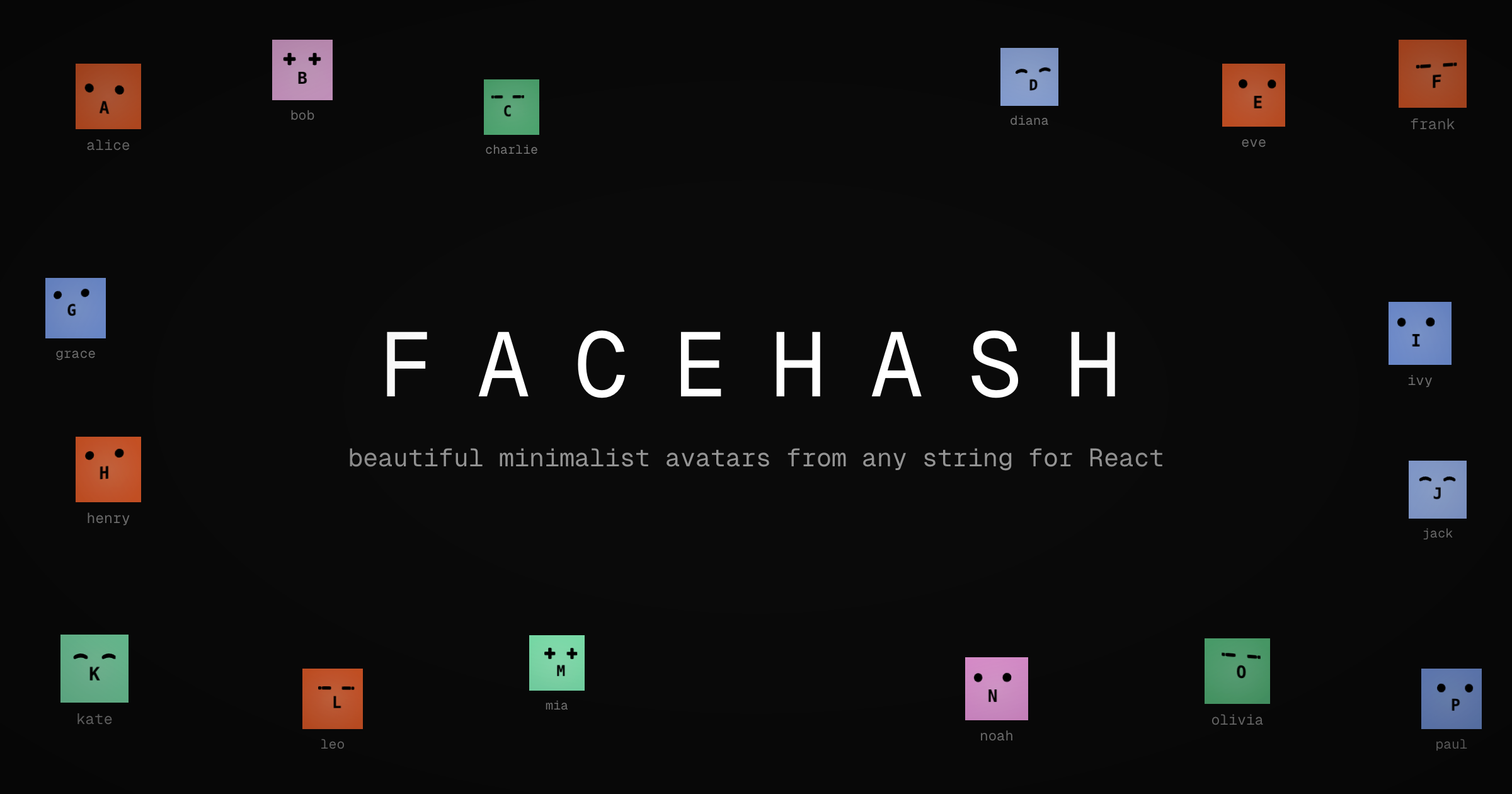
Each user gets a unique, consistent face based on their name — no more
generic initials.
## Changes
- Installed `facehash` package
- Updated `resources/js/components/user-info.tsx` to use `<Facehash>`
instead of `<Avatar>` with initials fallback
## Test plan
- [x] Verify avatar renders correctly in the sidebar footer (desktop)
- [x] Verify avatar renders correctly in the mobile header
- [x] Verify avatar renders correctly in the user dropdown menu
- [x] Confirm the same user always gets the same face
- [x] Check dark mode appearance
## Summary
- Replace `subMonths()` with `subMonthsNoOverflow()` across controllers,
commands, and tests to prevent date overflow on months with 31 days
- On Jan 31, `subMonths(2)` overflows: Nov 31 doesn't exist → Carbon
rolls forward to Dec 1, producing wrong date ranges and off-by-one month
counts

## Root cause
Carbon's `subMonths()` allows day overflow. When the target month has
fewer days than the source date, it rolls into the next month. For
example:
- `2026-01-31 subMonths(2)` → Nov 31 → **2025-12-01** (expected Nov 30)
- `2026-01-31 subMonths(11)` → Feb 31 → **2025-03-03** (expected Feb 28)

`subMonthsNoOverflow()` clamps to the last valid day of the target month
instead.

## Files changed
- `app/Http/Controllers/Api/CashflowAnalyticsController.php` — cashflow
trend start date calculation
- `app/Console/Commands/ResetDemoAccountCommand.php` — balance history
date generation (was causing duplicate `balance_date` entries)
- `tests/Feature/AccountControllerTest.php` — balance evolution `from`
param
- `tests/Feature/CashflowAnalyticsTest.php` — transaction date
generation in loop
- `tests/Feature/DashboardAnalyticsTest.php` — net worth evolution
`from` param

## Test plan
- [x] `account balance evolution returns data` — expects 3 months, was
getting 2
- [x] `cashflow trend returns monthly data` — expects 3 months, was
getting 2
- [x] `cashflow trend defaults to 12 months` — expects 12 months, was
getting 11
- [x] `net worth evolution returns monthly data points` — expects 3
months, was getting 2
- [x] `demo:reset creates demo user` — was throwing
UniqueConstraintViolation on duplicate balance dates
## Summary
- Adds a new GitHub Actions workflow that enables auto-merge when the
"Automerge" label is added to a PR
- Uses `gh pr merge --auto --squash` to squash-merge once all required
CI checks pass

## Test plan
- [ ] Add the "Automerge" label to this PR to verify the workflow
triggers
- [ ] Confirm the PR is auto-merged after CI passes
## Summary
- Add `SyncUserToResendListener` to automatically sync users to Resend
contacts on registration
- Add `ResendService` for Resend API interactions
- Add `resend:sync` command to bulk sync existing users

## Changes
- **New**: `app/Listeners/SyncUserToResendListener.php` -
Auto-discovered queued listener
- **New**: `app/Services/ResendService.php` - Service for Resend
contacts API
- **New**: `app/Console/Commands/ResendSyncCommand.php` - Bulk sync
command
- **New**: Tests for listener and command

## Usage
New users are automatically synced on registration. For existing users:
```bash
php artisan resend:sync
```

## Test plan
- [x] New user registration triggers contact sync
- [x] `resend:sync` command syncs all existing users
- [x] Graceful handling when API key is not configured
- [x] Duplicate contacts are handled by Resend (no errors)
## Summary
- Enable the budgets Pennant feature flag for all users by changing the
default from `false` to `true`

## Test plan
- [x] Existing `BudgetFeatureFlagTest` passes (9 tests, 39 assertions)
## Summary
- Fixed hover background color in dark mode to improve visibility and
contrast with chart bars
- Changed from `fill-muted` (oklch(0.269 0 0)) to `fill-white/5` in dark
mode for a lighter, more transparent background
- Resolves issue where hover background was too similar to bar colors in
dark mode
## Changes
- Updated `ChartContainer` component to use `dark:fill-white/5` for the
recharts tooltip cursor in dark mode
- Maintains existing `fill-muted` behavior for light mode
Closes#66
## Summary
- Removed explicit `gap-6` from the mobile bottom navigation bar so
`justify-evenly` distributes items naturally
- Reduced horizontal padding from `px-8` to `px-4` to give items more
room when 5 are present (e.g., when Cashflow and Budgets features are
enabled)
Closes#77
## Test plan
- [x] Verify the bottom nav looks correct with 4 items (Cashflow or
Budgets feature disabled)
- [x] Verify the bottom nav looks correct with 5 items (all features
enabled)
- [x] Confirm items are evenly spaced and none are clipped on small
screens
## Summary
- Fixes automation rules not applying labels when creating transactions
manually or via CSV import
- Eager-loads the `labels` relationship on automation rules in both
`TransactionController` and `HandleInertiaRequests`
- Syncs `label_ids` on the transaction `store` endpoint (was accepted
but never persisted)
- Passes `automationRules` prop through the full component chain:
`index.tsx` → `TransactionActionsMenu` → `ImportTransactionsDrawer`, and
`index.tsx` → `EditTransactionDialog`
- Passes `automationRules` as the missing 5th argument to
`reEvaluateAll()`
Closes#61
## Test plan
- [x] Existing feature tests pass (`php artisan test
--filter=Transaction`, `--filter=AutomationRule`)
- [x] Pint, ESLint, and Prettier all pass
- [x] Manually verify: create a transaction matching an automation rule
with labels → labels are applied
- [x] Manually verify: import CSV with transactions matching rules with
labels → labels are applied
- [x] Manually verify: "Re-evaluate All" applies labels from matched
rules
## Summary
- Adds a structured bug report issue template using GitHub's YAML form
format
- Includes fields for environment, steps to reproduce, expected/actual
behavior, and additional context

## Test plan
- [x] Verify the template appears when creating a new issue on GitHub
- [x] Confirm all form fields render correctly
## Summary
- Added label update support to the single transaction `update()`
endpoint
- Previously, labels could only be updated via the bulk update endpoint
- Now both endpoints support label updates with consistent behavior

## Changes
- **UpdateTransactionRequest**: Added `label_ids` validation (array of
UUIDs that must belong to user)
- **TransactionController@update**: Now handles label updates alongside
other attributes
  - Syncs labels when `label_ids` is provided
  - Reloads labels relationship for fresh data in events
  - Fires single `updated` event after all changes
- **AssignTransactionToBudget listener**: Ensures labels are loaded
fresh after queue serialization
- **Tests**: Added 6 comprehensive tests covering all label update
scenarios

## Behavior
- **Don't send `label_ids`** → labels unchanged (partial update)
- **Send `label_ids: []`** → removes all labels
- **Send `label_ids: [uuid1, uuid2]`** → replaces labels with these

## Testing
When labels are updated, the `TransactionUpdated` event fires and the
transaction is automatically assigned to matching budgets (via queued
listener).

All tests pass (29 tests, 134 assertions).

Fixes the issue where transactions wouldn't appear in budget after
adding a matching label via the single transaction update endpoint.
## Overview

We're excited to introduce budgeting capabilities to Whisper Money! This
feature helps you take control of your finances by setting spending
limits and tracking your progress over time.

## Screenshots
<img width="1316" height="793" alt="image"
src="https://github.com/user-attachments/assets/ac394d36-cded-4ea4-9883-120785e260f1"
/>
<img width="1315" height="907" alt="image"
src="https://github.com/user-attachments/assets/7c682474-5aa7-4388-b626-29b56f5ebbef"
/>
<img width="1315" height="992" alt="image"
src="https://github.com/user-attachments/assets/21eace45-23c6-472d-9aa0-0feb6db3fba4"
/>

## What's New

### Create Flexible Budgets
- Set budgets for specific categories or labels
- Choose from monthly, weekly, bi-weekly, or custom periods
- Set your own budget start date for better alignment with your pay
schedule

### Track Your Spending
- Visual spending charts show how much you've spent vs. your budget
- See at a glance which budgets are on track and which need attention
- View all transactions that count toward each budget

### Smart Budget Management
- **Carry Over**: Unused budget amounts automatically roll into the next
period
- **Reset**: Unused amounts return to your available money pool
- Edit or delete budgets anytime as your needs change

### Easy Access
- New Budgets section in the main navigation
- Quick overview cards showing budget status
- Detailed budget pages with spending history and transaction lists

## How It Works

1. Create a budget by selecting a category or label and setting your
spending limit
2. Your transactions are automatically matched to relevant budgets
3. Track your progress with visual charts and spending summaries
4. Adjust your budgets as needed to stay on track with your financial
goals

This feature is now available behind a feature flag and can be enabled
for users who want to start budgeting their expenses.
https://github.com/user-attachments/assets/a80966de-b282-4ba0-9431-2cfbcfddc023

Every detail is important. Now, when you are about to update the balance
of an account, the current balance is pre-filled, and you can even do
simple math operations.

If you just receive 1,000 dollars, you can just type `+ 1000` and press
enter.

No need to do the maths by your self.
This PR simplifies the IndexedDB synchronization mechanism by removing
individual sync controllers and services, and instead using Inertia.js
shared props to provide data globally across the application.

## Benefits

1. **Simplified Architecture**: Removed complex sync logic for
static/semi-static data (accounts, categories, banks, labels, automation
rules)
2. **Better Performance**: Data is now shared via Inertia props,
eliminating unnecessary API calls and IndexedDB operations
3. **Reduced Complexity**: Significantly reduced codebase size (~2000
lines removed)
4. **Better UX**: Data is immediately available on page load without
waiting for sync operations
5. **Maintainability**: Fewer moving parts means easier to maintain and
debug

## Migration Notes

- Transaction syncing still uses IndexedDB for offline support
- All other data (accounts, categories, banks, labels, automation rules)
is now fetched via Inertia shared props
- Components automatically receive updated data on navigation without
manual sync operations
 Víctor Falcón




